3-20 (E)
BKM-21D
3-4-2. RGB Level Adjustment
(BD Board)
n
The following adjustment menu is below the BKM-21D
menu of the MAINTENANCE menu.
Y LEVEL
PB LEVEL
RP LEVEL
1. Set 05 CH.
2. Input the RGB 100% color bar signal into INPUTS 4
(G), 5 (B), and 6 (R).
3. Connect the oscilloscope to TP201 of the BD board.
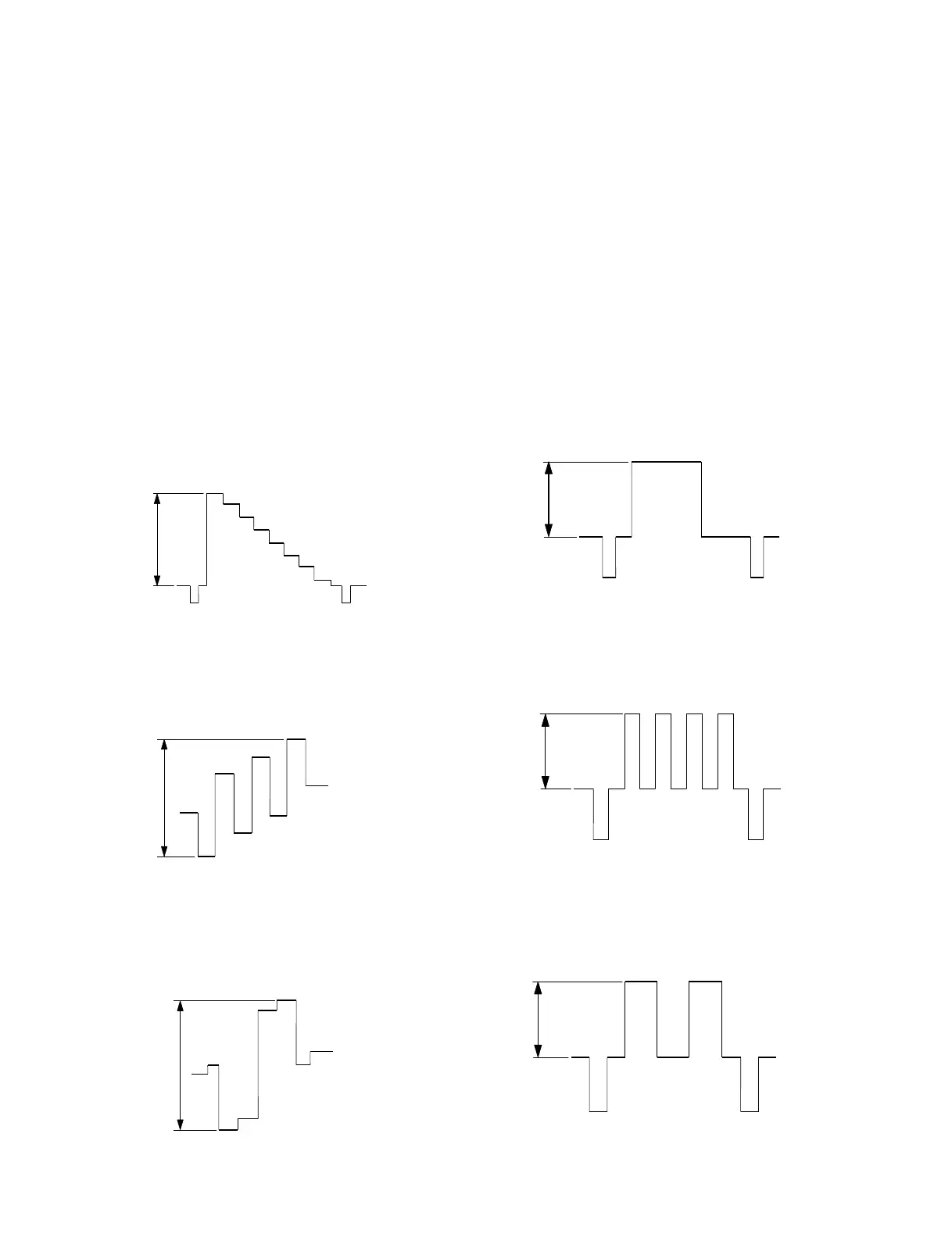
4. Adjust the Y LEVEL data so that the G OUT signal
level A of TP201 satisfies the specification.
Fig. 4-4.
5. Connect the oscilloscope to TP501 of the BD board.
6. Adjust the PB LEVEL data so that the B OUT signal
level B of TP501 satisfies the specification.
Fig. 4-5.
7. Connect the oscilloscope to TP601 of the BD board.
8. Adjust the PR LEVEL data so that the R OUT signal
level C of TP601 satisfies the specification.
Fig. 4-6
A
Specification A = 660 ± 10 mV
B
Specification B = 660 ± 10 mV
C
Specification C = 660 ± 10 mV
A
Specification A = 660 ± 10 mV
B
Specification B = 660 ± 10 mV
C
Specification C = 660 ± 10 mV
3-4.Analog Component, RGB Adjustment
3-4-1. Y/R-Y/B-Y Level Adjustment
(BD Board)
n
The following adjustment menu is below the BKM-21D
menu of the MAINTENANCE menu.
Y LEVEL
PB LEVEL
PR LEVEL
1. Set 04 CH.
2. Input the Y/R-Y/B-Y 100% color bar signal into
INPUTS 4 (Y), 5 (B-Y), 6 (R-Y).
3. Connect the oscilloscope to TP201 of the BD board.
4. Adjust the Y LEVEL data so that the Y OUT signal
level A of TP201 satisfies the specification.
Fig. 4-1.
5. Connect the oscilloscope to TP501 of the BD board.
6. Adjust the PB LEVEL data so that the PB OUT signal
level B of TP501 satisfies the specification.
Fig. 4-2.
7. Connect the oscilloscope to TP601 of the BD board.
8. Adjust the PR LEVEL data so that the PR OUT signal
level C of TP601 satisfies the specification.
Fig. 4-3.


 To Next Page