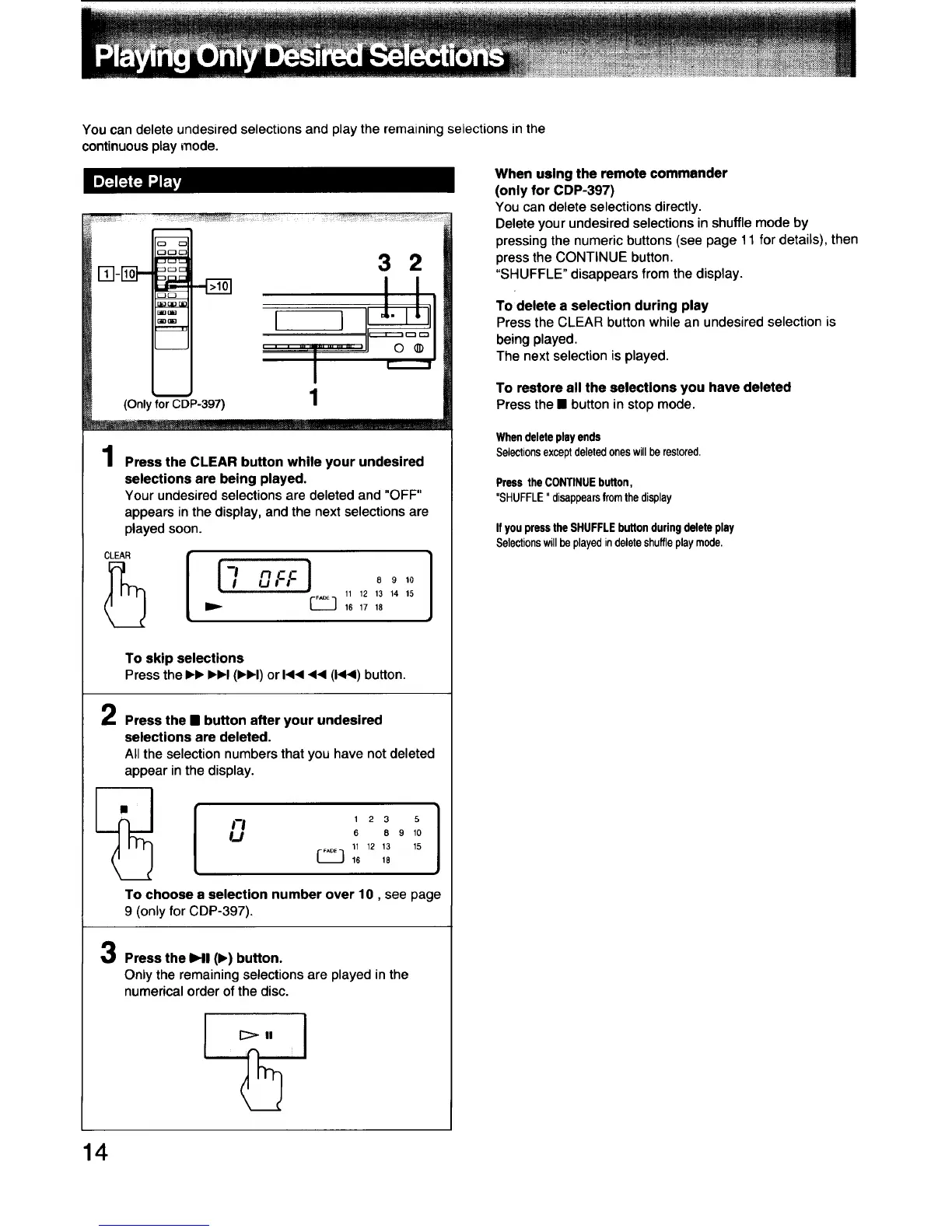
You can delete undesired selections and play the remaining selections in the
continuous play mode.
/
o
ooc
Ez)_
_(IB
3 2
LL
I I I _" ILl
......._............. I
(Only for C'_DP-397) 1
1
Press the CLEAR button while your undesired
selections are being played.
Your undesired selections are deleted and "OFF"
appears in the display, and the next selections are
played soon.
CLEAR
OFF) oo,o
11 12 13 14 15
I I 16 17 18
To skip selections
Press the IH) IHH (IH_I) or I<1<<< (1441)button.
Press the • button after your undesired
selections are deleted.
All the selection numbers that you have not deleted
appear in the display.
_--_ 1 2 3 5
_,j 6 8 9 10
11 12 13 15
16 18
To choose a selection number over 10, see page
9 (only forCDP-397).
Press the HI (I)) button.
Only the remaining selections are played in the
numerical order of the disc.
When using the remote commender
(only for CDP-397)
You can delete selections directly.
Delete your undesired selections in shuffle mode by
pressing the numeric buttons (see page 11 for details), then
press the CONTINUE button.
"SHUFFLE" disappears from the display.
To delete a selection during play
Pressthe CLEAR button whilean undesired selection is
beingplayed.
The nextselection isplayed.
To restore all the selections you have deleted
Press the • button in stop mode.
Whendeleteplay ends
Selectionsexceptdeletedoneswillberestored.
Press theCONTINUEbutton,
"SHUFFLE"disappearsfromthedisplay
If youpressthe SHUFFLEbuttonduringdeleteplay
Selectionswillbeplayedindeleteshuffleplaymode,
14



 To Next Page
 Loading...