EasyManua.ls Logo

Sony CDP-400 - Repeat Play

Sony CDP-400
48 pages
Print Icon
To Next Page IconTo Next Page
To Previous Page IconTo Previous Page
Loading...
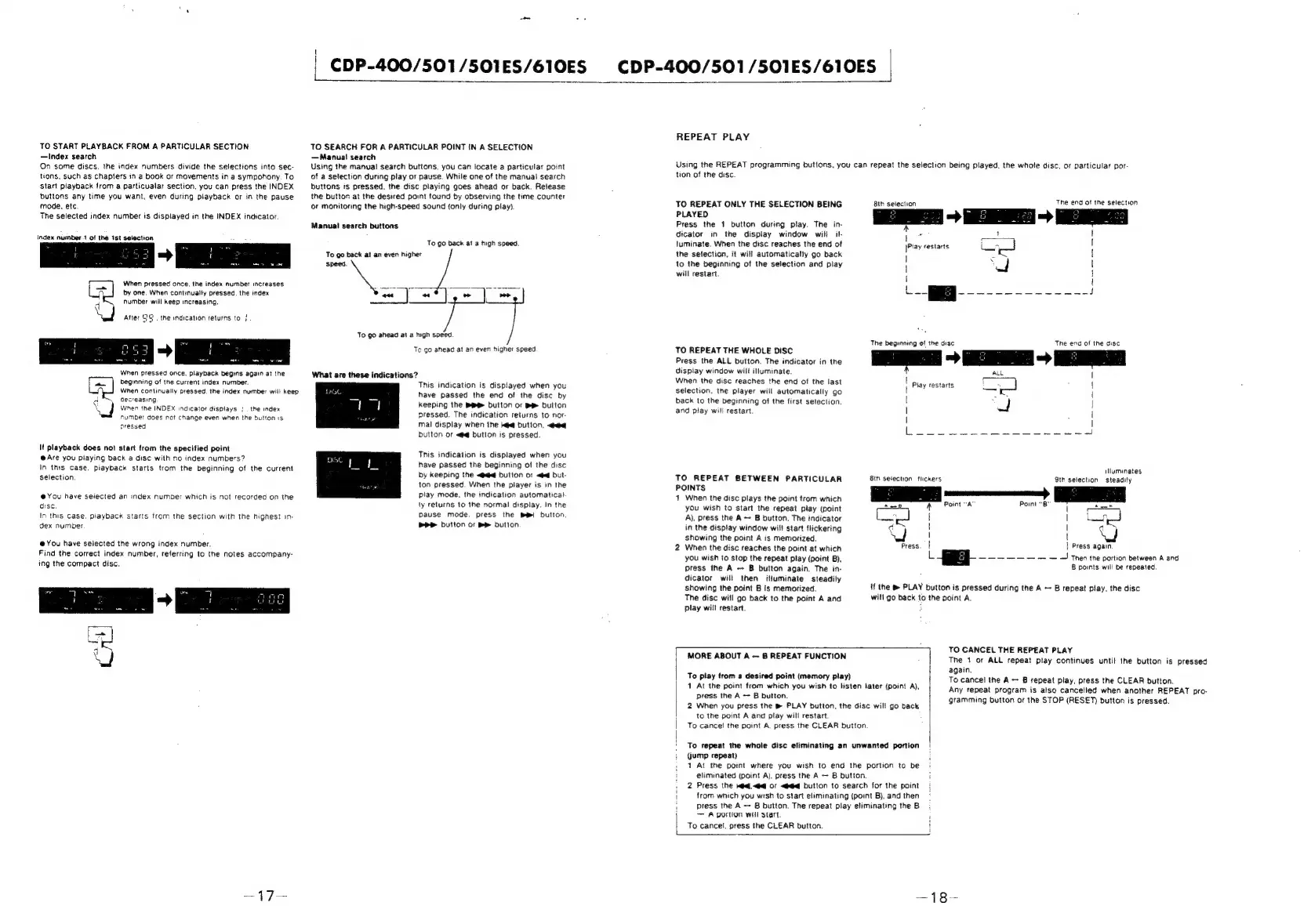
TO
START
PLAYBACK
FROM
A
PARTICULAR
SECTION
—Index
search
On
some
discs.
the
index
numbers
divide
the
selections
into
sec-
tions,
such
as
chapters
in
a
book
or
movements
in
a
sympohony.
To
start
playback
from
a
particualar
section,
you
can
press
the
INDEX
buttons
any
time
you
want,
even
during
piayback
or
in
the
pause
mode,
etc
The
selected
index
number
is
disptayed
in
the
INDEX
indicator.
Index
number.t
of
the
3st
selection
number
will
keep
increasing.
a
|
When
pressed
once.
the
index
number
increases
f
by
one.
When
continually
pressed.
the
index
Atter
25.
the
indication
returns
to
}
When
pressed
once.
playback
begins
again
at
the
beginning
of
the
current
index
number.
When
continually
pressed,
the
index
number
will
keep
a
decreasing
\
}
When
the
INDEX
indicator
displays
|
.
the
index
number
does
not
change
even
when
the
button
is
pressed
lt
playback
does
not
start
from
the
specified
point
@
Are
you
playing
back
a
disc
with
no
index
numbers?
In
this
case.
piayback
starts
trom
the
beginning
of
the
current
selection,
@You
have
selected
an
index
number
which
is
not
recorded
on
the
disc.
In
this
case,
playback
starts
from
the
section
with
the
highest
1n-
dex
number
@
You
have
selected
the
wrong
index
number.
Find
the
correct
index
number,
referring
to
the
notes
accompany-
ing
the
compact
disc.
—17—
oo
|
CDP-400/501
/501ES/610ES
CDP-400/501/SO1ES/610ES
|
TO
SEARCH
FOR
A
PARTICULAR
POINT
IN
A
SELECTION
—Manua!
search
Using
the
manual
search
buttons.
you
can
locate
a
particular
point
of
a
selection
during
ptay
or
pause.
While
one
of
the
manuai
search
buttons
is
pressed.
the
disc
playing
goes
ahead
or
back.
Reiease
the
button
at
the
desired
pont
found
by
observing
the
time
counter
or
monitoring
the
high-speed
sound
{only
during
play}.
Manual
search
buttons
To go
back
at
a
high
speed.
To
go
back
at
an
even
higher
-_
To
go
ahead
at
a
high
speed
To
go
ahead
at
an
even
higher
speed
What
are
these
indications?
This
indication
is
dispiayed
when
you
have
passed
the
end
of
the
disc
by
keeping
the
Bi
button
or
BR
dutton
pressed.
The
indication
returns
to
nor
mal
display
when
the
ke@
Dutton.
«eq
button
or
<#@
button
is
pressed.
This
indication
is
displayed
when
you
have
passed
the
beginning
of
the
disc
by
keeping
the
«akg
button
or
<q
but-
ton
pressed.
When
the
player
is
in
the
play
mode,
the
indication
automatica)-
ly
returns
to
the
norma!
display.
In
the
pause
mode,
press
the
Bw!
button
PPP
button
oF
Be
button
REPEAT
PLAY
Using
the
REPEAT
programming
buttons,
you
can
repeat
the
selection
being
played,
the
whole
disc,
or
particular
por-
tion
of
the
disc.
TO
REPEAT
ONLY
THE
SELECTION
BEING
PLAYED
Press
the
1
button
during
play.
The
in-
dicator
in
the
display
window
will
il-
luminate.
When
the
disc
reaches
the
end
of
the
selection,
it
will
automatically
go
back
to
the
beginning
of
the
selection
and
play
will
restart.
TO
REPEAT
THE
WHOLE
DISC
Press
the
ALL
button.
The
indicator
in
the
dispiay
window
will
illuminate.
When
the
disc
reaches
the
end
of
the
last
selection.
the
player
will
automatically
go
back
to
the
beginning
of
the
first
setection.
and
play
will
restart
TO
REPEAT
BETWEEN
PARTICULAR
POINTS
4
When
the
disc
plays
the
point
from
which
you
wish
to
start
the
repeat
play
(point
A),
press
the
A
~
B
button.
The
indicator
in
the
display
window
will
start
flickering
showing
the
point
A
is
memorized.
2
When
the
disc
reaches
the
point
at
which
you
wish
to
stop
the
repeat
play
(point
B),
press
the
A
~
B
button
again.
The
in-
dicator
will
then
ituminate
steadily
showing
the
point
B
is
memorized.
The
disc
will
go
back
to
the
point
A
and
play
will
restart.
8th
selection
The
end
of
the
selection
rN
t
|Piay
restarts
|
|
Li
Seen
ey
amare
ae
ve
et
J
The
beginning
of
the
disc
The
end
of
the
disc
es
~
ee
~
ee
|
Play
restarts
|
Pies
{
|
:
f
|
|
|
|
illuminates
9th
selection
steadily
A
Point
“A
Point
“B"
|
rer
|
|
as
!
|
qd
Nod
Press.
|
|
Press again
i
.
of
---o-Or
rr
~
Then
the
portion
between
A
and
B
points
will
be
repeated.
if
the
&
PLAY
button
is
pressed
during
the
A
B
repeat
play,
the
disc
will
go
back
to
the
point
A.
To
play
trom
a
desired
point
(memory
play)
1
At
the
point
from
which
you
wish
to
listen
later
(point
A),
2
When
you
press
the
®
PLAY
button,
the
disc
wil!
go
back
to
the
point
A
and
play
will
restart.
To
cance!
the
point
A.
press
the
CLEAR
button
|
press
the
A
B
button.
|
|
To
repeat
the
whole
disc
eliminating
an
unwanted
portion
(jump
repeat)
1
At
the
point
where
you
wish
to
end
the
portion
to
be
eliminated
(point
Aj.
press
the
A
B
button.
2
Press
the
Wd.<@
OF
<#@q
button
to
search
for
the
point
|
MORE
ABOUT
A
8
REPEAT
FUNCTION
TO
CANCEL
THE
REPEAT
PLAY
The
1
or
ALL
repeat
play
continues
until
the
button
is
pressed
again.
To
cancel
the
A
B
repeat
play,
press
the
CLEAR
button.
Any
repeat
program
is
also
cancelled
when
another
REPEAT
pro-
gramming
button
or
the
STOP
(RESET)
button
is
pressed.
!
from
which
you
wish
to
start
eliminating
(point
B),
and
then
1
press
tne
A
B
button.
The
repeat
play
eliminating
the
B
A
MOTION
WHI
Start.
To
cancel.
press
the
CLEAR
button.
—18-

Related product manuals