EasyManua.ls Logo

Sony CDP-400 - Using the Time Counter

Sony CDP-400
48 pages
Print Icon
To Next Page IconTo Next Page
To Previous Page IconTo Previous Page
Loading...
Se
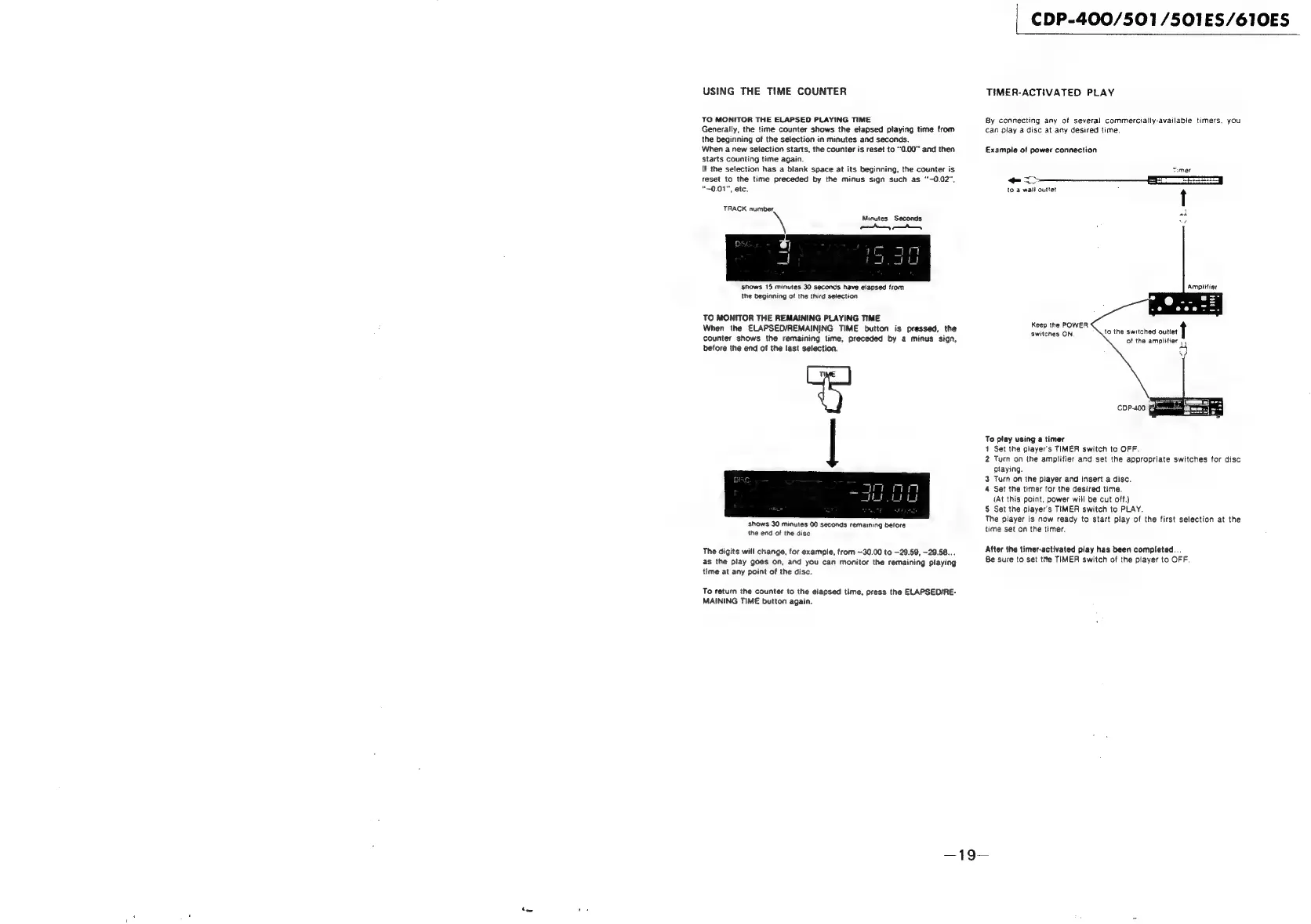
USING
THE
TIME
COUNTER
TO
MONITOR
THE
ELAPSED
PLAYING
TIME
Generally,
the
time
counter
shows
the
elapsed
playing
time
from
the
beginning
of
the
selection
in
minutes
and
seconds.
When
a
new
selection
starts,
the
counter
is
reset
to
“0.00”
and
then
starts
counting
time
again.
If
the
selection
has
a
blank
space
at
its
beginning,
the
counter
is
reset
to
the
time
preceded
by
the
minus
sign
such
as
‘“-0.02",
"~0.01",
etc.
TRACK
number,
Minutes
Seconds
pee
ene
shows
15
minutes
30
seconds
have
elapsed
from
the
beginning
of
the
third
selection
TO
MONITOR
THE
REMAINING
PLAYING
TIME
When
the
ELAPSED/REMAINING
TIME
button
is
pressed,
the
counter
shows
the
remaining
time,
preceded
by
a
minus
sign,
before
the
end
of
the
last
selection.
shows
30
minutes
00
seconds
remaining
before
the
end
of
the
disc
The
digits
will
change,
for
example,
from
~30.00
to
—29.59,
-29.58...
as
the
play
goes
on,
and you
can
monitor
the
remaining
playing
time
at
any
point
of
the
disc.
To
return
the
counter
to
the
elapsed
time,
press
the
ELAPSED/RE-
MAINING
TIME
button
again.
CDP-400/501/501ES/610ES
TIMER-ACTIVATED
PLAY
By
connecting
any
of
several
commercially-available
timers,
you
can
play
a
disc
at
any
desired
time.
Example
of
power
connection
Timer
ee
REET
Tees
|
to
a
wall
outlet
7
t
Ampiifier
Keep
the
POWER
switcnes
ON
to
the
switched
outiet
of
the
amplifier
pe
To
play
using
a
timer
+
Set
the
player's
TIMER
switch
to
OFF.
2
Turn
on
the
amplifier
and
set
the
appropriate
switches
for
disc
playing.
3
Turn
on
the
player
and
insert
a
disc.
4
Set
the
timer
for
the
desired
time.
(At
this
point,
power
will
be
cut
off.)
5
Set
the
player's
TIMER
switch
to
PLAY.
The
player
is
now
ready
to
start
play
of
the
first
selection
at
the
time
set
on
the
timer.
After
the
timer-activated
play
has
been
completed...
Be
sure
to
set
tite
TIMER
switch
of
the
player
to
OFF.

Related product manuals