EasyManua.ls Logo

Sony CDP-400 - Electrical Adjustments

Sony CDP-400
48 pages
Print Icon
To Next Page IconTo Next Page
To Previous Page IconTo Previous Page
Loading...
3-
i
2,
ELECTRICAL
ADJUSTMENTS
.
Perform
adjustments
in
the
order
given.
.
Use
YEDS-1
disc
unless
otherwise
indicated.
Part
No.
of
YEDS-1:
3-703-696-01
.
Set
the
unit
horizontal.
|
CDP-400/501/501ES/610ES
|
I
!
-—————
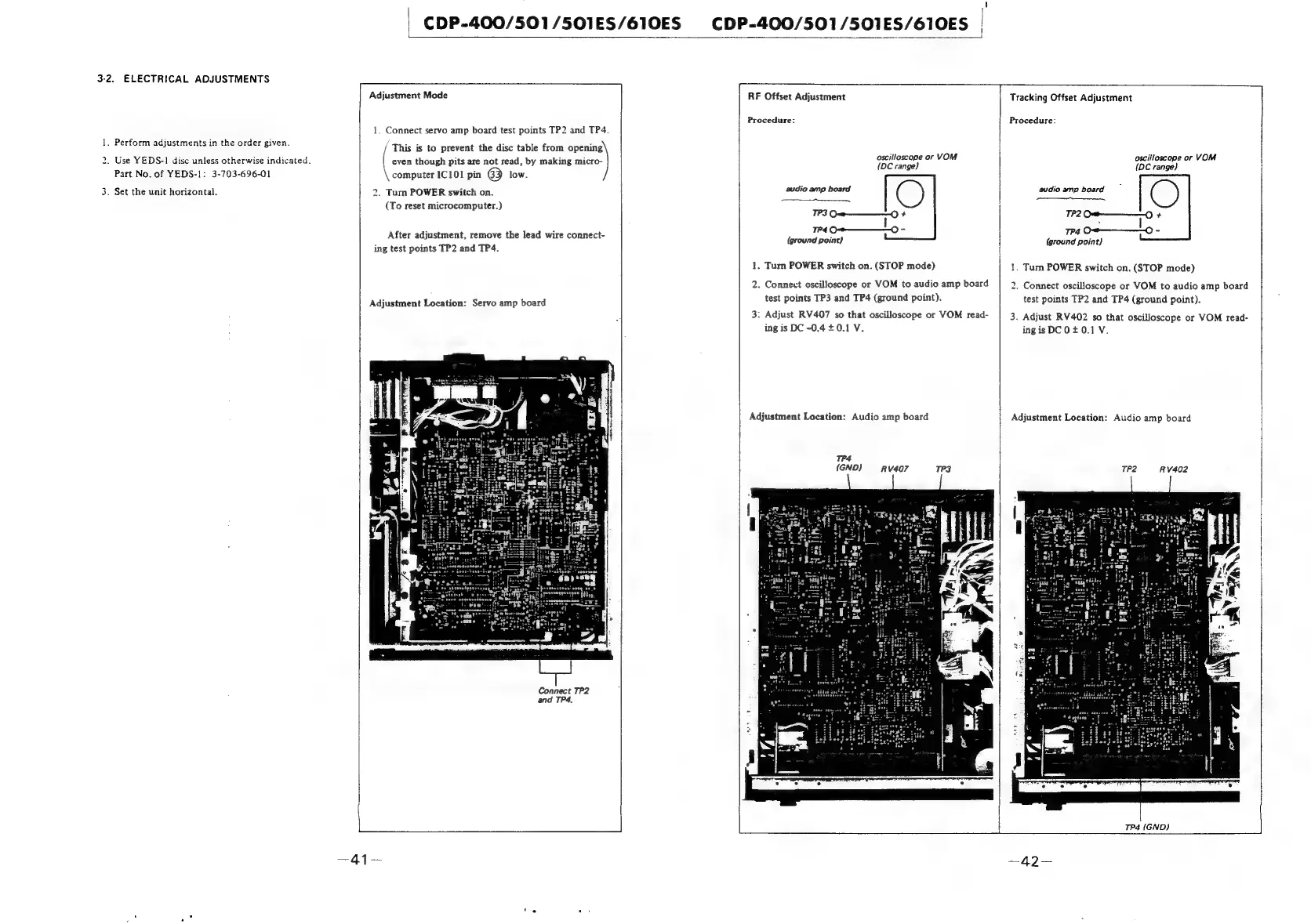
Adjustment
Mode
1.
Connect
servo
amp
board
test
points
TP2
and
TP4.
'
This
is
to
prevent
the
disc
table
from
opening
(ee
though
pits
are
not
read,
by
making
micro-
computer
ICIO1
pin
63
low.
2.
Tum
POWER
switch
on.
(To
reset
microcomputer.)
After
adjustment,
remove
the
lead
wire
connect-
ing
test
points
TP2
and
TP4.
Adjustment
Location:
Servo
amp
board
Connect
TP2
and
TP4.
RF
Offset
Adjustment
Procedure:
oscilloscope
or
VOM
{DC
range)
audio
amp
board
C)
ee
TP3
O<m———-—-O
+
oes
-
{ground
point)
1.
Turn
POWER
switch
on.
(STOP
mode)
test
points
TP3
and
TP4
(ground
point).
ing
is
DC
-0.4+0.1
V.
Adjustment
Location:
Audio
amp
board
TP4
(GND)
RV407
2.
Connect
oscilloscope
or
VOM
to
audio
amp
board
3:
Adjust
RV407
so
that
oscilloscope
or
VOM
read-
Tracking
Offset
Adjustment
Procedure:
oscilloscope
or
VOM
{OC
range}
audio
amp
board
OC)
REED
TP2
Ct)
+
:
I
TP4
Ot———-——©
-
(ground
point)
1.
Turn
POWER
switch
on.
(STOP
mode)
.
Connect
oscilloscope
or
VOM
to
audio
amp
board
test
points
TP2
and
TP4
(ground
point).
3.
Adjust
RV402
so
that
oscilloscope
or
VOM
read-
ingisDCO0+0.1V.
to
Adjustment
Location:
Audio
amp
board
TP2
RV402
AN
as
mee
\
TP4
(GND)

Related product manuals