EasyManua.ls Logo

Sony CDP-400 - Location and Function of Controls

Sony CDP-400
48 pages
Print Icon
To Next Page IconTo Next Page
To Previous Page IconTo Previous Page
Loading...
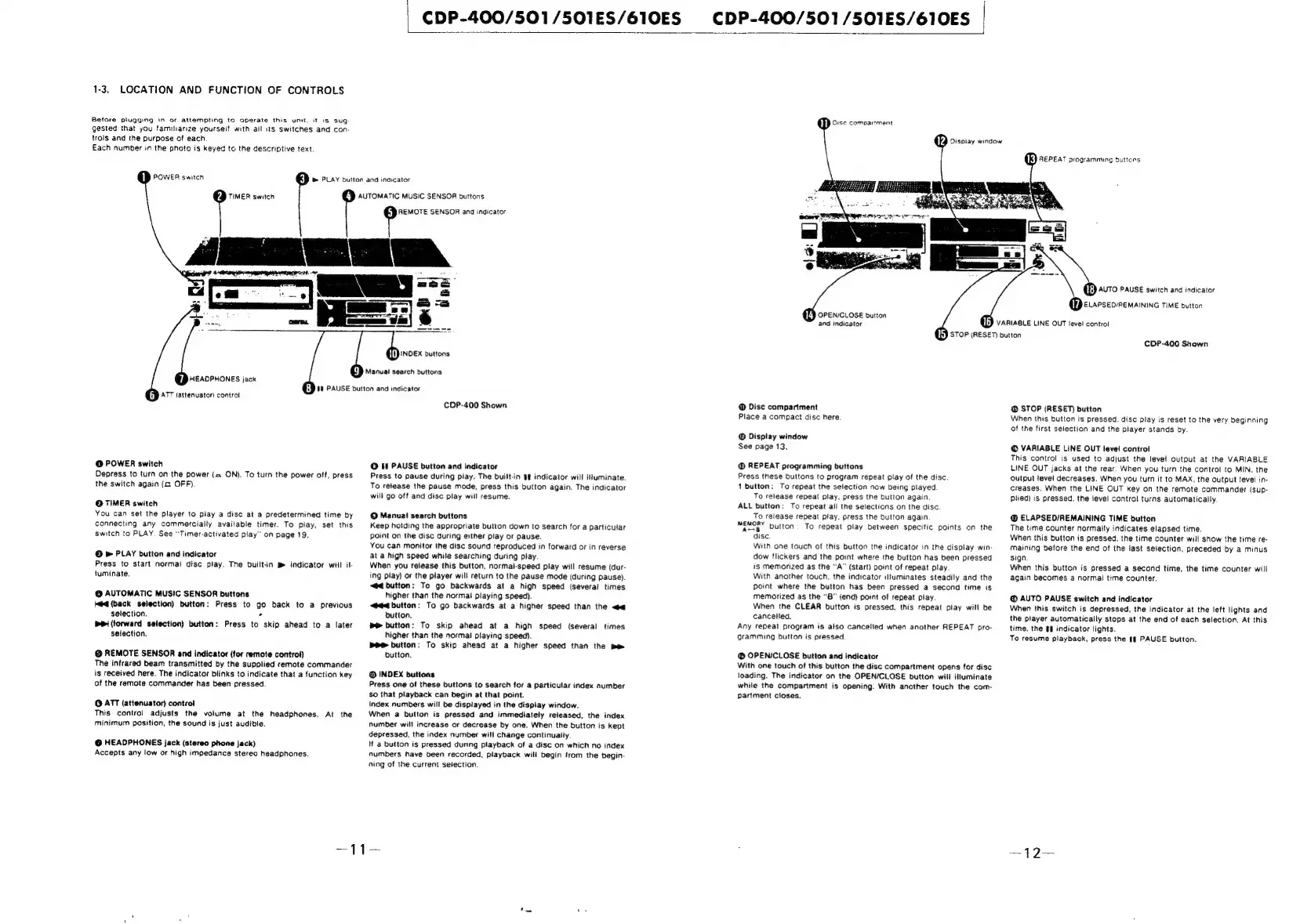
1-3.
LOCATION
AND
FUNCTION
OF
CONTROLS
Before
plugging
in
of
attempting
to
operate
this
unit.
it
is
sug-
gested
that
you
familiarize
yourself
with
ail
its
switches
and
con-
trois
and
the
purpose
of
each
Each
number
in
the
pnoto
is
keyed
to
the
descriptive
text.
POWER
switch
TIMER
switch
CDP-400/501/501ES/610ES
CDP-400/501/S501ES/610ES
|
i
PLAY
buiton
and
indicator
AUTOMATIC
MUSIC
SENSOR
buttons
REMOTE
SENSOR
and
indicator
HEADPHONES
jack
ATT
(attenuator)
controt
@
POWER
switch
Depress
to
turn
on
the
power
(=
ON).
To
turn
the
power
off,
press
the
switch
again
(a
OFF).
©
TIMER
switch
You
can
set
the
player
to
play
a
disc
at
a
predetermined
time
by
connecting
any
commercially
available
timer.
To
play,
set
this
switch
to
PLAY.
See
“Timer-activated
play”
on
page
19.
©
»
PLAY
button
and
indicator
Press
to
start
normai
disc
play.
The
built-in
Bm
indicator
will
il-
luminate.
@
AUTOMATIC
MUSIC
SENSOR
buttons
Mead
(back
selection)
button:
Press
to
go
back
to a
previous
selection.
-
(forward
selection)
button:
Press
to
skip
ahead
to
a
later
selection.
@
REMOTE
SENSOR
and
indicator
(for
remote
control)
The
infrared
beam
transmitted
by
the
supplied
remote
commander
is
received
here.
The
indicator
blinks
to
indicate
that
a
function
key
of
the
remote
commander
has
been
pressed.
@
ATT
(attenuator)
control
This
control
adjusts
the
volume
at
the
headphones.
At
the
minimum
position,
the
sound
is
just
audible.
@
HEADPHONES
jack
(stereo
phone
jack)
Accepts
any
low
or
high
impedance
stereo
headphones.
sas.
buttons
d.
PAUSE
button
and
indicator
Manual
search
buttons
COP-400
Shown
©
If
PAUSE
button
and
indicator
Press
to
pause
during
play.
The
built-in
§$
indicator
will
illuminate.
To
release
the
pause
mode,
press
this
button
again.
The
indicator
will
go
off
and
disc
play
will
resume.
©
Manua!
search
buttons
Keep
holding
the
appropriate
button
down
to
search
for
a
particular
point
on
the
disc
during
either
play
or
pause.
You
can
monitor
the
disc
sound
reproduced
in
forward
or
in
reverse
at
a
high
speed
while
searching
during
play
When
you
release
this
button,
normal-speed
play
will
resume
(dur-
ing
play)
or
the
player
will
return
to
the
pause
mode
{during
pause).
<@4
button:
To
go
backwards
at
a
high
speed
(severai
times
higher
than
the
normal
playing
speed).
<@4<4
button:
To go
backwards
at
a
higher
speed
than
the
button,
button:
To
skip
ahead
at
a
high
speed
(several
times
higher
than
the
normal
playing
speed).
Be
button:
To
skip
ahead
at
a
higher
speed
than
the
pe
button.
INDEX
buttons
Press
one
of
these
buttons
to
search
for
a
particular
index
number
$o
that
playback
can
begin
at
that
point.
index
numbers
will
be
displayed
in
the
display
window.
When
a
button
is
pressed
and
immediately
released,
the
index
number
will
increase
or
decrease
by
one.
When
the
button
is
kept
depressed,
the
index
number
will
change
continuaily.
Hf
a
button
is
pressed
during
playback
of
a
disc
on
which
no
index
numbers
nave
been
recorded,
playback
will
begin
from
the
begin-
ning
of
the
current
selection.
ER}
Orsc
compartment
OPEN/CLOSE
button
and
indicator
@
Disc
compartment
Place
a
compact
disc
here.
@
Display
window
See
page
13.
REPEAT
programming
buttons
Press
these
buttons
to
program
repeat
play
of
the
disc
1
button:
To
repeat
the
selection
now
being
ptayed
To
release
repeat
play,
press
the
button
again
ALL
button:
To
repeat
ail
the
selections
on
the
disc
To
release
repeat
play,
press
the
button
again
MEMORY
button
To
repeat
play
between
specific
points
on
the
“disc
With
one
touch
of
this
button
the
indicator
in
the
display
win-
dow
flickers
and
the
point
where
the
button
has
been
pressed
is
memorized
as
the
“A”
(start)
point
of
repeat
play
With
another
touch.
the
indicator
il!uminates
steadily
and
the
point
where
the
button
has
been
pressed
a
second
time
is
memorized
as
the
“B"
(end) point
of
repeat
play.
When
the
CLEAR
button
is
pressed,
this
repeat
play
will
be
cancelled.
Any
repeat
program
is
also
cancelled
when
another
REPEAT
pro-
gramming
button
is
pressed.
@
OPEN/CLOSE
button
and
indicator
With
one
touch
of
this
button
the
disc
compartment
opens
for
disc
loading.
The
indicator
on
the
OPEN/CLOSE
button
wiil
illuminate
while
the
compartment
is
opening.
With
another
touch
the
com-
partment
closes.
12
Dispiay
window
[k)
REPEAT
programming
duttcrs
@)
2v70
Pause
switch
and
indicator
QD
cvvpseoremaininG
TIME
button
VARIABLE
LINE
OUT
fevel
control
Lb)
STOP
(RESET
button
CDP-400
Shown
®
STOP
(RESET)
button
When
this
button
is
pressed.
disc
play
is
reset
to
the
very
beginning
of
the
first
selection
and
the
player
stands
by.
©
VARIABLE
LINE
OUT
level
control
This
control
is
used
to
adjust
the
level
output
at
the
VARIABLE
LINE
OUT
jacks
at
the
rear.
When
you
turn
the
control
to
MIN.
the
output
level
decreases.
When
you
turn
it
to
MAX.
the
output
tevel
in-
creases.
When
the
LINE
OUT
key
on
the
remote
commander
(sup-
plied)
is
pressed,
the
level
control
turns
automatically
@
ELAPSED/REMAINING
TIME
button
The
time
counter
normality
indicates
elapsed
time.
When
this
button
is
pressed.
the
time
counter
will
show
the
time
re-
maining
before
the
end
of
the
last
selection,
preceded
by
a
minus
sign.
When
this
button
is
pressed
a
second
time,
the
time
counter
will
again
becomes
a
normal
time
counter.
@
AUTO
PAUSE
switch
and
indicator
When
this
switch
is
depressed,
the
indicator
at
the
left
lights
and
the
player
automatically
stops
at
the
end
of
each
selection.
At
this
time,
the
§§
indicator
lights.
To
resume
playback,
press
the
If
PAUSE
button.

Related product manuals