EasyManua.ls Logo

Sony CDP-400 - Page 8

Sony CDP-400
48 pages
Print Icon
To Next Page IconTo Next Page
To Previous Page IconTo Previous Page
Loading...
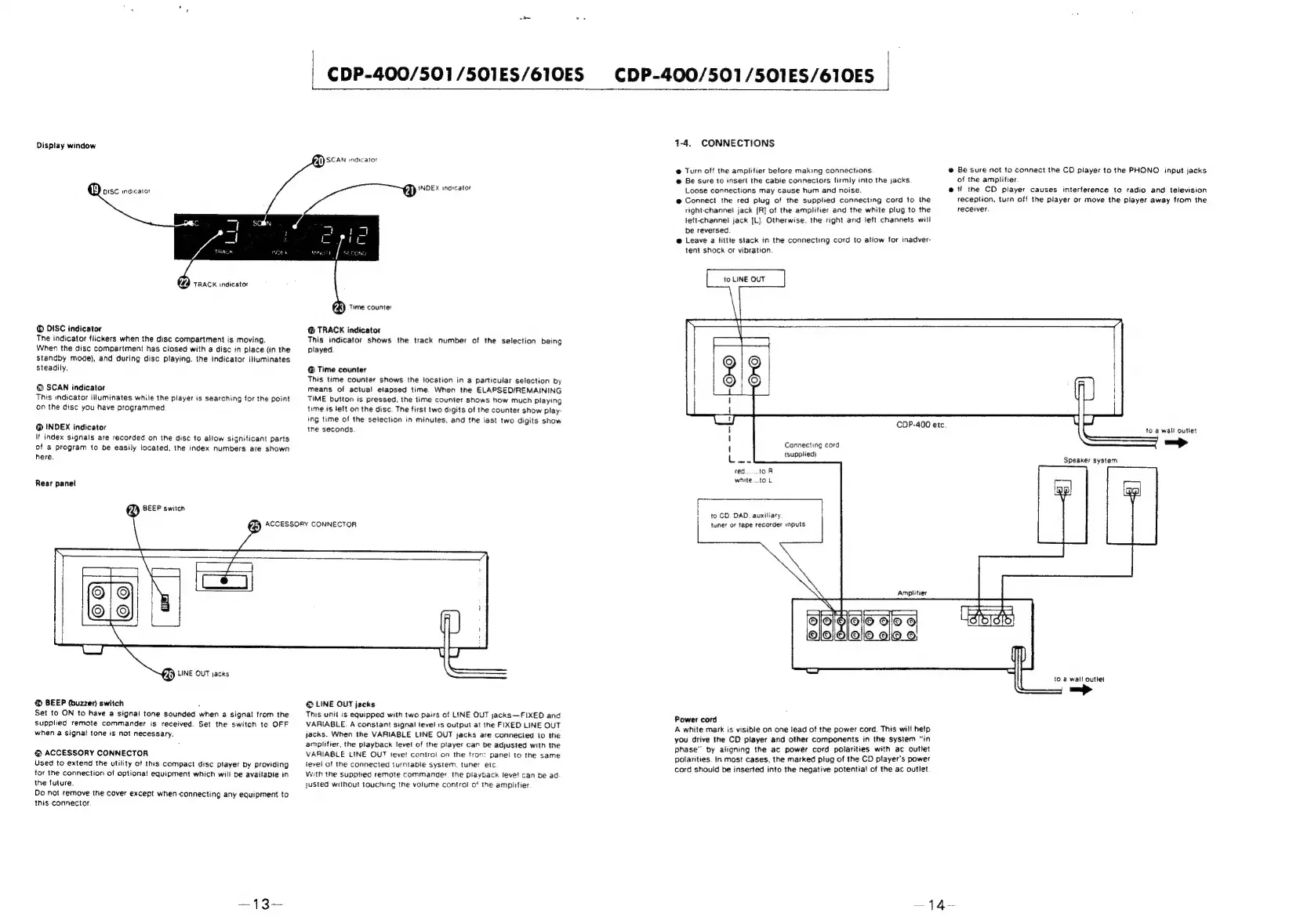
Display
window
UY)
isc
indicator
22
TRACK
indicator
DISC
indicator
The
indicator
flickers
when
the
disc
compartment
is
moving.
When
the
disc
compartment
has
closed
with
a
disc
in
place
(in
the
Standby
mode),
and
during
disc
playing,
the
indicator
itiuminates
steadily.
@
SCAN
indicator
This
indicator
illuminates
while
the
player
is
searching
for
the
point
on
the
disc
you
have
programmed
@
INDEX
indicator
If
index
signals
are
recorded
on
the
disc
to
allow
significant
parts
of
a
program
to
be
easily
located.
the
index
numbers
are
shown
here.
Rear
panel
(2)
BEEP
switch
CDP-400/501/S501ES/610ES
F{I)
SCAN
inaicator
(4)
INDEX
inarcator
()
Time
counter
@
TRACK
indicator
This
indicator
shows
the
track
number
of
the
selection
being
played.
@
Time
counter
This
time
counter
shows
the
location
in
a
particular
selection
by
means
of
actual!
elapsed
time.
When
the
ELAPSED/REMAINING
TIME
button
is
pressed,
the
time
counter
shows
how
much
playing
time
is
left
on
the
disc.
The
first
two
digits
of
the
counter
show
play-
ing
time
of
the
selection
in
minutes,
and
the
iast
two
digits
show
tne
seconds.
(2)
ACCESSORY
CONNECTOR
PZi)
LINE
OUT
jacks
@
BEEP
(buzzer)
switch
z
Set
to
ON
to
have
a
signal
tone
sounded
when
a
signal
trom
the
supplied
remote
commander
is
received.
Set
the
switch
to
OFF
when
a
signal
tone
is
not
necessary.
@
ACCESSORY
CONNECTOR
Used
to
extend
the
utitity
of
this
compact
disc
player
by
providing
for
the
connection
of
optional!
equipment
which
will
be
avaitabie
in
the
future.
Do
not
remove
the
cover
except
when
connecting
any
equipment
to
this
connector.
@
LINE
OUT
jacks
This
unit
is
equipped
with
two
pairs
of
LINE
OUT
jacks~-FIXED
and
VARIABLE.
A
constant
signal
tevel
1s
output
at
the
FIXED
LINE
OUT
jacks.
When
the
VARIABLE
LINE
OUT
jacks
are
connected
to
the
amplifier,
the
playback
level
of
the
player
can
be
adjusted
with
the
VARIABLE
LINE
OUT
leve!
control
on
the
fron:
panel
to
the
same
level
of
the
connected
turntable
system.
tuner
etc
With
the
supptied
remote
commander.
the
playback
leve!
can
be ad
justed
without
touching
the
volume
controi
of
the
ampiifier
1-4.
CONNECTIONS
@
Turn
off
the
amplifier
before
making
connections
@
Be
sure
to
insert
the
cabie
connectors
firmly
into
the
jacks
Loose
connections
may
cause
hum
and
noise.
@
Connect
the
red
plug
of
the
supplied
connecting
cord
to
the
right-channe}
jack
[R]
of
the
amplifier
and
the
white
plug
to
the
left-channe!
jack
{L}.
Otherwise.
the
right
and
left
channels
will
be
reversed
@
Leave
a
littie
stack
in
the
connecting
cord
to
aliow
for
inadver-
tent
shock
or
vibration
@
Be
sure
not
to
connect
the
CD
player
to
the
PHONO
input
jacks
of
the
amplifier.
@'f
the
CD
player
causes
interference
to
radio
and
television
reception,
turn
off
the
player
or
move
the
player
away
from
the
receiver.
Connecting
cord
(supplied)
red
1oR
white.toL
to
CD.
DAD.
auxitiary.
tuner
or
tape
recorder
inputs
Amplitier
Power
cord
A
white
mark
is
visible
on
one
lead
of
the
power
cord.
This
will
help
you
drive
the
CD
player
and
other
components
in
the
system
“in
phase”
by
aitgning
the
ac
power
cord
polarities
with
ac
outlet
polarities.
in
most
cases,
the
marked
plug
of
the
CD
player's
power
cord
should
be
inserted
into
the
negative
potential
of
the
ac
outlet
COP-400
etc.
to a
wall outlet
=.
1
4-

Related product manuals