EasyManua.ls Logo

Sony CDP-CA7ES - Program Play Creation

Sony CDP-CA7ES
15 pages
Print Icon
To Next Page IconTo Next Page
To Previous Page IconTo Previous Page
Loading...
pete
i
|
i
H
1n
~
Shuffle
Play
on
one
disc
You
can
play
all
tracks
on
the
specific
disc
in
a
random
order.
À
Press
SHUFFLE
repeatedly
until
“1
DISC”
appears
in
the
display.
2
Press
DISC
1
-5
to
start
1
DISC
Shuffle
Play
on
the
selected
disc.
The
Č
J,
indication
appears
while
the
player
is
“shuffling”
the
tracks.
To
cancel
Shuffle
Play
Press
CONTINUE.
xe
You
can
start
Shuffle
Play
while
playing
Press
SHUFFLE,
and
Shuffle
Play
starts
from
the
current
track.
Ra
ee
eee
Creating
Your
Own
Program
(Program
Play)
You
can
arrange
the
order
of
the
tracks
on
the
discs
and
create
your
own
program.
The
program
can
contain
up
to
32
tracks.
DISC
1-5
Bb
PROGRAM
=
Number
buttons
>10
PROGRAM
Number
buttons
>10
CLEAR
DISC
1-5
>
5
4
Le
Playing
CDs
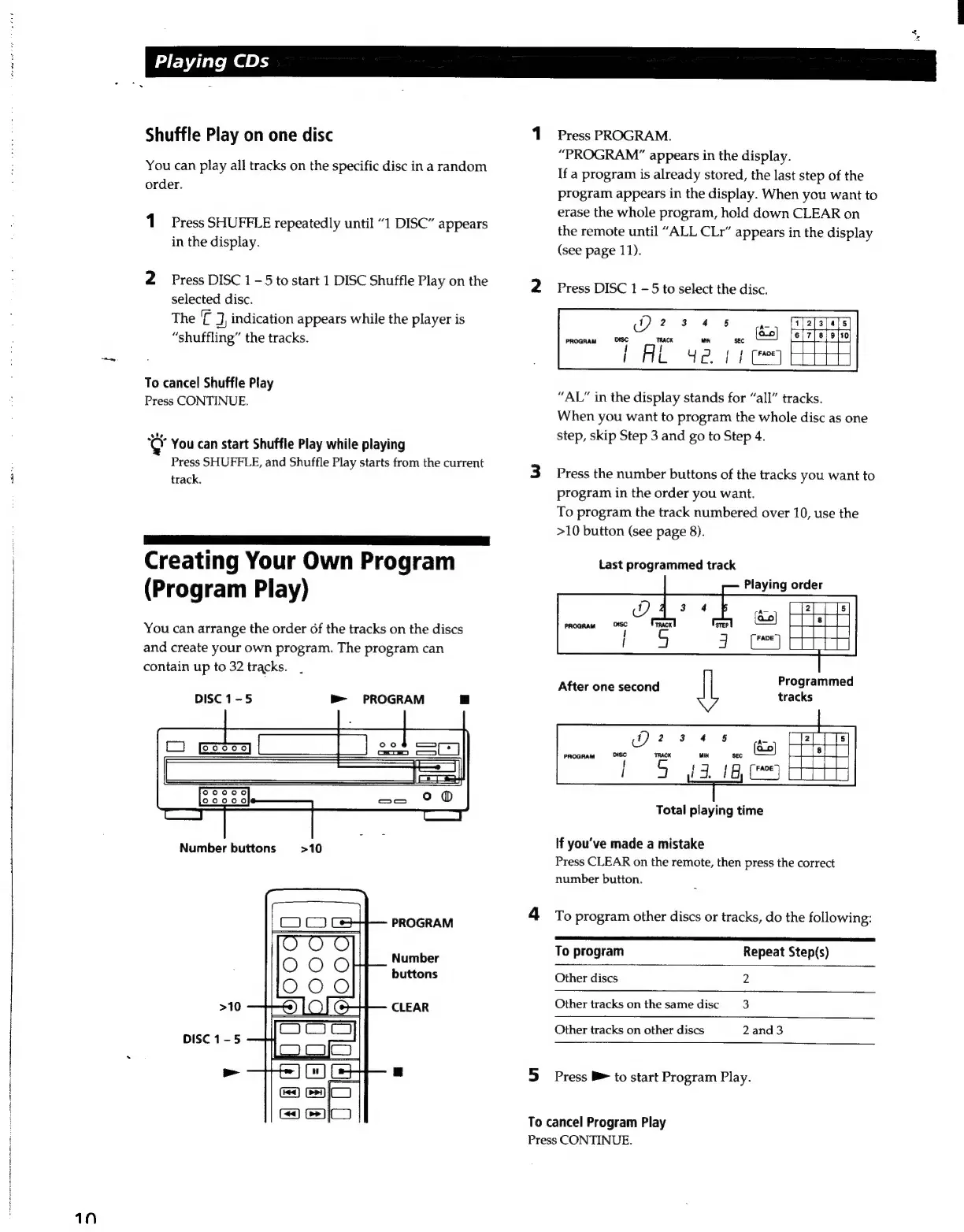
Press
PROGRAM.
“PROGRAM”
appears
in
the
display.
If
a
program
is
already
stored,
the
last
step
of
the
program
appears
in
the
display.
When
you
want
to
erase
the
whole
program,
hold
down
CLEAR
on
the
remote
until
“ALL
CLr”
appears
in
the
display
(see
page
11).
Press
DISC
1
-5
to
select
the
disc.
Q2s4s
A.
FRE
PROGRAM
sar
ri
MIN
SEC
{ao}
{
A
L
y
Z.
|
I
[
FADE)
“AL”
in
the
display
stands
for
“all”
tracks.
When
you
want
to
program
the
whole
disc
as
one
step,
skip
Step
3
and
go
to
Step
4.
Press
the
number
buttons
of
the
tracks
you
want
to
program
in
the
order
you
want.
To
program
the
track
numbered
over
10,
use
the
>10
button
(see
page
8).
Last
programmed
track
Playing
order
After
one
second
Programmed
tracks
Total
playing
time
If
you've
made
a
mistake
Press
CLEAR
on
the
remote,
then
press
the
correct
number
button.
To
program
other
discs
or
tracks,
do
the
following:
S
a
To
program
Repeat
Step(s)
Other
discs
2
Other
tracks
on
the
same
disc
3
Other
tracks
on
other
discs
2and3
Press
B
to
start
Program
Play.
To
cancel
Program
Play
Press
CONTINUE.

Related product manuals