EasyManua.ls Logo

Sony CDP-CA7ES - Selecting Specific Discs; Locating Tracks and Points

Sony CDP-CA7ES
15 pages
Print Icon
To Next Page IconTo Next Page
To Previous Page IconTo Previous Page
Loading...
|
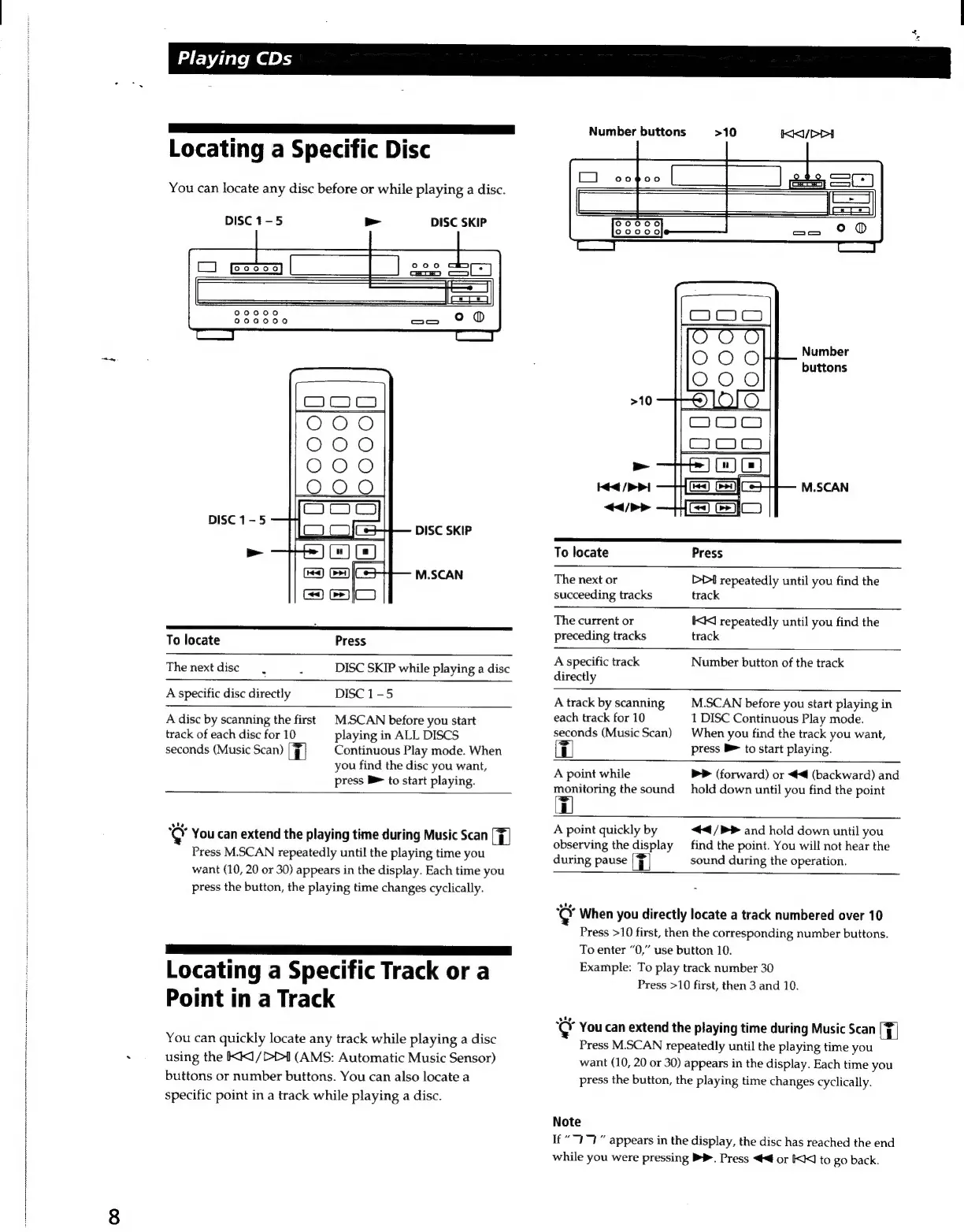
Locating
a
Specific
Disc
You
can
locate
any
disc
before
or
while
playing
a
disc.
DISC
1-5
>
DISC
SKIP
DISC
1-5
DISC
SKIP
>
M.SCAN
To
locate
Press
The
next
disc
DISC
SKIP
while
playing
a
disc
.
A
specific
disc
directly
DISC
1-5
A
disc
by
scanning
the
first
M.SCAN
before
you
start
track
of
each
disc
for
10
playing
in
ALL
DISCS
seconds
(Music
Scan)
T
Continuous
Play
mode.
When
you
find
the
disc
you
want,
press
B
to
start
playing.
el
You
can
extend
the
playing
time
during
Music
Scan
[F]
Press
M.SCAN
repeatedly
until
the
playing
time
you
want
(10,
20
or
30)
appears
in
the
display.
Each
time
you
press
the
button,
the
playing
time
changes
cyclically.
aS
SS
Ee
E
OUUU]
Locating
a
Specific
Track
or
a
Point
in
a
Track
You
can
quickly
locate
any
track
while
playing
a
disc
using
the
KK1/D
(AMS:
Automatic
Music
Sensor)
buttons
or
number
buttons.
You
can
also
locate
a
specific
point
in
a
track
while
playing
a
disc.
Number
buttons
>10
Number
buttons
>10
p
Hea
/>
P|
M.SCAN
</>>
To
locate
Press
The
next
or
>D
repeatedly
until
you
find
the
succeeding
tracks
track
The
current
or
KK
repeatedly
until
you
find
the
preceding
tracks
track
A
specific
track
Number
button
of
the
track
directly
A
track
by
scanning
M.SCAN
before
you
start
playing
in
each
track
for
10
1
DISC
Continuous
Play
mode.
seconds
(Music
Scan)
When
you
find
the
track
you
want,
T
press
B
to
start
playing.
A
point
while
>>
(forward)
or
(backward)
and
monitoring
the
sound
hold
down
until
you
find
the
point
[=F]
Eu
A
point
quickly
by
</P>
and
hold
down
until
you
observing
the
display
find
the
point.
You
will
not
hear
the
during
pause
|]
sound
during
the
operation.
el
When
you
directly
locate
a
track
numbered
over
10
Press
>10
first,
then
the
corresponding
number
buttons.
To
enter
“0,”
use
button
10.
Example:
To
play
track
number
30
Press
>10
first,
then
3
and
10.
Le
You
can
extend
the
playing
time
during
Music
Scan
Tl
Press
M.SCAN
repeatedly
until
the
playing
time
you
want
(10,
20
or
30)
appears
in
the
display.
Each
time
you
press
the
button,
the
playing
time
changes
cyclically.
Note
If
“7777”
appears
in
the
display,
the
disc
has
reached
the
end
while
you
were
pressing
>.
Press
or
KI
to
go
back.
4
w
Playing
CDs

Related product manuals