EasyManua.ls Logo

Sony CDP-CA7ES - Replacing Discs During Playback

Sony CDP-CA7ES
15 pages
Print Icon
To Next Page IconTo Next Page
To Previous Page IconTo Previous Page
Loading...
Playing
CDs
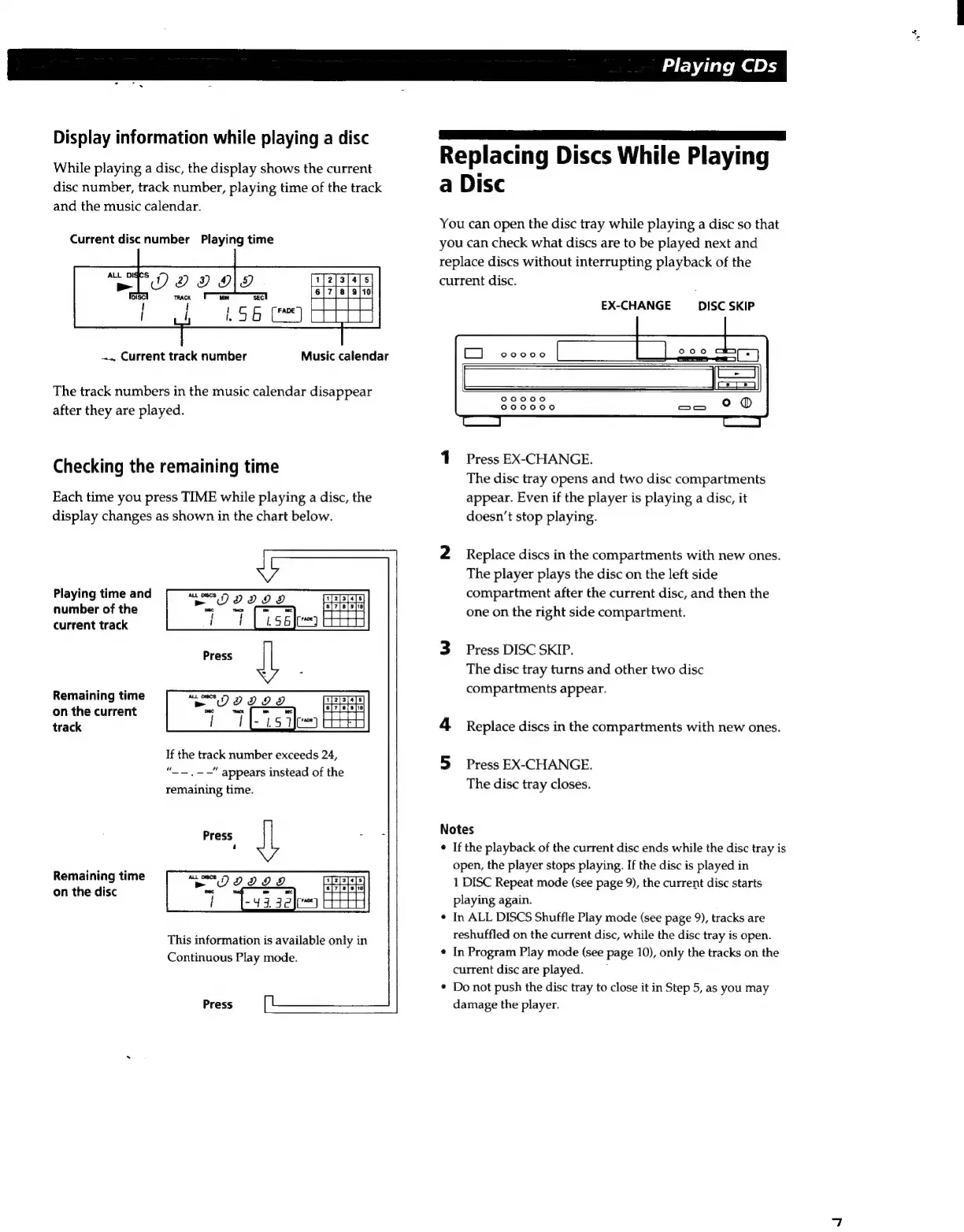
Display
information
while
playing
a
disc
Replacina
Discs
While
Plaving
While
playing
a
disc,
the
display
shows
the
current
ep
acing
ISCS
ne
P
aying
disc
number,
track
number,
playing
time
of
the
track
a
Disc
and
the
music
calendar.
You
can
open
the
disc
tray
while
playing
a
disc
so
that
Current
disc
number
Playing
time
you
can
check
what
discs
are
to
be
played
next
and
replace
discs
without
interrupting
playback
of
the
TO
2 9 ©
current
disc.
EX-CHANGE
DISC
SKIP
Current
track
number
Music
calendar
The
track
numbers
in
the
music
calendar
disappear
after
they
are
played.
1
Press
EX-CHANGE.
The
disc
tray
opens
and
two
disc
compartments
Each
time
you
press
TIME
while
playing
a
disc,
the
appear.
Even
if
the
player
is
playing
a
disc,
it
display
changes
as
shown
in
the
chart
below.
doesn’t
stop
playing.
Checking
the
remaining
time
2
Replace
discs
in
the
compartments
with
new
ones.
The
player
plays
the
disc
on
the
left
side
compartment
after
the
current
disc,
and
then
the
one
on
the
right
side
compartment.
Playing
time
and
number
of
the
current
track
3
Press
DISC
SKIP.
The
disc
tray
turns
and
other
two
disc
in
ti
rtment
r.
Remaining
time
compartments
appea
on
the
current
track
4
Replace
discs
in
the
compartments
with
new
ones.
If
the
track
number
exceeds
24,
“——,——"
appears
instead
of
the
remaining
time.
Press
JL
a
5
Press
EX-CHANGE.
The
disc
tray
closes.
Notes
+
If
the
playback
of
the
current
disc
ends
while
the
disc
tray
is
open,
the
player
stops
playing.
If
the
disc
is
played
in
1
DISC
Repeat
mode
(see
page
9),
the
current
disc
starts
playing
again.
+
In
ALL
DISCS
Shuffle
Play
mode
(see
page
9),
tracks
are
reshuffled
on
the
current
disc,
while
the
disc
tray
is
open.
¢
In
Program
Play
mode
(see
page
10),
only
the
tracks
on
the
current
disc
are
played.
Remaining
time
on
the
disc
This
information
is
available
only
in
Continuous
Play
mode.
*
Do
not
push
the
disc
tray
to
close
it
in
Step
5,
as
you
may
damage
the
player.
Press

Related product manuals