EasyManua.ls Logo

Sony CDP-CA7ES - Understanding the Player Display

Sony CDP-CA7ES
15 pages
Print Icon
To Next Page IconTo Next Page
To Previous Page IconTo Previous Page
Loading...
2
~
Getting
Started
e
If
you
have
a
digital
component
such
as
a
digital
amplifier,
D/A
converter,
DAT
or
MD
Connect
the
component
via
the
DIGITAL
OUT
(OPTICAL)
connector
using
the
optical
cable
(not
supplied).
Take
off
the
cap
and
plug
in
the
optical
cable.
Note
that
you
cannot
use
fading
in
or
out
function
(page
12)
when
making
this
connection.
POC-15
CE
Optical
cable
(not
supplied)
Digital
component
Note
When
you
connect
via
the
DIGITAL
OUT
(OPTICAL)
connector,
noise
may
occur
when
you
play
CD
software
other
than
music,
such
as
a
CD-ROM.
Connecting
the
AC
power
cord
Connect
the
AC
power
cord
to
a
wall
outlet.
Where
do!
go
next?
Now
you're
ready
to
use
your
player.
If
you
aren’t
familiar
with
how
to
play
CDs,
go
to
the
section
“Playing
a
CD”
on
page
4.
Then,
go
to
the
following
sections
for
other
operations.
Transporting
the
player
Before
transporting
the
player,
follow
the
procedure
below
to
return
the
internal
mechanisms
back
to
their
original
position.
1
Remove
all
the
discs
from
the
disc
tray.
2
Press
&
OPEN/CLOSE
to
close
the
disc
tray.
“no
dISC”
appears
in
the
display.
3
Wait
for
10
seconds,
then
press
POWER
to
turn
off
the
player.
Playing
CDs
Using
the
Display
You
can
check
information
about
the
disc
using
the
display.
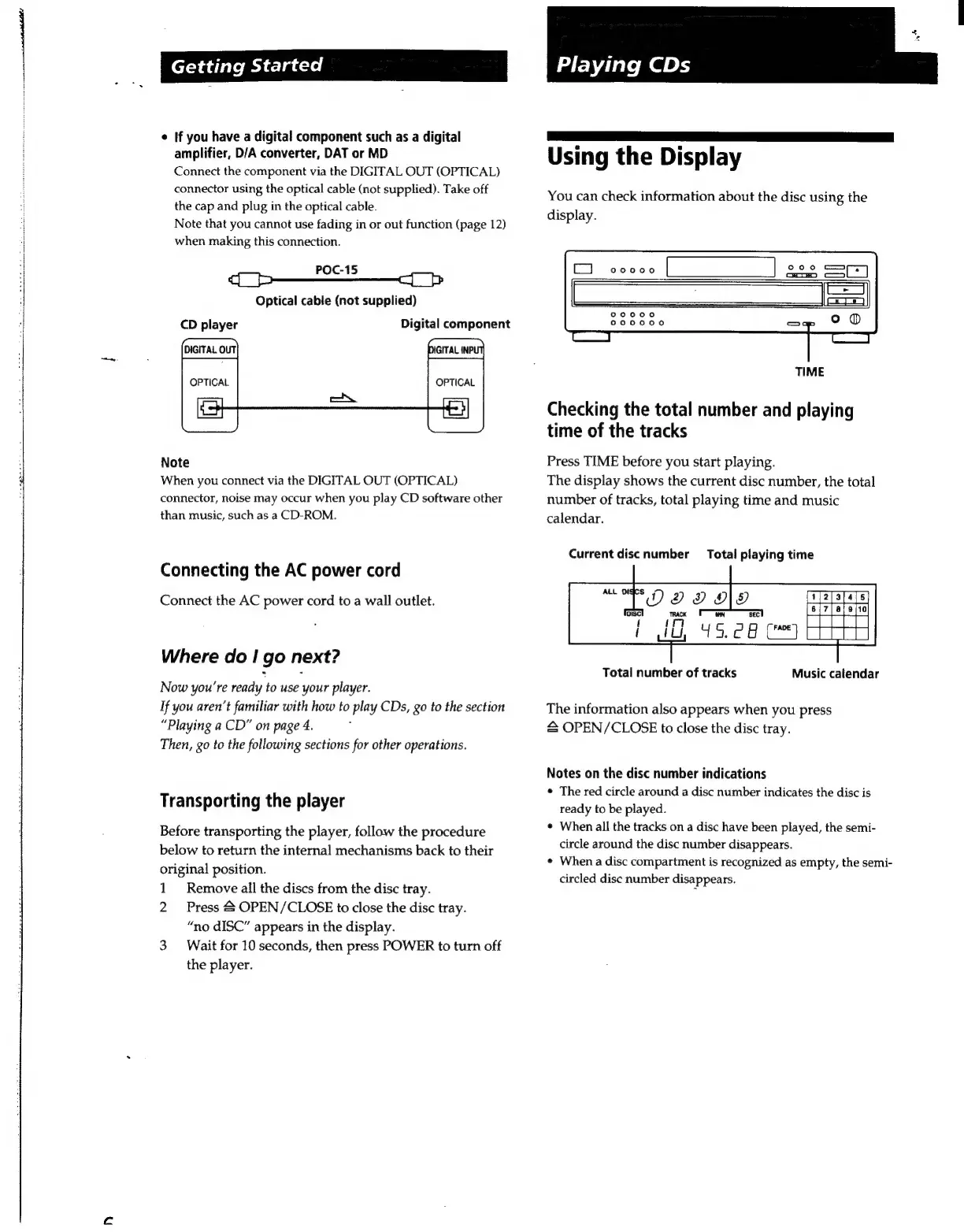
TIME
Checking
the
total
number
and
playing
time
of
the
tracks
Press
TIME
before
you
start
playing.
The
display
shows
the
current
disc
number,
the
total
number
of
tracks,
total
playing
time
and
music
calendar.
Current
disc
number
Total
playing
time
Music
calendar
Total
number
of
tracks
The
information
also
appears
when
you
press
&
OPEN/CLOSE
to
close
the
disc
tray.
Notes
on
the
disc
number
indications
+
The
red
circle
around
a
disc
number
indicates
the
disc
is
ready
to
be
played.
When
all
the
tracks
on
a
disc
have been
played,
the
semi-
circle
around
the
disc
number
disappears.
+
When
a
disc
compartment
is
recognized
as
empty,
the
semi-
circled
disc
number
disappears.

Related product manuals