EasyManua.ls Logo

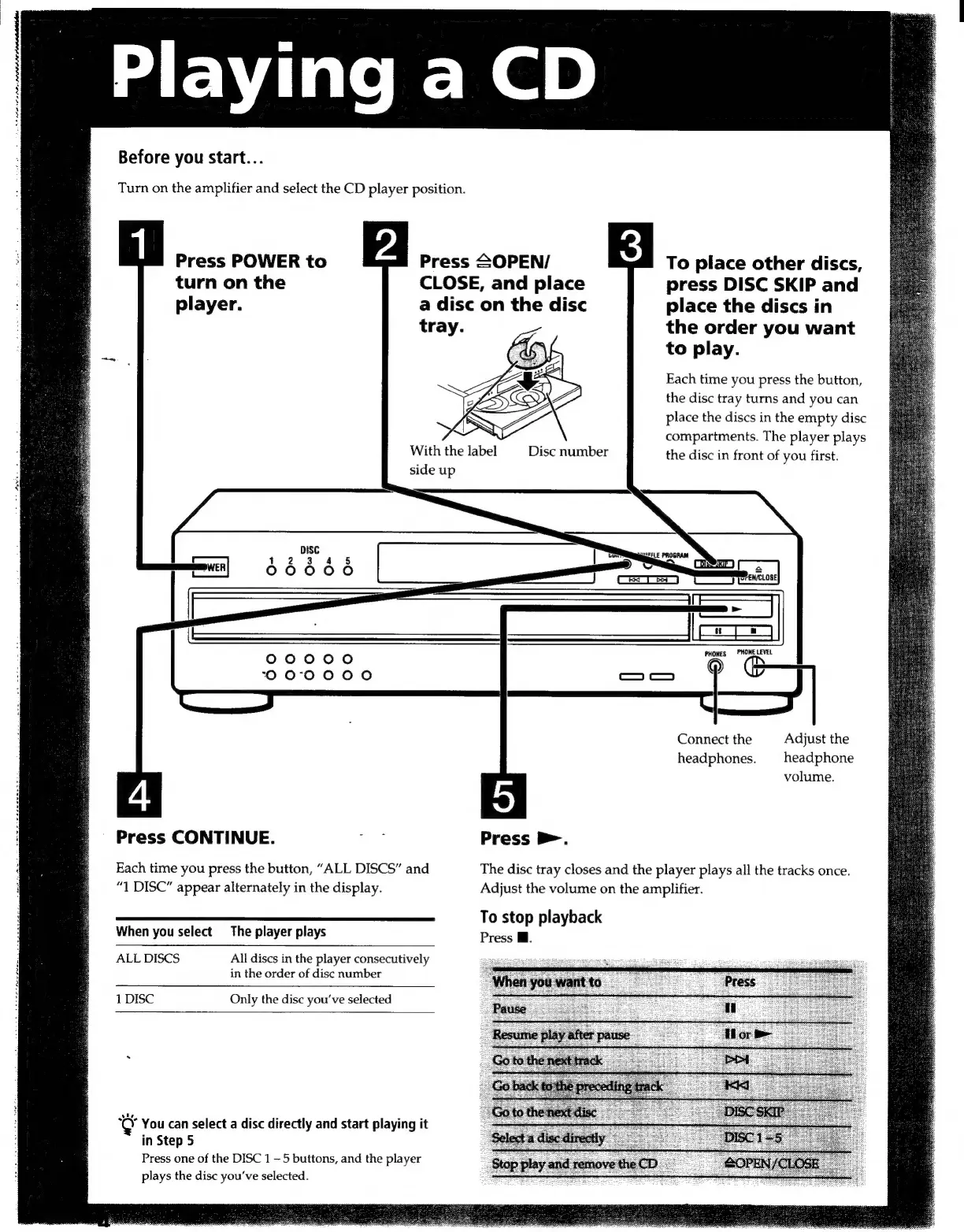
Sony CDP-CA7ES - Playing a CD; Basic CD Playback

Sony CDP-CA7ES
15 pages
Print Icon
To Next Page IconTo Next Page
To Previous Page IconTo Previous Page
Loading...
te
PPS
POLE
Before
you
start...
Turn
on
the
amplifier
and
select
the
CD
player
position.
Press
POWER
to
turn
on
the
Press
SOPEN/
CLOSE,
and
place
To
place
other
discs,
press
DISC
SKIP
and
player.
a
disc
on
the
disc
place
the
discs
in
the
order
you
want
to
play.
Each
time
you
press
the
button,
the
disc
tray
turns
and
you
can
place
the
discs
in
the
empty
disc
compartments.
The
player
plays
With
the
label
Disc
number
the
disc
in
front
of
you
first.
:
side
up
DISC
1
2
3
4
5
PWEN
00000
00000
©
PHONE
LEVEL
O0
00000
CREER
Connect
the
Adjust
the
headphones.
headphone
4
5
volume.
Press
CONTINUE.
a
Press
D.
i
Each
time
you
press
the
button,
“ALL
DISCS”
and
The
disc
tray
closes
and
the
player
plays
all
the
tracks
once.
;
“1
DISC”
appear
alternately
in
the
display.
Adjust
the
volume
on
the
amplifier.
To
stop
playback
When
you
select
The
player
plays
Press
W.
;
ALL
DISCS
All
discs
in
the
player
consecutively
?
in
the
order
of
disc
number
:
1
DISC
Only
the
disc
you've
selected
‘Ù
You
can
select
a
disc
directly
and
start
playing
it
in
Step
5
Press
one
of
the
DISC
1
5
buttons,
and
the
player
plays
the
disc
you've
selected.

Related product manuals