16
US
Enjoying Music in
Various Play Modes
You can use various playback modes to play
tracks/files. Some playback modes are available
simultaneously.
In normal playback mode, you can play tracks/
files in sequential order. The tracks/files to be
played can be selected.
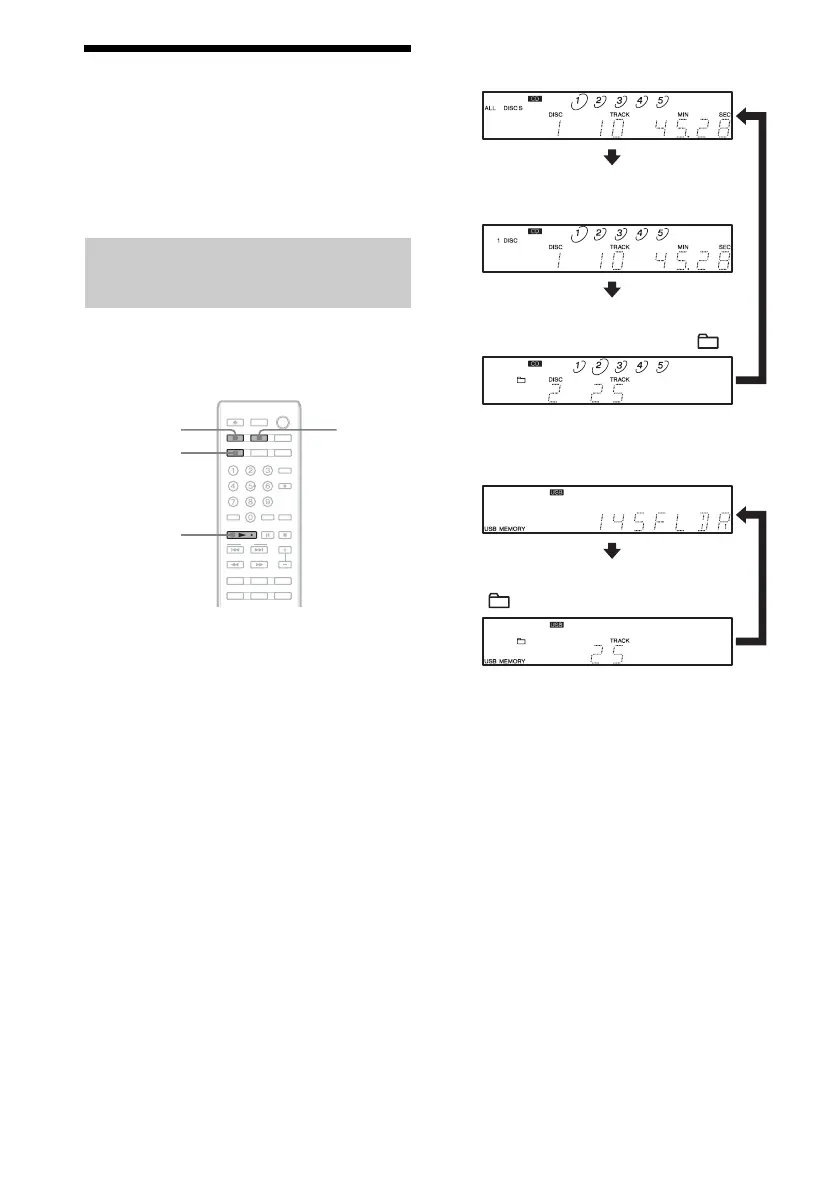
1 Press CD or USB.
For operation via the player, press CD/USB
repeatedly to select the CD or USB mode.
Before you change the playback mode, be
sure to stop playback.
2 Press CONTINUE repeatedly.
The tracks/files to be played change as
follows:
For a CD
For a USB device
1)
The display for an MP3 disc differs.
2)
To select the disc, press DISC 1-5 (or DISC
SKIP repeatedly).
3)
For a CD, functions the same as 1 DISC play.
4)
To select the folder, press FOLDER +/–.
3 Press N.
Playback starts.
Selecting tracks/files to be
played
CONTINUE
CD
N
USB
Plays all tracks/files on all discs (ALL DISCS).
1)
Plays all tracks/files on the current disc
(1 DISC).
1)2)
Plays all files in the current folder ( ).
3)4)
Plays all files on the USB device
(USB MEMORY).
Plays all files in the current folder
( USB MEMORY).
4)



 To Next Page