EasyManua.ls Logo

Sony CDP-X339ES - Page 36

Sony CDP-X339ES
40 pages
Print Icon
To Next Page IconTo Next Page
To Previous Page IconTo Previous Page
Loading...
Keeping
the
Program
in
Memory
-
Program
Bank
After
programming
selections,
you
can
keep
the
program
memorized,
so
that
the
disc
is
played
always
in
the
fixed
order.
The
memorized
program
is
called
“program
bank”.
One
program
bank
can
be
made
for
a
disc.
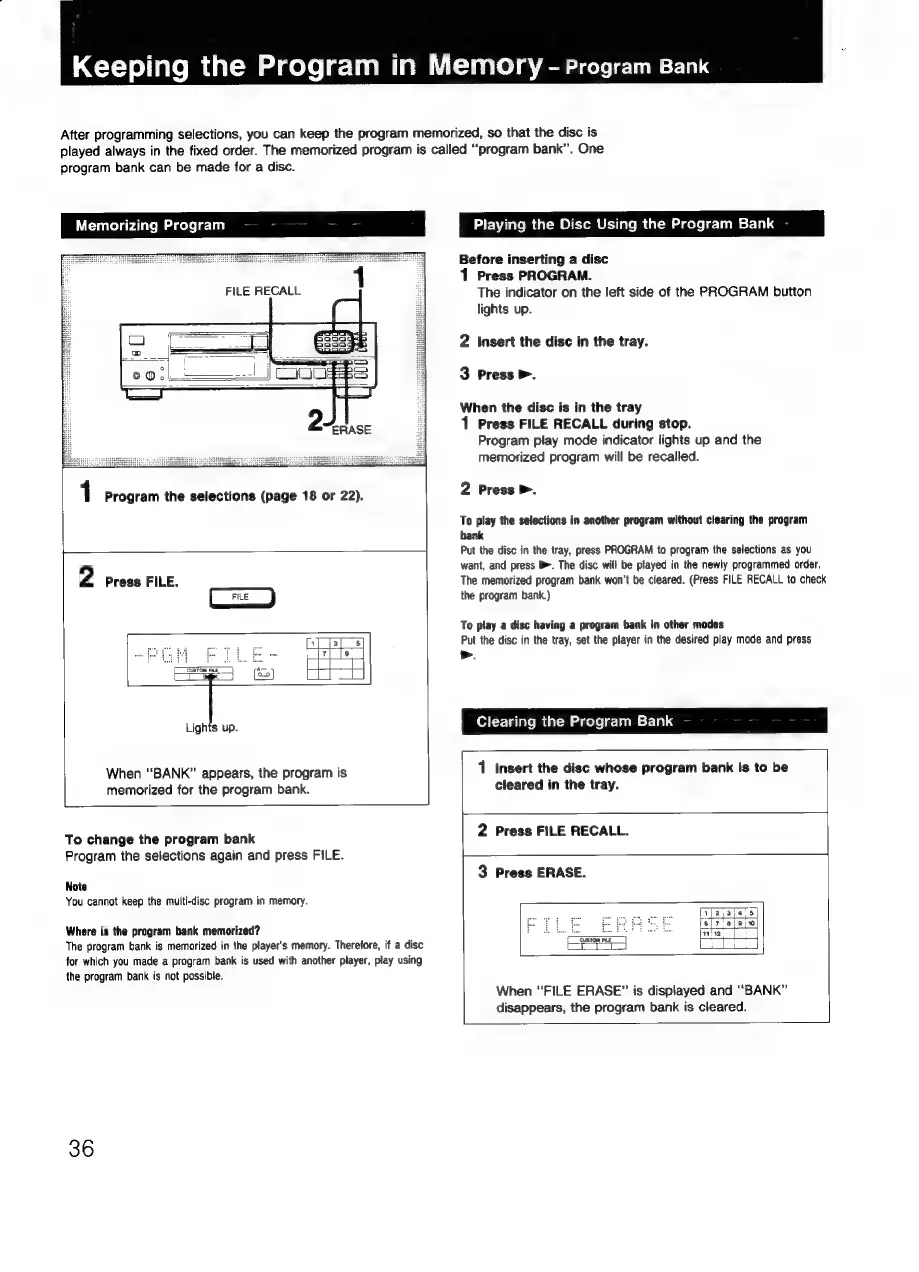
Memorizing
Program
FILE
RECALL
1
Program
the
selections
(page
18
or
22).
2
Press
FILE.
FILE
Lights
up.
When
“BANK”
appears,
the
program
is
memorized
for
the
program
bank.
To
change
the
program
bank
Program
the
selections
again
and
press
FILE.
Note
You
cannot
keep
the
multi-disc
program
in
memory.
Where
is
the
program
bank
memorized?
The
program
bank
is
memorized
in
the
player's
memory.
Therefore,
if
a
disc
for
which
you
made
a
program
bank
is
used
with
another
player,
play
using
the
program
bank
is
not
possible.
36
Playing
the
Disc
Using
the
Program
Bank
Before
inserting
a
disc
1
Press
PROGRAM.
The
indicator
on
the
left
side
of
the
PROGRAM
button
lights
up.
2
insert
the
disc
in
the
tray.
3
Press
>.
When
the
disc
is
in
the
tray
1
Press
FILE
RECALL
during
stop.
Program
play
mode
indicator
lights
up
and
the
memorized
program
will
be
recalled.
2
Press
>.
To
play
the
selections
in
another
program
without
clearing
the
program
bank
Put
the
disc
in
the
tray,
press
PROGRAM
to
program
the
selections
as
you
want,
and
press
B.
The
disc
will
be
played
in
the
newly
programmed
order.
The
memorized
program
bank
won't
be
cleared.
(Press
FILE
RECALL
to
check
the
program
bank.)
To
play
a
disc
having
a
program
bank
in
other
modes
Put
the
disc
in
the
tray,
set
the
player
in
the
desired
play
mode
and
press
>.
Clearing
the
Program
Bank
1
Insert
the
disc
whose
program
bank
is
to
be
cleared
in
the
tray.
2
Press
FILE
RECALL.
3
Press
ERASE.
CaSTOM
E?
i
i
When
“FILE
ERASE”
is
displayed
and
“BANK”
disappears,
the
program
bank
is
cleared.