EasyManua.ls Logo

Sony CDP-X339ES - Page 37

Sony CDP-X339ES
40 pages
Print Icon
To Next Page IconTo Next Page
To Previous Page IconTo Previous Page
Loading...
|
<-y-Jeliale
mm
Aolelamelale(-slia-lemet-li-lettcelamiam
ice
ay,
-
Delete
Bank
After
choosing
undesired
selections,
you
can
store
them
in
the
memory.
These
memorized
undesired
selections
are
called
“Delete
Bank”.
One
delete
bank
can
be
made
for
each
disc.
Note
that
both
program
bank
and
delete
banks
cannot
be
made
for
one
disc.
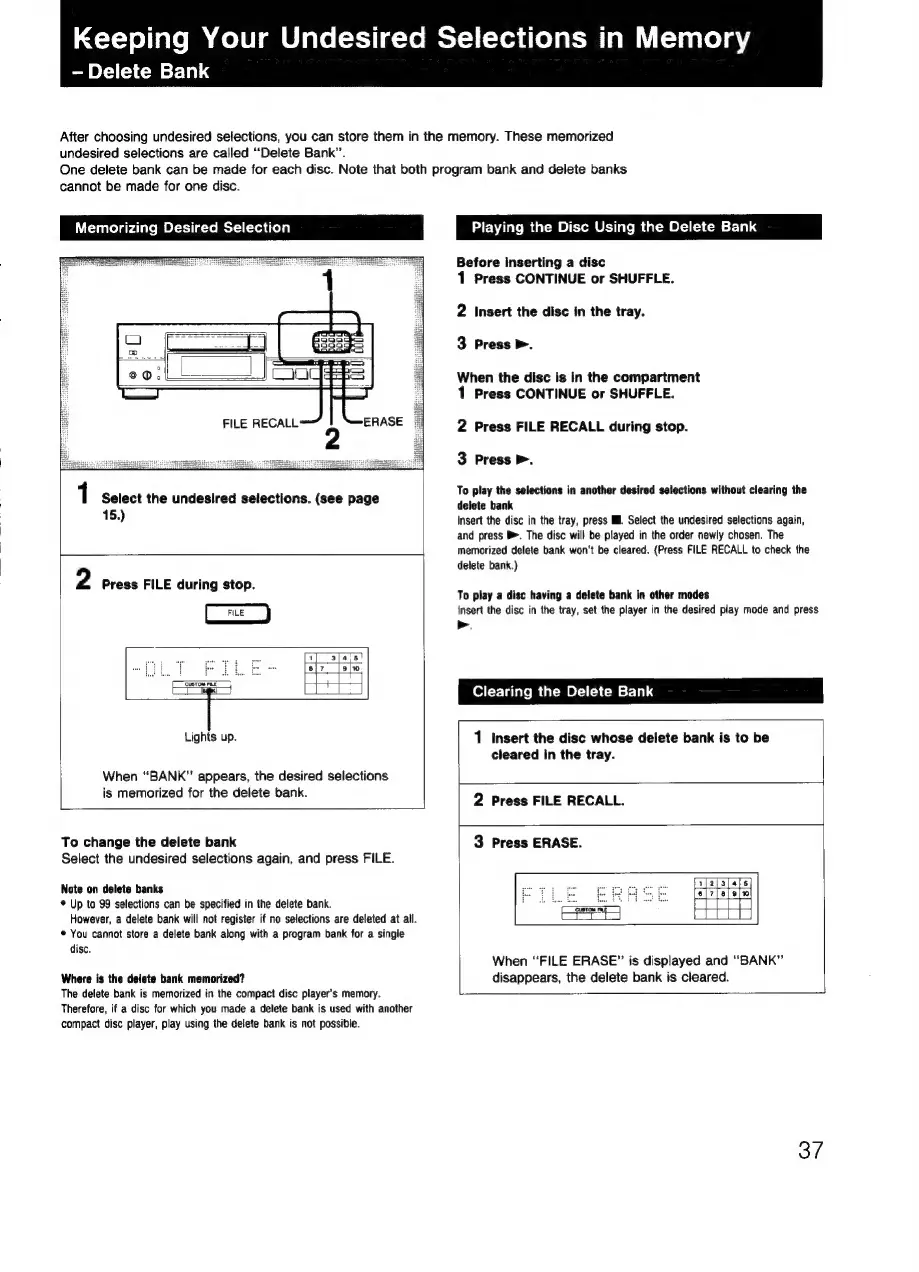
Memorizing
Desired
Selection
1
Select
the
undesired
selections.
(see
page
15.)
2
Press
FILE
during
stop.
Lights
up.
When
“BANK”
appears,
the
desired
selections
is
memorized
for
the
delete
bank.
To
change
the
delete
bank
Select
the
undesired
selections
again,
and
press
FILE.
Note
on
delete
banks
*
Up
to
99
selections
can
be
specified
in
the
delete
bank.
However,
a
delete
bank
will
not
register
if
no
selections
are
deleted
at
all.
*
You
cannot
store
a
delete
bank
along
with
a
program
bank
for
a
single
disc.
Where
is
the
delete
bank
memorized?
The
delete
bank
is
memorized
in
the
compact
disc
player's
memory.
Therefore,
if
a
disc
for
which
you
made
a
delete
bank
is
used
with
another
compact
disc
player,
play
using
the
delete
bank
is
not
possible.
Playing
the
Disc
Using
the
Delete
Bank
Before
inserting
a
disc
1
Press
CONTINUE
or
SHUFFLE.
2
Insert
the
disc
in
the
tray.
3
Press
>.
When
the
disc
is in
the
compartment
1
Press
CONTINUE
or
SHUFFLE.
2
Press
FILE
RECALL
during
stop.
3
Press
>.
To
play
the
selections
in
another
desired
selections
without
clearing
the
delete
bank
Insert
the
disc
in
the
tray,
press
I.
Select
the
undesired
selections
again,
and
press
®.
The
disc
will
be
played
in
the
order
newly
chosen.
The
memorized
delete
bank
won't
be
cleared.
(Press
FILE
RECALL
to
check
the
delete
bank.)
To
play
a
disc
having
a
delete
bank
in
other
modes
insert
the
disc
in
the
tray,
set
the
player
in
the
desired
play
mode
and
press
>.
Clearing
the
Delete
Bank
1
Insert
the
disc
whose
delete
bank
is
to
be
cleared
in
the
tray.
2
Press
FILE
RECALL.
3
Press
ERASE.
6 °
5 o
When
“FILE
ERASE”
is
displayed
and
“BANK”
disappears,
the
delete
bank
is
cleared.
37