Connecting the Drive
Connect the drive to the computer with the following connectors:
● DC INPUT connector
● F. GND tab (unless the drive’s frame is in direct contact with the
computer’s chassis).
● AUDIO OUT connector (if you plan to connect audio equipment)
● INTERFACE CONNECTOR.
■ DC INPUT connector
The pin assignment is as follows.
After matching the beveled edges, insert the plug of the power supply cable
to the DC INPUT connector and push it firmly in place.
Caution: Improper connection may damage the drive and void the warranty.
Installing the Drive in Your Computer 15
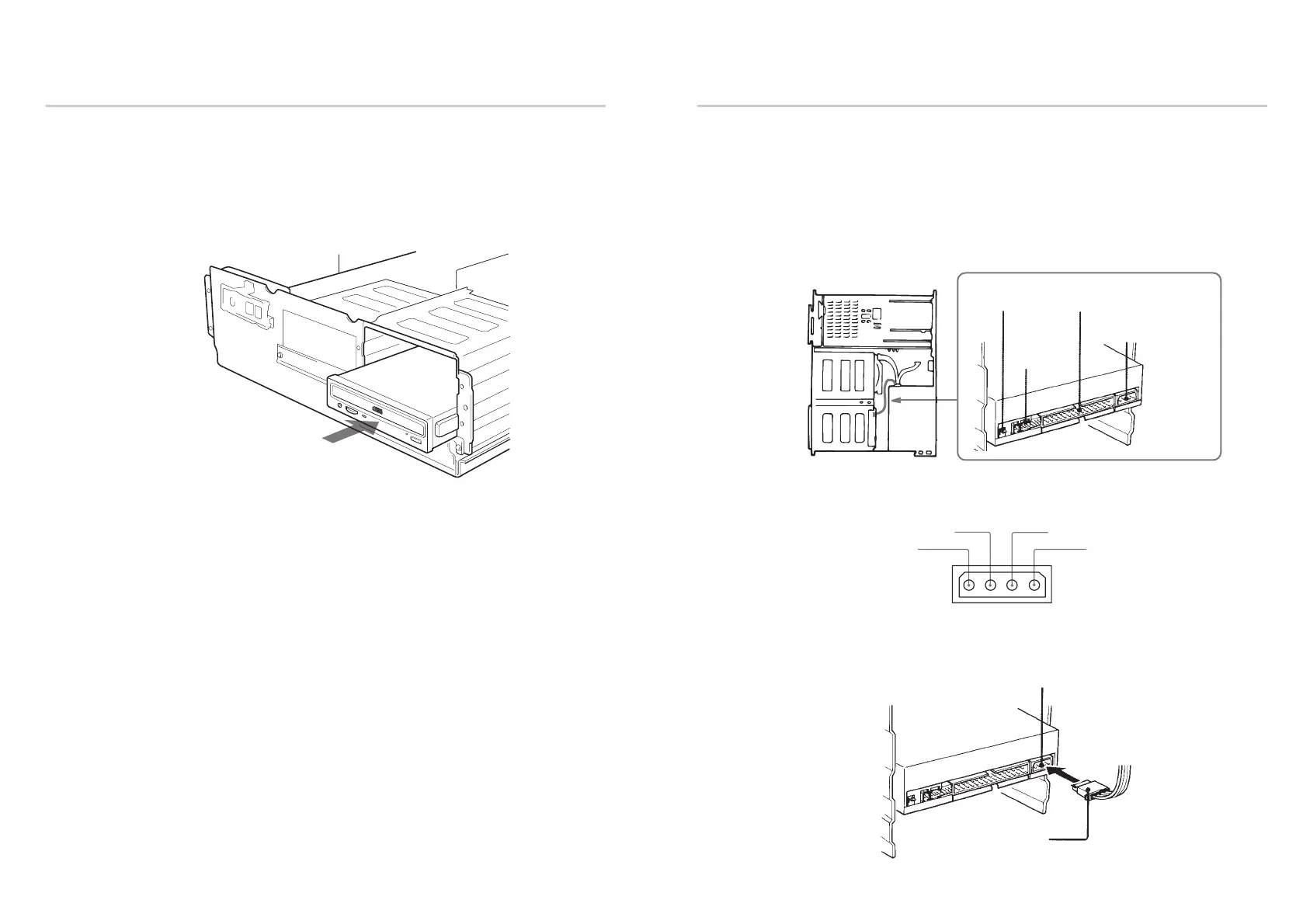
Mounting the Drive
If mounting rails are necessary, attach them to the drive in the same way as
your floppy disk drive and slide the drive into the lower drive bay.
If mounting rails are not required in your system, screw the drive in place.
14 Installing the Drive in Your Computer
Slide the drive into the lower bay.
F. GND tab INTERFACE CONNECTOR
DC INPUT connector
AUDIO OUT
connector
GND
+5 V DC +12 V DC
GND
DC INPUT connector
Power supply cable
(4-pin connection cable)



 To Next Page