5
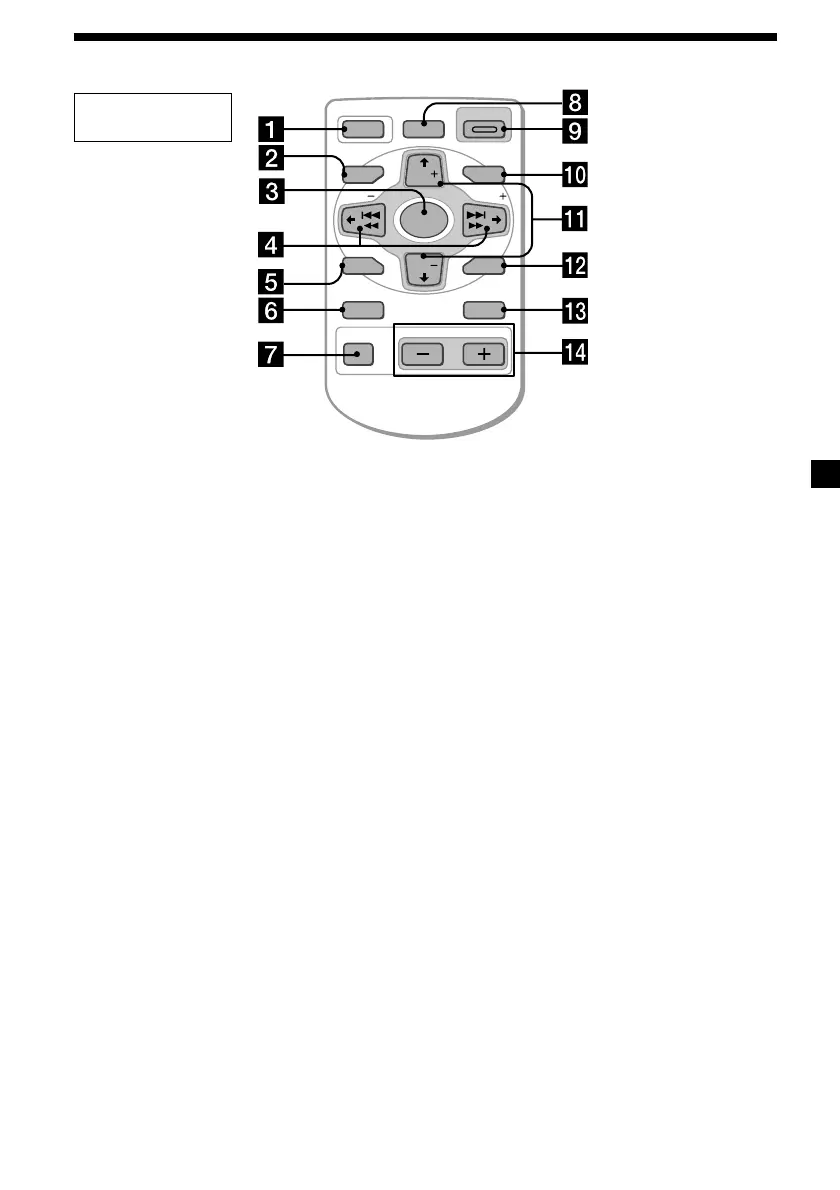
Location of controls
OFF
SEEK SEEK
MENU LIST
SOUND
ENTER
DISC
DISC
SOURCE
DSPL MODE
VOLATT
OPEN/CLOSE
DSO
Card remote
commander
1 OFF button 8, 10
2 MENU button 9, 12, 13, 14, 15, 16, 17,
18, 22, 27, 28, 29, 31
3 SOURCE (TUNER/CD/MD/TV) button
8, 10, 11, 14, 16, 17, 19, 20, 21, 22, 28,
29, 30, 31
4 </, (SEEK/AMS –/+) buttons
8, 9, 11, 12, 15, 16, 17, 19, 20, 21, 22, 23,
26, 28, 30, 31
Automatic Music Sensor (./>) 11
Manual Search (m/M) 11
Seek 16, 28
5 SOUND button 19, 20, 21, 22, 26
6 DSPL (display mode change) button
10, 11, 13, 18, 19, 25
7 ATT (attenuate) button 26
8 CDX-M750:
DSO
(Dynamic Soundstage Organaizer)
button 21
CDX-M600:
D-BASS button 27
9 OPEN/CLOSE button 10
0 LIST button 13, 14, 18, 19, 30, 31
List-up 14, 19, 30, 31
Refer to the pages listed for details.
qa M/m (PRST/DISC +/–) buttons
8, 9, 11, 12, 13, 14, 15, 17, 18, 19, 20, 22,
23, 27, 28
During CD/MD playback:
Disc change 11
During radio reception:
Preset stations select 17
During TV reception:
Band select 29
qs ENTER button 9, 11, 13, 14, 15, 16, 17,
18, 19, 20, 22, 23, 27, 29, 31
qd MODE button 10, 14, 16, 17, 29, 31
During CD/MD playback:
CD/MD unit select 10, 14
During radio reception:
BAND select 16, 17
During TV reception:
Unit select 29
qf VOL (volume adjust) buttons
A unit turned off by pressing (OFF) for two
seconds cannot be operated with the card
remote commander unless (SOURCE) on the
unit is pressed or a CD is inserted to activate
the unit first.



 To Next Page