EasyManua.ls Logo

Sony CFD-50 - Tuner Section

Sony CFD-50
29 pages
Print Icon
To Next Page IconTo Next Page
To Previous Page IconTo Previous Page
Loading...
CFD-50
|
5-2.
TUNER
SECTION
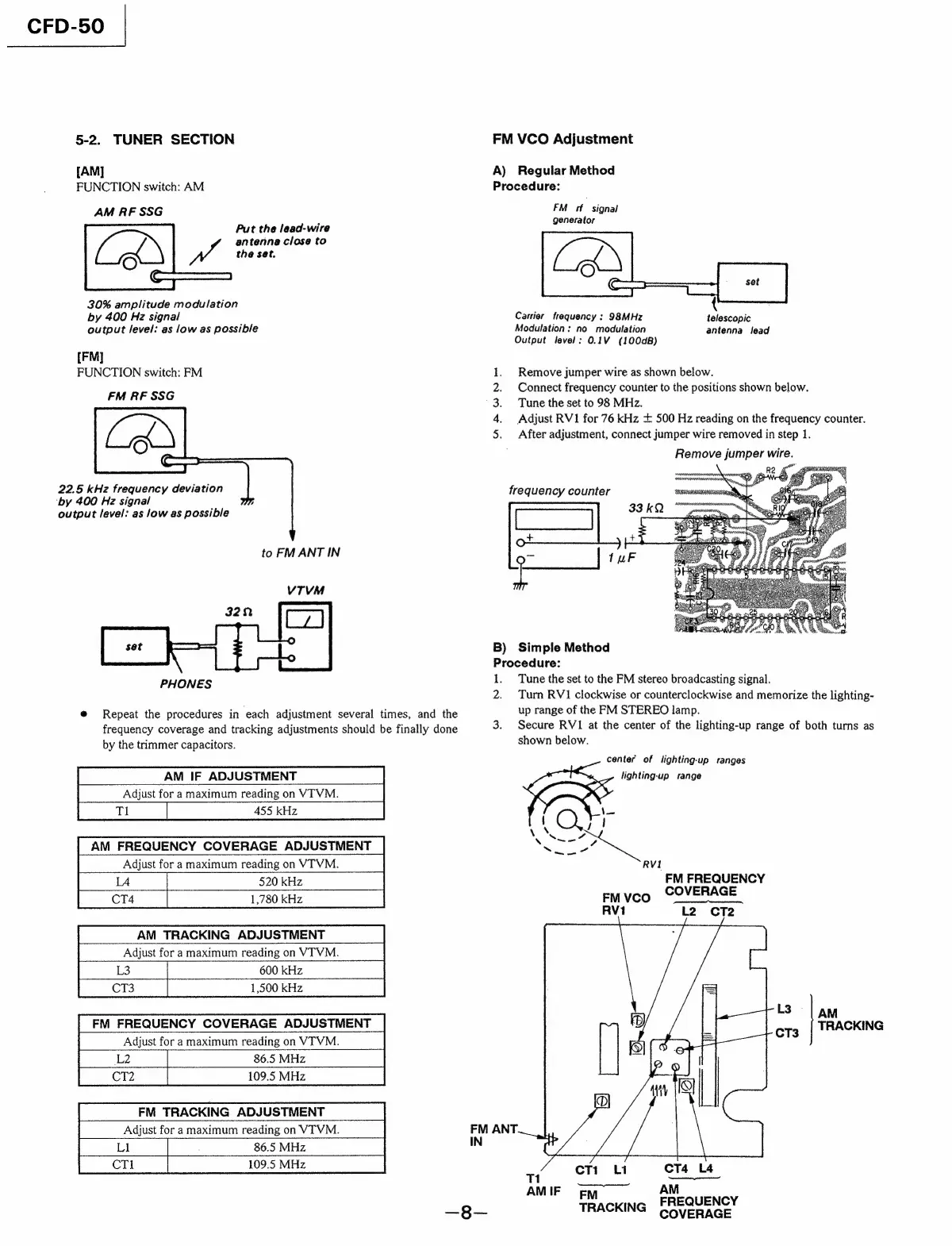
[AM]
FUNCTION
switch:
AM
AM
RF
SSG
Put
the
lead-wire
antenna
close
to
we
the
set.
(QE
aE
30%
amplitude
modulation
by
400
Hz
signal
output
level:
as
low
as
possible
[FM]
FUNCTION
switch:
FM
FM
RF
SSG
22.5
kHz
frequency
deviation
‘by
400
Hz
signal
output
level:
as
low
as
possible
to
FM
ANT
IN
PHONES
@
Repeat
the
procedures
in
each
adjustment
several
times,
and
the
frequency
coverage
and
tracking
adjustments
should
be
finally
done
by
the
trimmer
capacitors.
AM
IF
ADJUSTMENT
Adjust
for
a
maximum
reading
on
VITVM.
455
kHz
AM
FREQUENCY
COVERAGE
ADJUSTMENT
Adjust
for
a
maximum
reading
on
VT
VM.
520
kHz
1,780
kHz
AM
TRACKING
ADJUSTMENT
Adjust
for
a
maximum
reading
on
VTVM.
600
kHz
1,500
kHz
FM
TRACKING
ADJUSTMENT
Adjust
for
a
maximum
reading
on
VTVM.
.
86.5
MHz
109.5
MHz
FM
VCO
Adjustment
A)
Regular
Method
Procedure:
FM
ff
signal
generator
=
po
Carrier
frequency
:
98MHz
telescopic
Modulation:
no
modulation
antenna
lead
Output
level:
0.1V
(100dB)
Remove
jumper
wire
as
shown
below.
Connect
frequency
counter
to
the
positions
shown
below.
Tune
the
set
to
98
MHz.
Adjust
RV1
for
76
kHz
+
500
Hz
reading
on
the
frequency
counter.
After
adjustment,
connect
jumper
wire
removed
in
step
1.
Remove
jumper
wire
Aaa
Noe
frequency
counter
nee)
Bere
B)
Simple
Method
Procedure:
1.
Tune
the
set
to
the
FM
stereo
broadcasting
signal.
2.
Turn
RV1
clockwise
or
counterclockwise
and
memorize
the
lighting-
up
range
of
the
FM
STEREO
lamp.
3.
Secure
RVI
at
the
center
of
the
lighting-up
range
of
both
turns
as
shown
below.
center
of
lighting-up
ranges
lighting-up
range
iO)
/
,
N
N
ee
Sao
RVI
FM
FREQUENCY
EMVvco
COVERAGE
RV1
L2
cCT2
AM
TRACKING
11
CTi
Li
CT4
L4
AMIE
CEM
FREQUENCY
—38—
TRACKING
GovERAGE

Related product manuals