EasyManua.ls Logo

Sony CFD-50 - Focus Bias Adjustment

Sony CFD-50
29 pages
Print Icon
To Next Page IconTo Next Page
To Previous Page IconTo Previous Page
Loading...
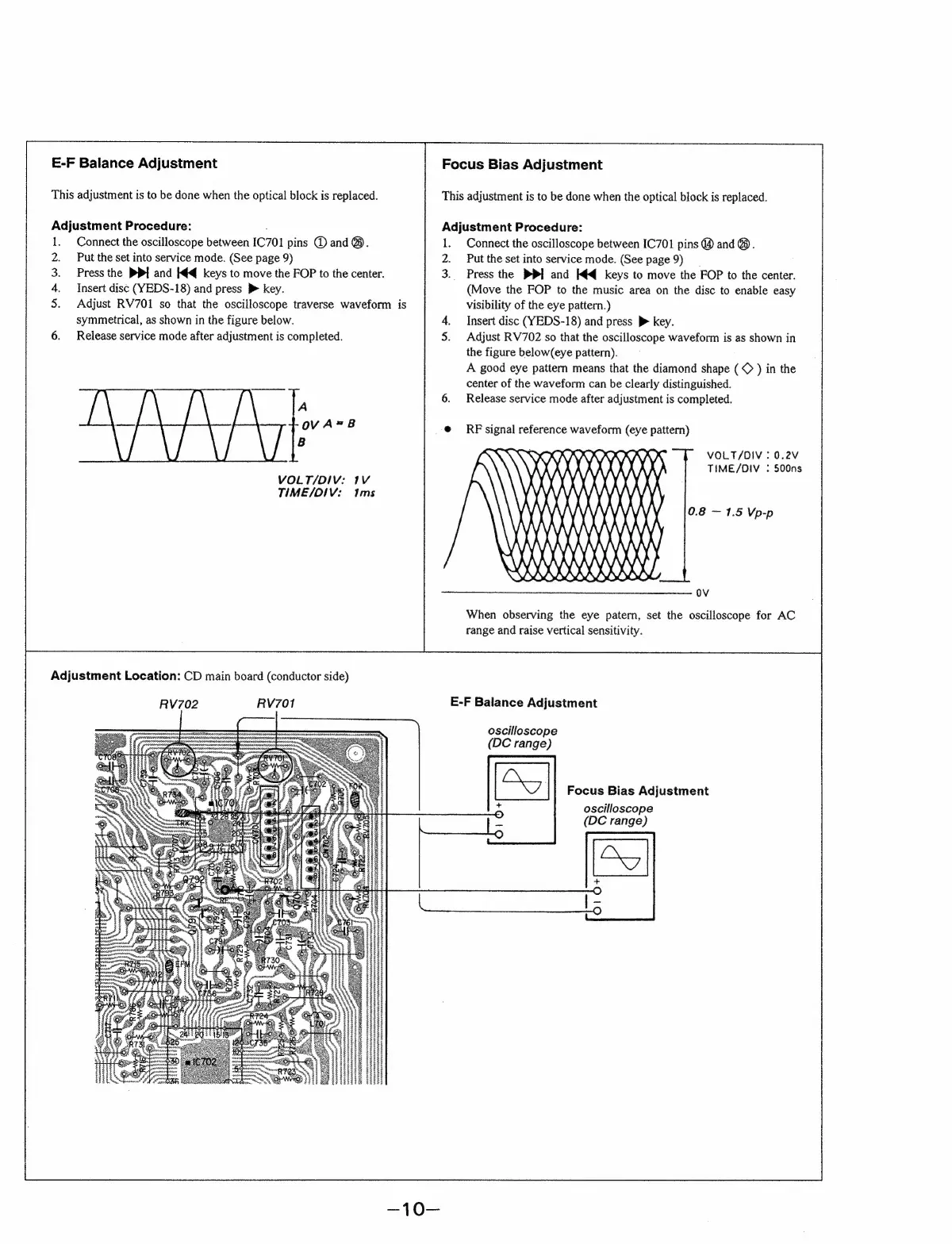
E-F
Balance
Adjustment
This
adjustment
is
to
be
done
when
the
optical
block
is
replaced.
Adjustment
Procedure:
:
Connect
the
oscilloscope
between
IC701
pins
@
and
@.
Put
the
set
into
service
mode.
(See
page
9)
Press
the
PP]
and
k4q
keys
to
move
the
FOP
to
the
center.
Insert
disc
(YEDS-18)
and
press
}
key.
Adjust
RV701
so
that
the
oscilloscope
traverse
waveform
is
symmetrical,
as
shown
in
the
figure
below.
Release
service
mode
after
adjustment
is
completed.
A
8
VOLT/DIV:
1V
TIME/OIV:
Ims
Adjustment
Location:
CD
main
board
(conductor
side)
RV702
RV701
Focus
Bias
Adjustment
This
adjustment
is
to
be
done
when
the
optical
block
is
replaced.
Adjustment
Procedure:
Connect
the
oscilloscope
between
IC701
pins
@
and
@.
Put
the
set
into
service
mode.
(See
page
9)
__
Press
the
PP]
and
K¢q
keys
to
move
the
FOP
to
the
center.
(Move
the
FOP
to
the
music
area
on
the
disc
to
enable
easy
visibility
of
the
eye
pattern.)
Insert
disc
(YEDS-18)
and
press
>
key.
Adjust
RV702
so
that
the
oscilloscope
waveform
is
as
shown
in
the
figure
below(eye
pattern).
A
good
eye
pattern
means
that
the
diamond
shape
)
in
the
center
of
the
waveform
can
be
clearly
distinguished.
Release
service
mode
after
adjustment
is
completed.
RF
signal
reference
waveform
(eye
pattern)
\RXANA
i
Wie
i
\\
VOLT/OIV
:
0.2V
TIME/OIV
:
500ns
0.8
1.5
Vp-p
Hii
MA
Way
Wy
ov
When
observing
the
eye
patern,
set
the
oscilloscope
for
AC
range
and
raise
vertical
sensitivity.
E-F
Balance
Adjustment
oscilloscope
(DC
range)
ES
Focus
Bias
Adjustment
+
oscilloscope
(DC
range)

Related product manuals