EasyManua.ls Logo

Sony CFD-50 - Page 11

Sony CFD-50
29 pages
Print Icon
To Next Page IconTo Next Page
To Previous Page IconTo Previous Page
Loading...
REFERENCE
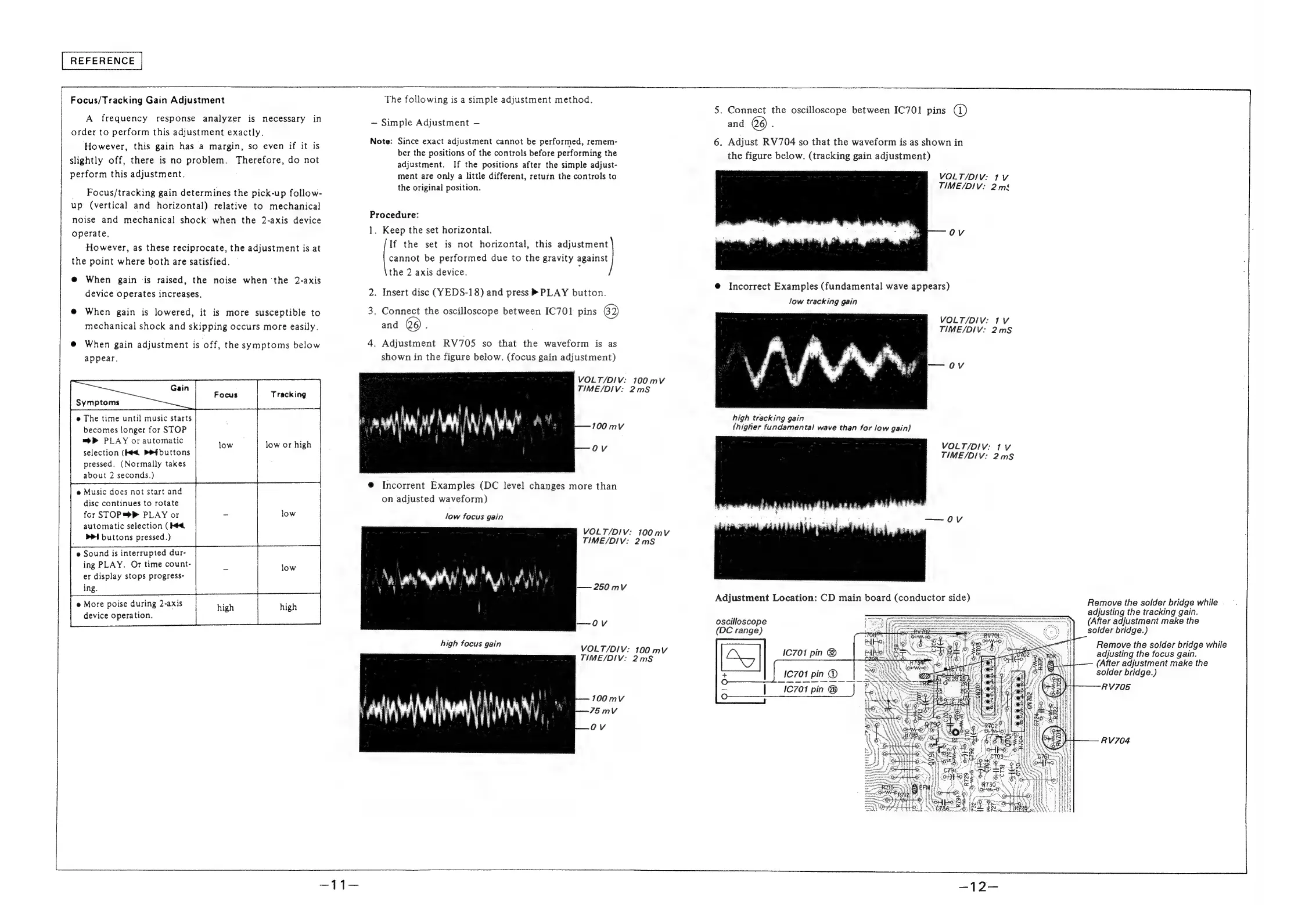
Focus/Tracking
Gain
Adjustment
A
frequency
response
analyzer
is
necessary
in
order
to
perform
this
adjustment
exactly.
However,
this
gain
has
a
margin,
so
even
if
it
is
slightly
off,
there
is
no
problem.
Therefore,
do
not
perform
this
adjustment.
Focus/tracking
gain
determines
the
pick-up
follow-
up
(vertical
and
horizontal)
relative
to
mechanical
noise
and
mechanical
shock
when
the
2-axis
device
operate,
However,
as
these
reciprocate,
the
adjustment
is
at
the
point
where
both
are
satisfied.
@
When
gain
is
raised,
the
noise
when
the
2-axis
device
operates
increases.
@
When
gain
is
lowered,
it
is
more
susceptible
to
mechanical
shock
and
skipping
occurs
more
easily.
@
When
gain
adjustment
is
off,
the
symptoms
below
appear.
low
or
high
@
The
time
until
music
starts
becomes
longer
for
STOP
=P
PLAY
or
automatic
selection
(Hed
PR
buttons
pressed.
(Normally
takes
about
2
seconds.)
e
Music
does
not
start
and
disc
continues
to
rotate
for
STOP
=>
PLAY
or
automatic
selection
(Hed
bi
buttons
pressed.)
e
Sound
is
interrupted
dur-
ing
PLAY.
Or
time
count-
er
display
stops
progress-
ing.
e
More
poise
during
2-axis
device
operation.
The
following
is
a
simple
adjustment
method.
Simple
Adjustment
Note:
Since
exact
adjustment
cannot
be
performed,
remem-
ber
the
positions
of
the
controls
before
performing
the
adjustment.
If
the
positions
after
the
simple
adjust-
ment
are
only
a
little
different,
return
the
controls
to
the
original
position.
Procedure:
1.
Keep
the
set
horizontal.
If
the
set
is
not
horizontal,
this
adjustment
cannot
be
performed
due
to
the
gravity
against
the
2
axis
device.
2.
Insert
disc
(YEDS-18)
and
press
®»
PLAY
button.
3.
Connect
the
oscilloscope
between
IC701
pins
62)
and
6)
.
4.
Adjustment
RV705
so
that
the
waveform
is
as
shown
in
the
figure
below.
(focus
gain
adjustment)
@
Incorrent
Examples
(DC
level
changes
more
than
on
adjusted
waveform)
low
focus
gain
—-OV
VOLT/DIV:
TIME/DIV:
2mS
VOLT/DIV:
TIME/DIV:
2mS
250mvVv
700
mV
100
mV
VOLT/DIV:
100
mv
TIME/DIV:
2mS
5.
Connect
the
oscilloscope
between
IC701
pins
@)
and
26)
:
6.
Adjust
RV704
so
that
the
waveform
is
as
shown
in
the
figure
below.
(tracking
gain
adjustment)
VOLT/DIV:
1V
TIME/DIV:
2ms
OV
@
Incorrect
Examples
(fundamental
wave
appears)
low
tracking
gain
VOLT/DIV:
1V
TIME/DIV:
2mS
OV
high
tracking
gain
(higher
fundamental
wave
than
for
low
gain)
VOLT/DIV:
1V
TIME/DIV:
2mS
Ov
Adjustment
Location:
CD
main
board
(conductor
side)
Remove
the
solder
bridge
while
-
adjusting
the
tracking
gain.
(After
adjustment
make
the
solder
bridge.)
oscilloscope
(DC
range)
Remove
the
solder
bridge
while
adjusting
the
focus
gain.
——
(After
adjustment
make
the
solder
bridge.)
RV705
1C701
pin
@
1C701
pin
@
IC701
pin
@
RV704

Related product manuals