EasyManua.ls Logo

Sony CFD-K10 - Cautions for Adjustments; Before Adjustments; How to Create the Test Mode; Sled Motor Check

Sony CFD-K10
108 pages
Print Icon
To Next Page IconTo Next Page
To Previous Page IconTo Previous Page
Loading...
CFD-KTO
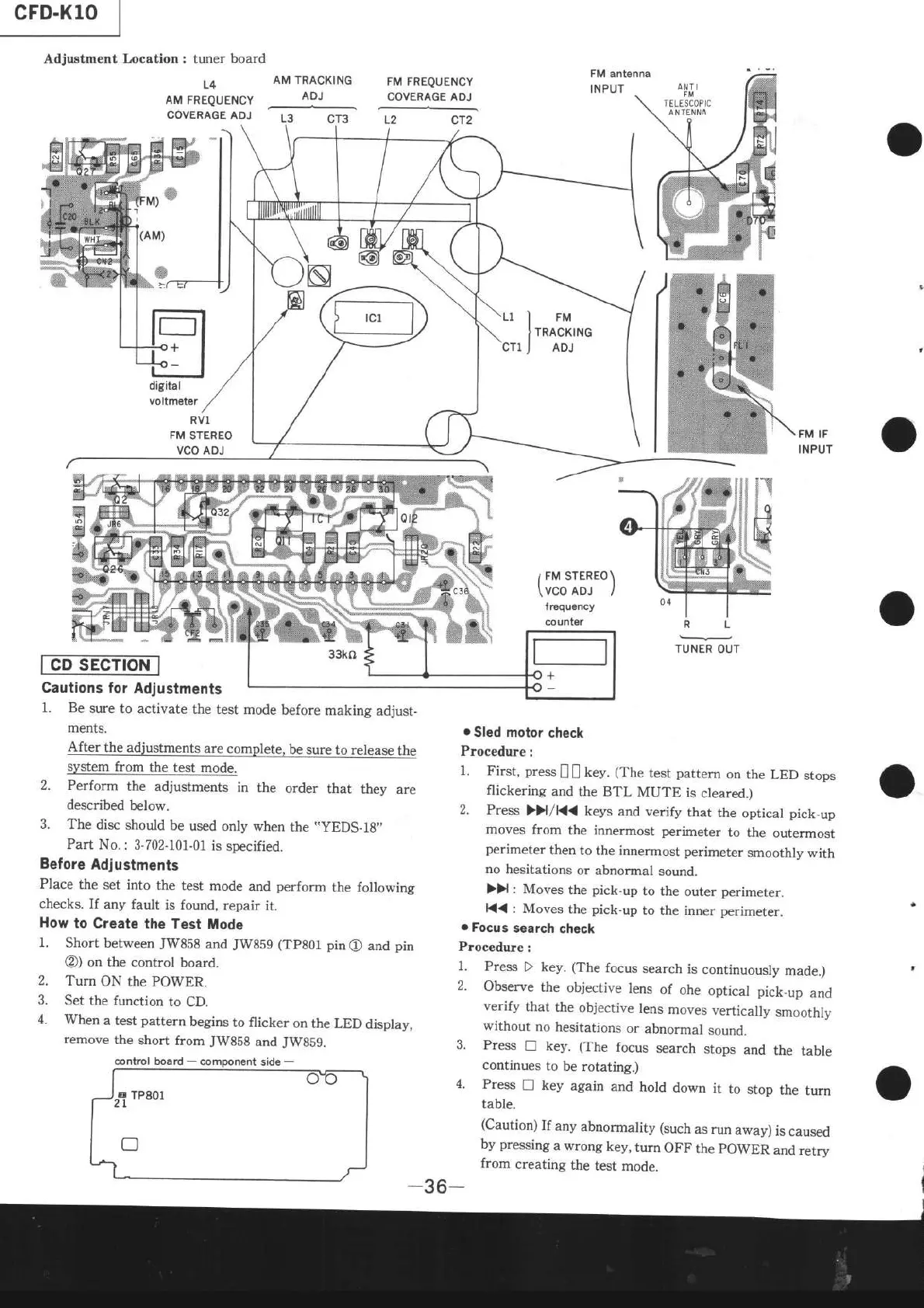
Adjustment Location : tuner board
L4
AM
FREQUENCY
COVERAGE
ADJ
AM
TRACKING
FM FREQUENCY
ADJ
COVERAGE
ADJ
digital
voltmêtêr
RVl
FM
STEREO
VCO
ADJ
a
w
&
Cautions
for Adjustments
1. Be
sure
to activate
the
test mode
before
making
adjust-
ments.
After
the adjustments
are
complete,
be
sure to release
the
system from
the test
mode.
2. Perform
the
adjustments
in
the
order
that
they
are
described
below.
3.
The
disc
should
be used
only when
the
"YEDS-18.
Part
No.: 3-702-101-01
is
soecified.
Before
Adjustments
Place
the
set into
the
test mode
and
perform
the following
checks.
If
any fault is
found,
repair
it.
How
to Create
the
Test tlode
1.
Short between
JW858
and
JW859
(TP80r
pin@
and
pin
@)
on the
control
board.
Turn
ON the
PO\4ER.
Set
the
function
to CD.
When
a test
pattern
begins
to flicker
on the
LED
display,
remove
the
short
from
JWB5S
and
JWSS9.
I
FM srERÊo)
\
VCO
ADJ
I
lrequêncy
counter
o
Sled
motor
check
Procedure
:
1.
First,
press
[
|
key.
(The
test
pattern
on the
LED
stops
flickering
and
the BTL
MUTE
is
cleared.)
2.
Press
>>l
/K<
keys
and verify
that
the
optical
pick-up
moves
from
the innermost perimeter
to
the
outermost
perimeter
then
to
the innermost perimeter
smoothly
with
no hesitations
or abnormal
sound.
))
: Moves
the
pick-up
to the
outer
perimeter.
K{
: Moves
the
pick.up
to the inner
perimeter.
.
Focu
s search
check
Procedure
:
1.
Press
D
key.
(The
focus
search
is
continuously
made.)
2.
Observe
the
objective
lens
of
ohe
optical pick.up
and
verify
that
the
objective
lens
moves
vertically
smoothly
without
no
hesitations
or
abnormal
sound.
3.
Press
! key.
(The
focus
search
stops
and
the
table
continues
to be
rotating.)
4.
Press
n
key
again
and
hold
down
it
to
stop
the
turn
table.
(Caution)
If
any
abnormality (such
as run
away)
is
caused
by
pressing
a wrong
key,
turn
OFF
the
pOWER
and retrv
from
creating
the
test
mode.
L.
21
rP80l
o

Table of Contents

Related product manuals