EasyManua.ls Logo

Sony CFD-K10 - VCO Free-Run Adjustment; Traverse Adjustment; Focus Bias Adjustment

Sony CFD-K10
108 pages
Print Icon
To Next Page IconTo Next Page
To Previous Page IconTo Previous Page
Loading...
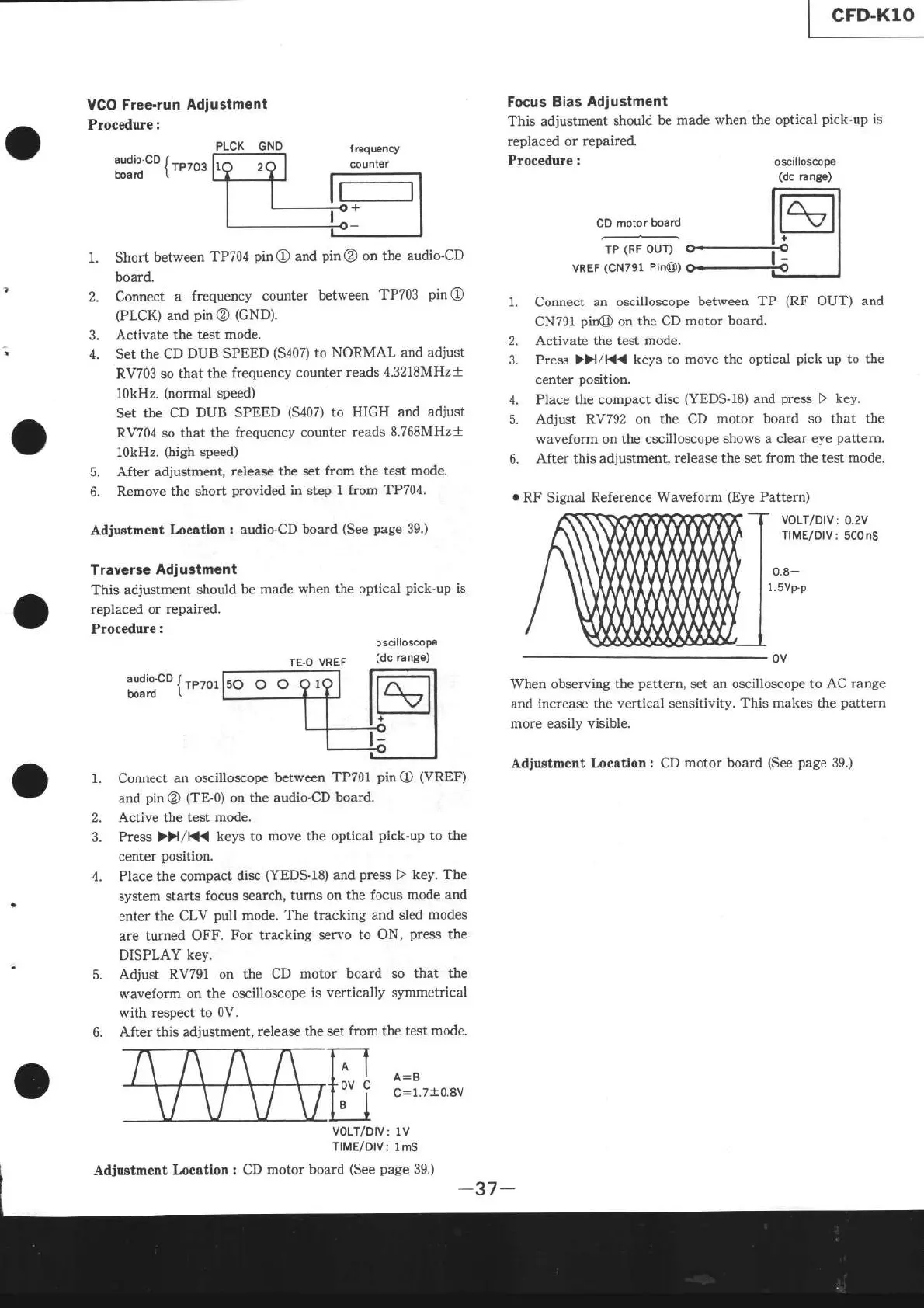
VGO
Free-ru n
Adjustment
Procedure
:
PLCK GNO
:udio:cD {
rP7o3
ooaro
(
Short
between
TP704
pin
O
and
pin
@
on the
audio-CD
board.
Connect
a
frequency
counter
between
TP703
pinO
(PLCK)
and
pin@
(GND).
Activate
the test mode.
Set the CD
DUB SPEED
(5407)
to
NORMAL and
adjust
RV703 so that
the frequency
counter
reads
4.3218MH2+
10kHz.
(normal
speed)
Set
the CD
DUB SPEED
(5407)
to
HIGH and adjust
RV704
so that the
frequency counter
reads
8.768MH2+
10kHz.
(high
speed)
5.
After adjustment,
release the
set from the test
mode.
6.
Remove the short
provided
in step 1 from
TP704.
Adjustment
Location:
audio-CD board
(See page
39')
Traverse
Adiustment
This adjustment
should
be made
when the optical
pick'up
is
replaced or
repaired.
Procedure
:
TE.O
VREF
oscilloscop€
(dc
ra nge)
l' Connect
an oscilloscope
between
TP701
pinO
ffREF)
and
pin
O
(TE-0)
on
the audio-CD
board.
2.
Active the test mode.
3.
Press
>H/K<
keys to
move
the
optical
pick.up
to
the
center
position.
4. Place the compact
disc
(YEDS-l8)
and
press
D
key.
The
system starts
focus search,
turns on the
focus
mode
and
enter the
CLV
pull
mode.
The
tracking
and sled
modes
are tumed OFF.
For tracking
servo to ON,
press
the
DISPLAY
key.
5.
Adjust RV791 on
the CD
motor board so that the
waveform on the oscilloscope
is vertically symmetrical
with respect to
0V.
6. After this adjustment,
release the set
from the test mode.
A=B
C=
1.710.8V
VOLT/DIV:
1V
TIME/DIV:
1mS
CD
motor board
(See
page
39.)
Focus Bias
Adjustment
This adjustment
should
be made
when the optical
pick-up
is
replaced or
repaired.
Procedure :
oscilloscope
(dc
ra ngô)
CD
motor
board
TP
(RF
OUT)
VREF
(CN791
Pin@)
Connect
an oscilloscope
between TP
(RF
OUT)
and
CN791
pin@
on the CD
motor board.
Activate the
test mode.
Press ))|/K{
keys to
move the optical
pick-up
to the
center
position,
1.
2.
4. Place the compact
disc
(YEDS.l8)
and
press
D
key.
5. Adjust
RV792 on the CD
motor board so that the
waveform on the
oscilloscope shows
a clear eye
pattern.
6.
After this adjustment,
release the set from the test
mode.
o
RF
Signal
Reference Waveform
(Eye
Pattern)
VOLT/DIV:
0.2V
TIME/DIV:
500nS
0.8-
1.svÈp
When observing the
pattern,
set an oscilloscope
to AC range
and
increase
the
vertical sensitivity.
This makes the
pattern
more
easily
visible.
Adjuetment Location : CD
motor board
(See
page
39.)
Adjustment
Location :

Table of Contents

Related product manuals