100
GB
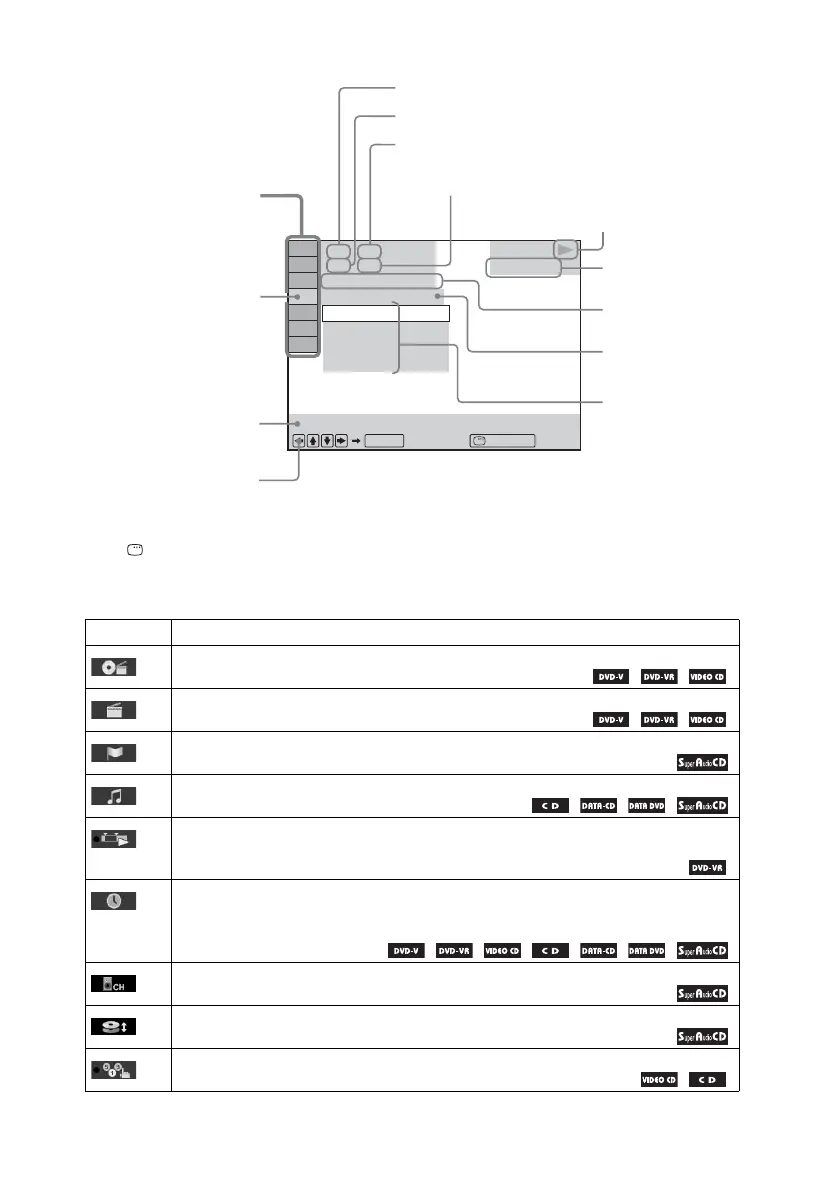
Example: Control Menu display 1 when playing a DVD VIDEO.
To turn off the display
Press DISPLAY.
List of Control Menu items
Item Item Name, Function, Relevant Disc Type
[TITLE] (page 35)/[SCENE] (page 35)/[TRACK] (page 35)
You can select the title, scene, or track to be played.
[CHAPTER] (page 35)/[INDEX] (page 35)
You can select the chapter or index to be played.
[INDEX] (page 35)
You can display the index and select the index to be played.
[TRACK] (page 35)
You can select the track to be played.
[ORIGINAL/PLAY LIST] (page 35)
You can select the type of titles (DVD-RW/DVD-R) to be played, the [ORIGINAL] one, or
an edited [PLAY LIST].
[TIME] (page 36)
You can check the elapsed time and the remaining playback time.
You can play from a desired point by inputting the time code (DVD VIDEO/DVD-VR only).
[MULTI/2CH] (page 30)
You can select the playback area on a Super Audio CD when available.
[SUPER AUDIO CD/CD LAYER] (page 30)
You can select the playback layer on a Super Audio CD when available.
[PROGRAM] (page 32)
You can select the track to play in the order you want.
98( 99)
OFF
DVD VIDEO
REPEAT
Quit:
ENTER DISPLAY
T 0: 04: 17
13( 99)
DISC
TITLE
CHAPTER
OFF
Currently playing title number
Playing time
Total number of chapters
Options
Current setting
Total number of titles
Playback status
(N Playback,
X Pause,
x Stop, etc.)
Function name of selected
Control Menu item
Operation message
Selected item
Control Menu items
Type of disc being
played
Currently playing chapter number



 To Next Page