72
GB
Controlling the TV with
the Supplied Remote
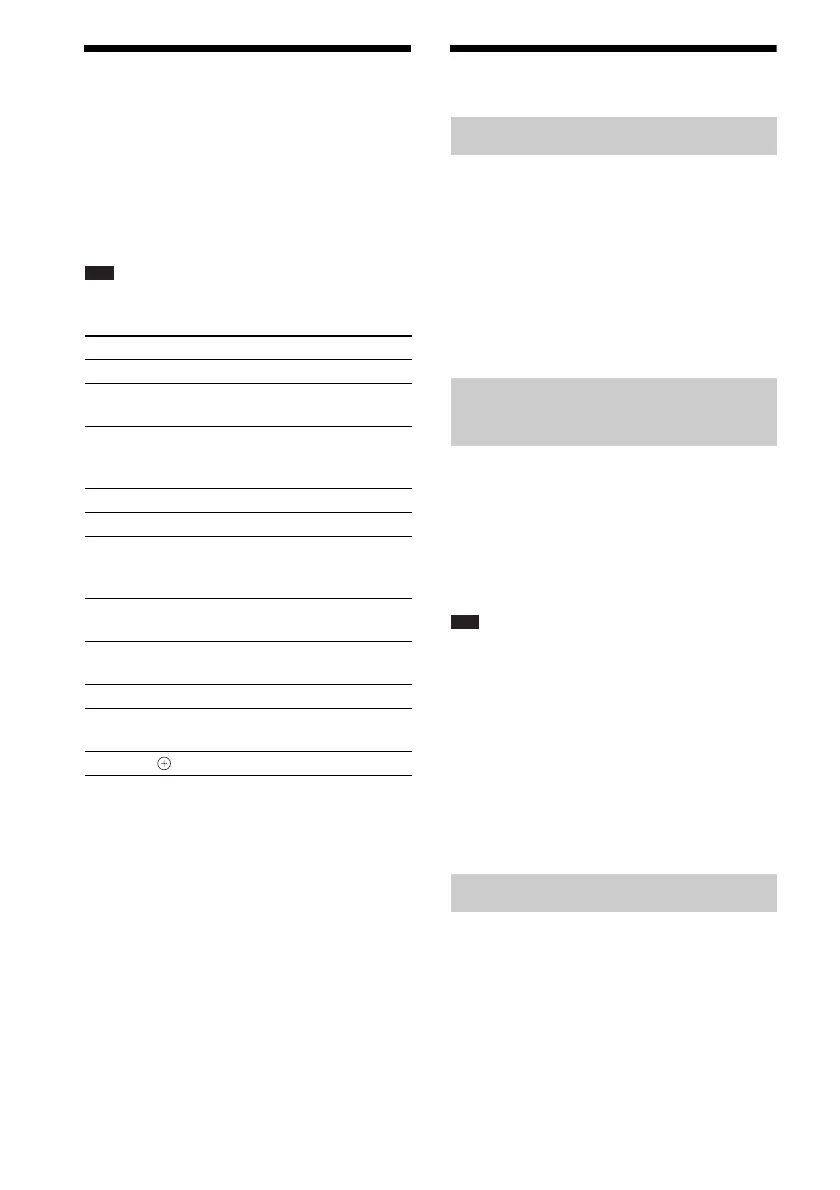
You can control the TV (Sony only) by using the
following buttons. Use these buttons (other than
TV [/1, THEATRE, and TV INPUT) while
pressing the TV button.
Note
• Depending on the TV, you may not be able to control
your TV or to use some of the buttons.
* Use these buttons while pressing the TV button.
Using the Sound Effect
You can reinforce bass frequencies.
Press DYNAMIC BASS.
“D. BASS ON” appears in the front panel
display and bass frequencies are effectively
reinforced.
To turn off the sound effect
Press DYNAMIC BASS again.
You can enjoy sound effects or dialogue, as you
would in a movie theater, even at low volume. It
is useful for watching movies at night.
Press NIGHT.
“NIGHT ON” appears in the front panel display
and the sound effect is activated.
Note
• This effect does not work for a Super Audio CD.
When you load a Super Audio CD during “NIGHT
ON,” the sound effect turns off automatically.
• When sound is output from the center speaker, this
effect is more pronounced, as speech (movie dialog,
etc.) is easy to hear. When sound is not output from
the center speaker, or you are using the headphones,
the system optimally adjusts the volume.
To turn off the sound effect
Press NIGHT again.
You can enhance compressed sound such as an
MP3 audio file.
This effect is activated automatically when all
the following conditions are satisfied:
– The function is set to “DMPORT,”
“AUDIO,” or “USB”.
By pressing You can
TV [/1 Turn the TV on/off.
THEATRE
Enjoy optimal image quality
suited for movies.
TV INPUT Switch the TV’s input source
between the TV and other input
sources.
VOLUME +/–* Adjust the TV volume.
PROG +/–* Select the TV channel.
Number
buttons*,
-*
ENTER*
Select the TV channel.
TOOLS* Displays the operation menu for
the current display.
RETURN* Return to the previous channel or
layer on the menu of the TV.
MENU* Display the menu of the TV.
MUTING* Turn off the TV sound
temporarily.
C/X/x/c*, * Select the item on the menu.
Reinforcing bass frequencies
Enjoying the sound at low
volume
Enhancing compressed sound



 To Next Page