17
GB
Getting Started
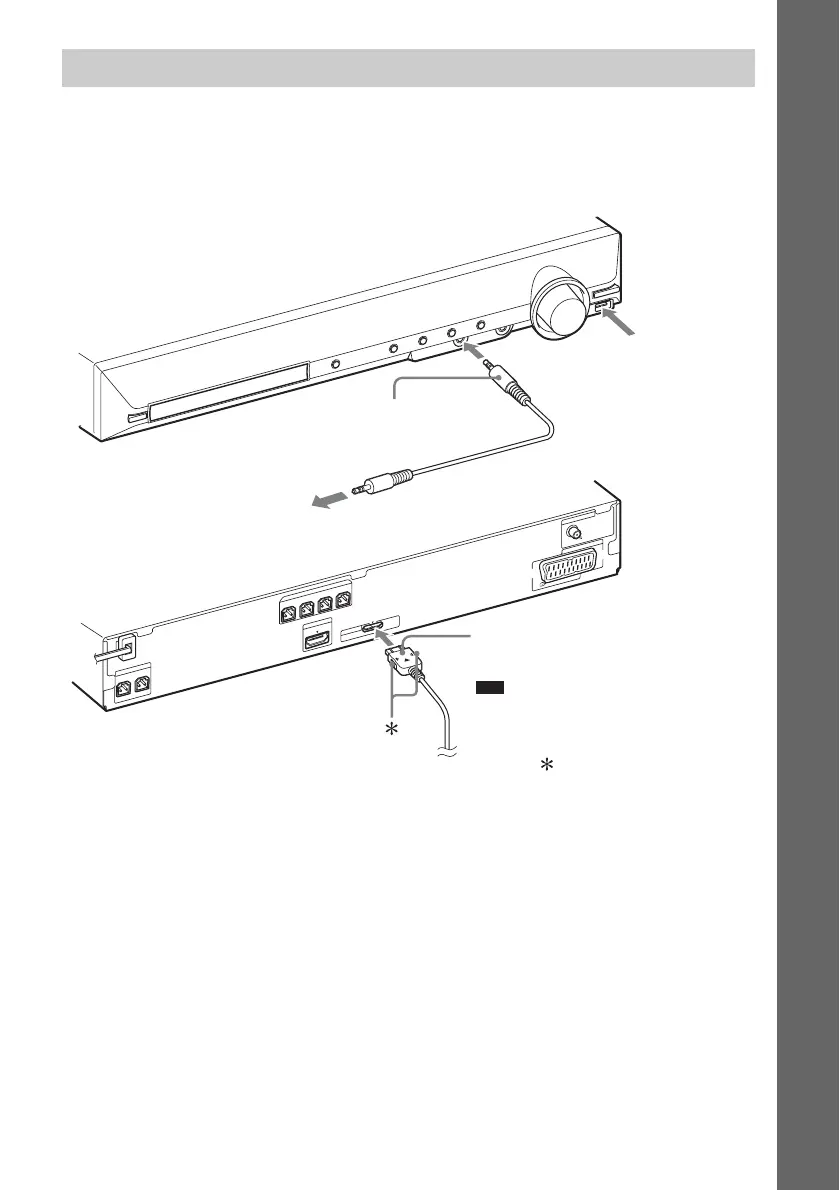
You can enjoy connected components via the system’s speakers.
Portable audio source (not supplied): C
USB device (not supplied): D
DIGITAL MEDIA PORT adapter (not supplied): E
Connecting the other components
CENTER
S
U
B
W
O
O
F
E
R
FRONT R FRONT L
SUR R SUR L
S
P
E
A
K
E
R
H
D
M
I O
U
T
S
P
E
A
K
E
R
E
U
R
O
A
V
O
U
TPU
T(TO
T
V)
COAXIAL 75
FM
A
N
T
E
N
N
A
D
M
P
O
R
T
DC5V
0.7A MAX
E DIGITAL MEDIA PORT adapter
(page 69)
To a portable audio source
C Stereo mini-plug cord
(not supplied)
D Connect a USB
device (page 57).
Note
• Connect the DIGITAL MEDIA PORT
adapter so that the V marks are aligned.
When disconnecting, pull out while
pressing .


 To Next Page