Connecting
theAC
power
cord
(lIIains
lead)
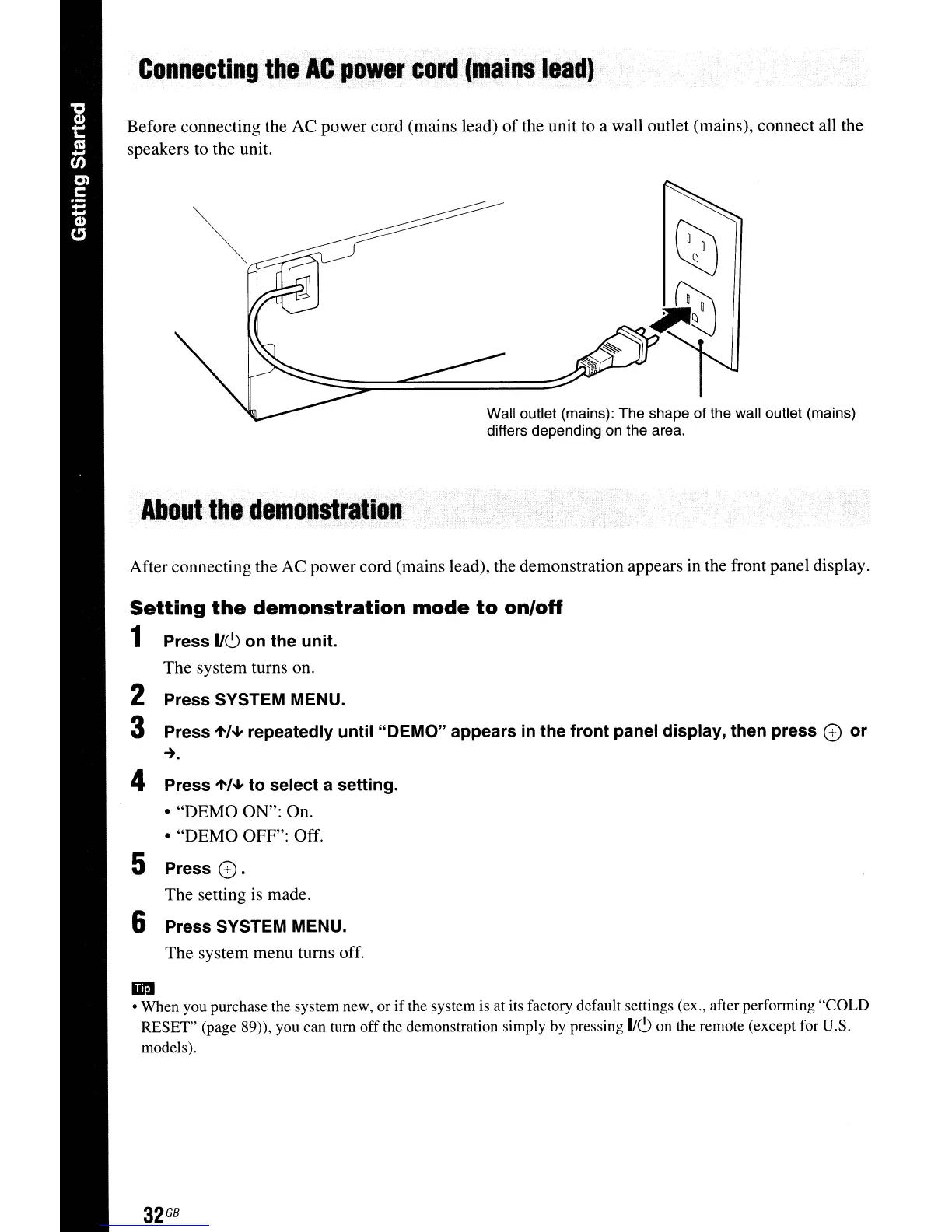
Before connecting the AC power cord (mains lead)
of
the unit to a wall outlet (mains), connect all the
speakers to the unit.
Wall outlet (mains): The shape of the wall outlet (mains)
differs depending on the area.
About
the
demonstration·
After connecting the AC power cord (mains lead), the demonstration appears in the front panel display.
Setting
the
demonstration
mode
to
on/off
1 Press
IICJ
on the unit.
The system turns on.
2 Press SYSTEM MENU.
3 Press
".,,,,,
repeatedly until "DEMO" appears
in
the front panel display, then press
G)
or
~.
4 Press
".,,,,,
to select a setting.
• "DEMO ON": On.
• "DEMO OFF": Off.
5 Press G).
The setting is made.
6 Press SYSTEM MENU.
The system menu turns off.
iiI'lI
• When you purchase the system new, or
if
the system
is
at its factory default settings (ex., after performing "COLD
RESET" (page 89)), you can turn
off
the demonstration simply by pressing
I/C)
on the remote (except for U.S.
models).
32
GB



 To Next Page