Using
the
DIGITAL
MEDIA
PORT
Adapter
The DIGITAL MEDIA
PORT
(DMPORT)
adapter is for enjoying sound from a portable
audio source
or
computer. By connecting a
DIGITAL MEDIA
PORT
adapter, you can
enjoy sound from the connected component on
the system.
Available DIGITAL MEDIA PORT adapters
vary in each area.
Fordetails on connecting the DIGITALMEDIA
PORT adapter, see page 29.
Em
• Do not connect an adapter other than the DIGITAL
MEDIA
PORT
adapter.
• Do not connect or disconnect the DIGITAL MEDIA
PORT adapter to/from the unit while the system is
turned on.
• When you use the system and the Bluetooth Wireless
Audio Adapter (such as
TDM-BTl,
not supplied) at
the same time, transmission distance between the
Bluetooth transmitter and Bluetooth Wireless Audio
Adapter may be reduced. In this case, place the
Bluetooth transmitter as far
as
possible from the
system, or move the Bluetooth Wireless Audio
Adapter closer to the Bluetooth transmitter.
• When you use the system and the Wireless Network
Audio Adapter (such as
TDM-NCl,
not supplied) at
the same time, place the Wireless Network Audio
Adapter as far as possible from the system.
PI~!i~~.f~'-~~~~~~~t~~
..•
~
•...........
.iY.
component:9.
n
"·thesystem
1 Press FUNCTION
+/-
repeatedly until
"OM
PORT"
appears
in
the front panel
display.
2 Start playback of the connected
component.
The sound and images from the connected
component are played on the system or
connected TV.
For operation details, refer to the operating
instructions
of
the DIGITAL MEDIA
PORT adapter.
Em
• Depending on the type
of
DIGITAL MEDIA PORT
adapter, images are also output. In this case, the
system outputs the composite video signal only,
regardless
of
the type
of
video signal.
imI
• Depending on the type
of
DIGITAL MEDIA PORT
adapter, you may be able to operate a connected
component using either the buttons on the remote or
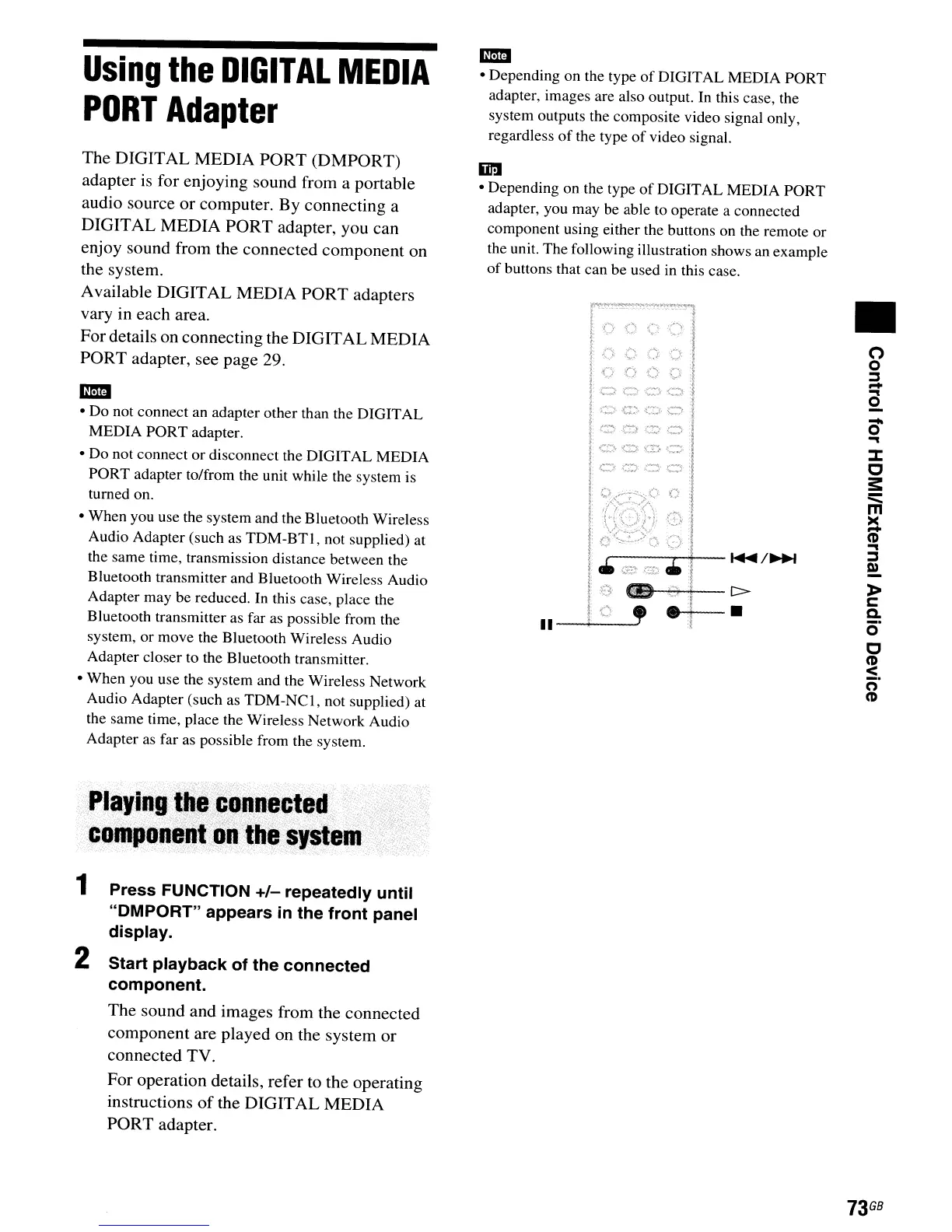
the unit. The following illustration shows an example
of
buttons that can be used in this case.
..
•o
o
::I
-
...
o
-
o
...
::::r:::
c
3:
=::::
m
~
...
::I
e!.
»
c:
Q.
o'
C
CD
~.
n
CD
73
GB



 To Next Page