16:9
16:9
4:3
LEnER
BOX
4:3
PAN
SCAN
STANDARD
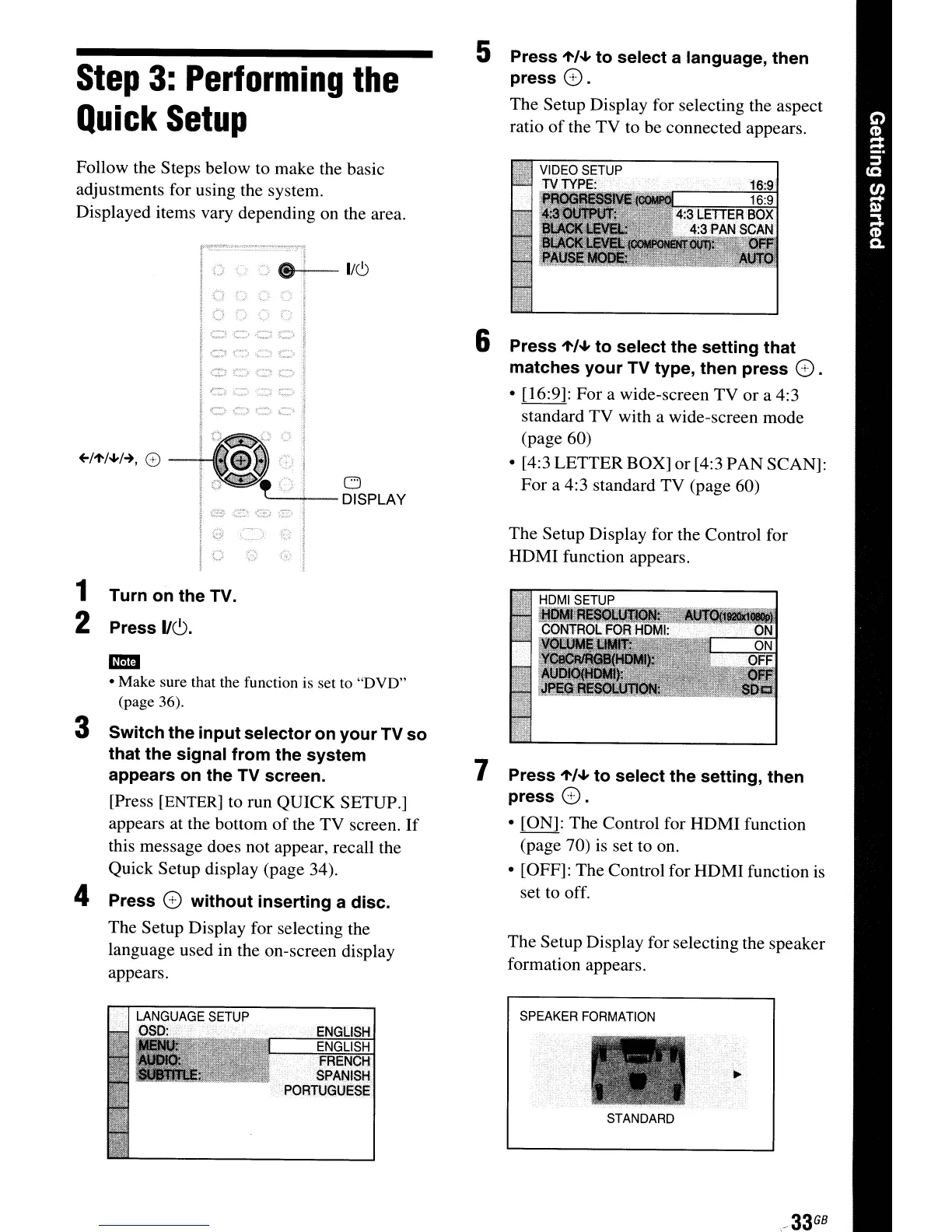
The Setup Display for selecting the speaker
formation appears.
.
33
GB
SPEAKER
FORMATION
The Setup Display for the Control for
HDMI function appears.
5 Press
"'/oJ,
to select a language, then
press
G.
The Setup Display for selecting the aspect
ratio
of
the TV to be connected appears.
6 Press
"'/oJ,
to select the setting that
matches your TV type, then press
G .
• [16:9]:
For
a wide-screen TV or a 4:3
standard TV with a wide-screen mode
(page 60)
• [4:3 LETTER BOX] or [4:3 PAN SCAN]:
For a 4:3 standard TV (page 60)
7 Press
"'/oJ,
to select the setting, then
press
G.
• [ON]: The Control for HDMI function
(page 70) is set to on.
• [OFF]: The Control for HDMI function is
set to off.
ENGLISH
ENGLISH
FRENCH
SPANISH
PORTUGUESe
f8-+---
1/(9
o
'---'!--
DISPLAY
Step
3:
Performing
the
Quick
Setup
Follow the Steps below to make the basic
adjustments for using the system.
Displayed items vary depending on the area.
-
• Make sure that the function is set to
"DVD"
(page 36).
3 Switch the input selector on your TV so
that the signal from the system
appears on the
TV
screen.
[Press [ENTER] to run QUICK SETUP.]
appears at the bottom
of
the
TV
screen.
If
this message does not appear, recall the
Quick Setup display (page 34).
4 Press G without inserting a disc.
The Setup Display for selecting the
language used in the on-screen display
appears.
1 Turn on the TV.
2 Press
IIC,).



 To Next Page