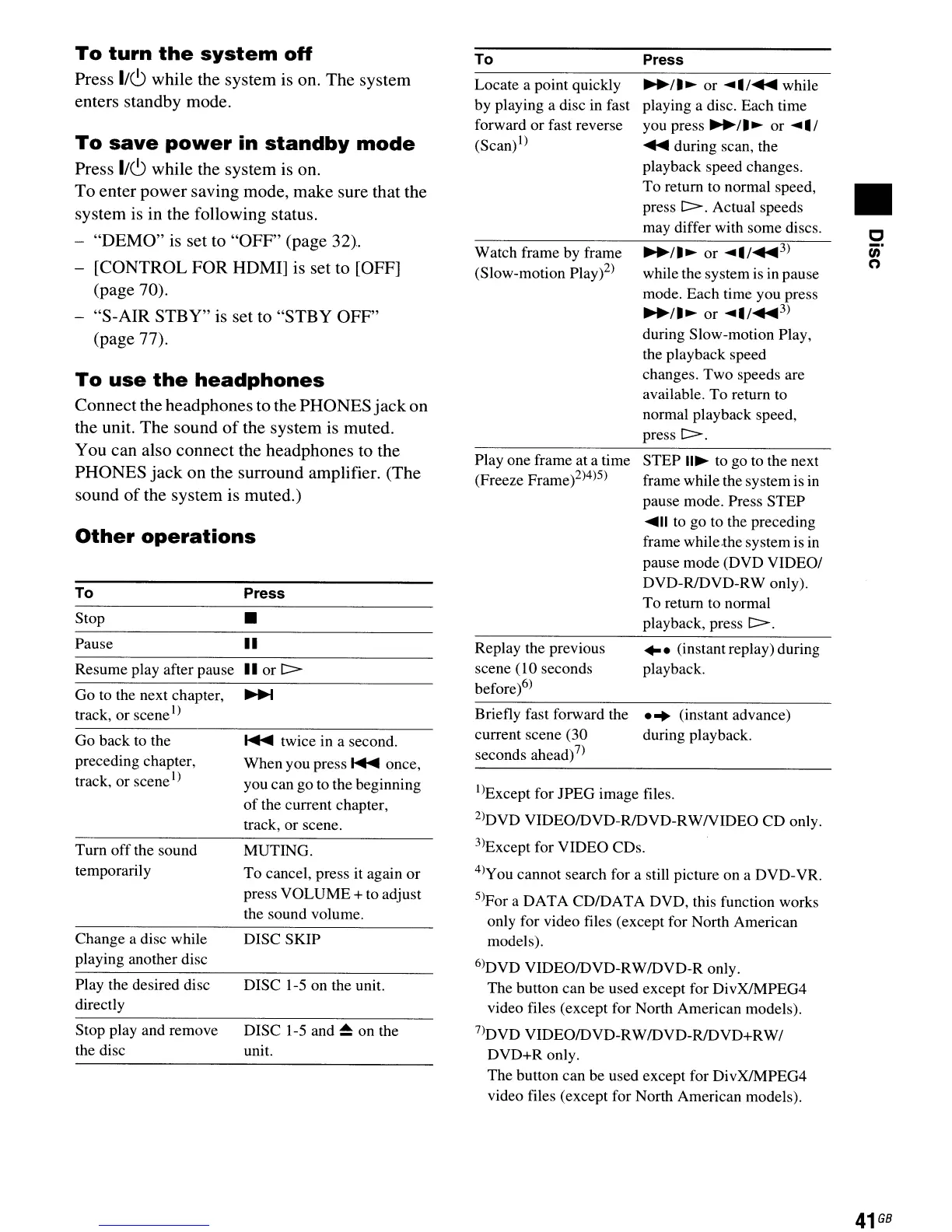
Other
operations
To
turn
the
system
off
Press 1/6 while the system is 011. The system
enters standby mode.
To
save
power
in
standby
mode
Press 1/6 while the system is on.
To enter power saving mode, make sure that the
system is in the following status.
"DEMO"
is
set to "OFF" (page 32).
- [CONTROL
FOR
HDMI] is set to [OFF]
(page 70).
"S-AIR STBY" is set to "STBY OFF"
(page 77).
To
use
the
headphones
Connectthe headphones to the PHONES
jack
on
the unit. The sound
of
the system is muted.
You can also connect the headphones to the
PHONES
jack
on the surround amplifier. (The
sound
of
the system is muted.)
I)Except for
JPEG
image files.
2)DVD
VIDEO/DVD-R/DVD-RWNIDEO
CD
only.
3)Except for VIDEO CDs.
4)you cannot search for a still picture on a DVD-YR.
5)For a
DATA
CD/DAT
A DVD, this function works
only for video files (except for North American
models).
6)DVD VIDEO/DVD-RW/DVD-R only.
The button can
be
used except for DivXJMPEG4
video files (except for North American models).
7)DVD VIDEO/DVD-RW/DVD-R/DVD+RWI
DVD+R
only.
The
button can be used except for DivXJMPEG4
video files (except for North American models).
c
t/)
n
•
...
(instant replay) during
playback.
...
(instant advance)
during playback.
STEP
II~
to go to the next
frame while the system is in
pause mode. Press
STEP
....
11
to go to the preceding
frame while,the system is in
pause mode (DVD VIDEOI
DVD-R/DVD-RW only).
To
return to normal
playback, press
C>.
Press
~/.~
or
....
1
....
3
)
while the system is in pause
mode. Each time you press
~/.~
or
....
1
....
3
)
during Slow-motion Play,
the playback speed
changes.
Two
speeds are
available. To return to
normal playback speed,
press
C>.
~/.~
or
....
1
....
while
playing a disc. Each time
you press
~/.~
or
....
1
....
during scan, the
playback speed changes.
To
return to normal speed,
press
C>.
Actual speeds
may differ with some discs.
Briefly fast forward the
current scene (30
seconds ahead)
7)
Replay the previous
scene
(10 seconds
before)6)
Play one frame at a time
(Freeze Frame)2)4)5)
Watch frame by frame
(Slow-motion Play)2)
Locate a point quickly
by playing a disc in fast
forward
or
fast reverse
(Scan)l)
To
DISC SKIP
DISC 1-5
on
the unit.
DISC 1-5 and
~
on
the
unit.
..
or
C>
.....
twice in a second.
When you press
.....
once,
you can go to the beginning
of
the current chapter,
track,
or
scene.
MUTING.
To
cancel, press it again
or
press
VOLUME
+ to adjust
the sound volume.
Press
•
..
Play the desired disc
directly
Stop play and remove
the disc
Change a disc while
playing another disc
Turn
off
the sound
temporarily
Pause
Resume play after pause
Go
to the next chapter,
track,
or
scene
l
)
Go
back to the
preceding chapter,
track,
or
scene
I)
Stop
To
41
GB



 To Next Page