129
Customizing Your Camcorder Personnalisation de votre caméscope
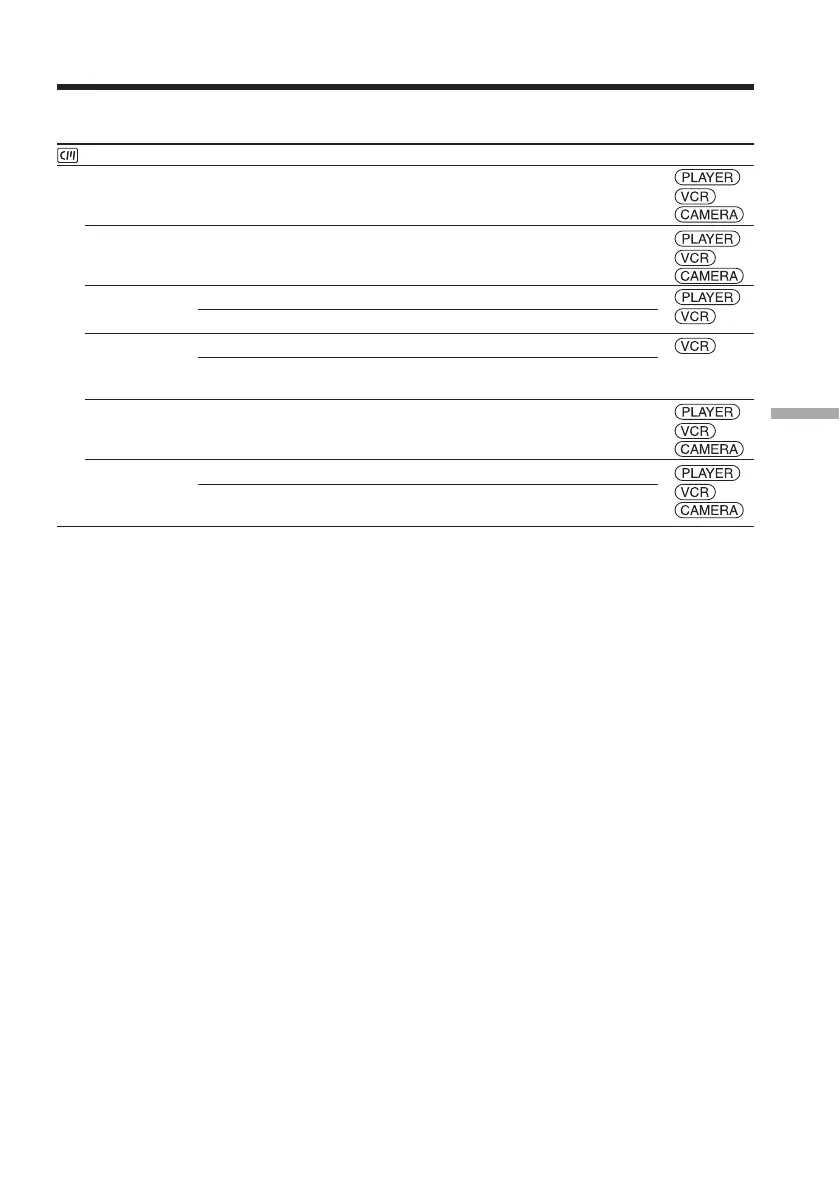
Icon/item
CM SET
TITLE
TITLEERASE
TITLE DSPL
CM SEARCH**
TAPE TITLE
ERASE ALL
* DCR-HC14E
** DCR-HC15E
(continued on the following page)
Mode
——
——
z ON
OFF
z ON
OFF
——
z RETURN
OK
Meaning
To superimpose a title or make your own title (p.
116, 119)
To erase the title you have superimposed (p. 118)
To display the title you have superimposed
Not to display the title (p. 117)
To search using Cassette Memory (p. 83, 85, 88)
To search without using Cassette Memory (p. 86,
89)
To label the cassette (p. 121)
To cancel erasing all the data
To erase all the data in Cassette Memory (p. 123)
POWER
switch
*/
**
*/
**
*/
**
**
*/
**
*/
**
Changing the menu settings



 To Next Page