42
Prise de vue dans l’obscurité
– Fonctions NightShot
La fonction NightShot vous permet de faire
des prises de vue de nuit ou dans un endroit
sombre.
Lors de la prise de vue avec la fonction
NightShot, les couleurs de l’image enregistrée
peuvent être incorrectes ou apparaître peu
naturelles.
(1) Réglez le commutateur POWER sur
CAMERA.
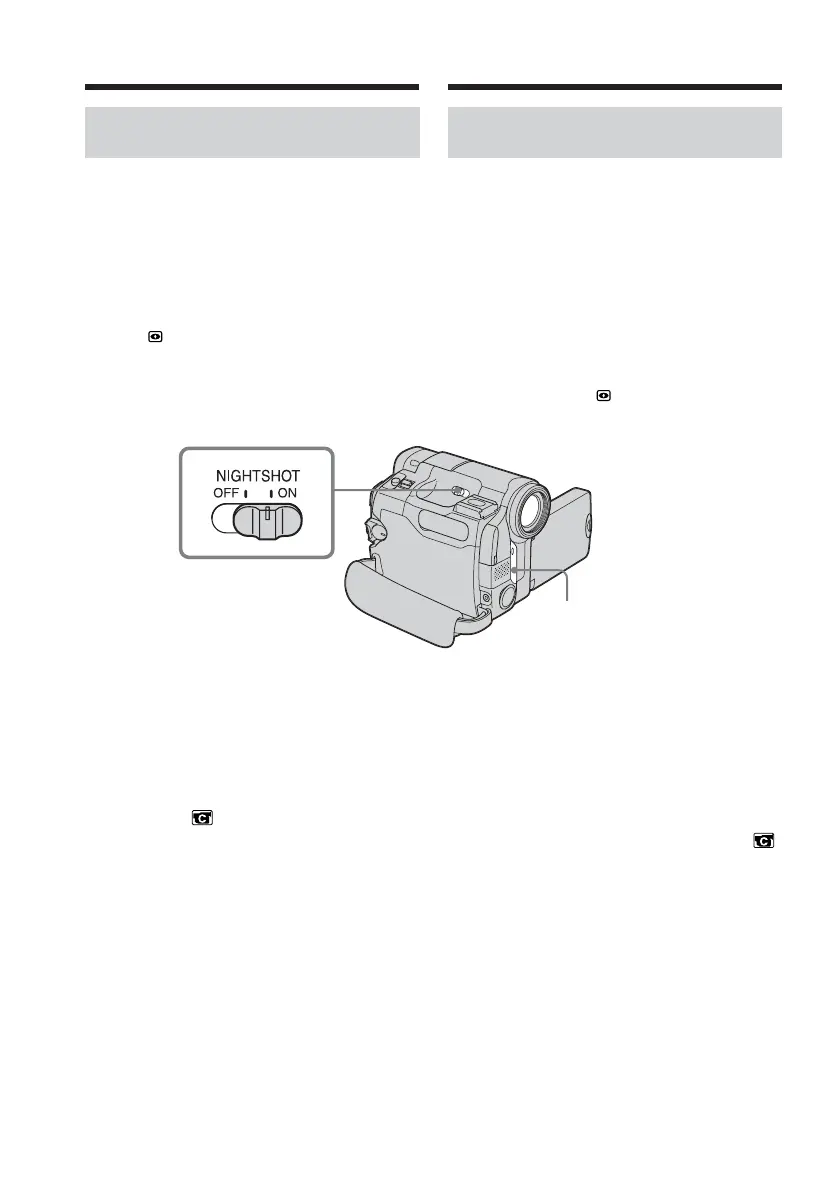
(2) Faites glisser NIGHTSHOT sur ON.
Les indicateurs
et « NIGHTSHOT »
clignotent à l’écran.
Pour désactiver la fonction NightShot
Faites glisser le bouton NIGHTSHOT sur OFF.
Utilisation de la fonction
d’éclairage NightShot
L’image est plus claire avec l’éclairage
NightShot activé. Pour activer l’éclairage
NightShot, réglez N.S.LIGHT sur ON sous
dans les réglages de menu (le réglage par
défaut est ON).
Shooting in the dark
– NightShot
The NightShot enables you to shoot a subject
in the night or in a dark place.
When recording with the NightShot, the
picture may be recorded in incorrect or
unnatural colours.
(1) Set the POWER switch to CAMERA.
(2) Slide NIGHTSHOT to ON.
The
and ”NIGHTSHOT” indicators
flash on the screen.
To cancel NightShot
Slide NIGHTSHOT to OFF.
Using NightShot Light
The picture will be clearer with the NightShot
Light on. To enable the NightShot Light, set
N.S. LIGHT in to ON in the menu settings.
(The default setting is ON.)
NightShot Light emitter/
Emetteur de l’éclairage
NightShot
Recording a picture Enregistrement d’une image



 To Next Page