Preventing accidental erasure
- Image protection
. DCR-TRV17 only
To prevent accidental erasme of important images, you can protect selected images.
Before operation
Insert a" Memory Stick" into yon] camcorder.
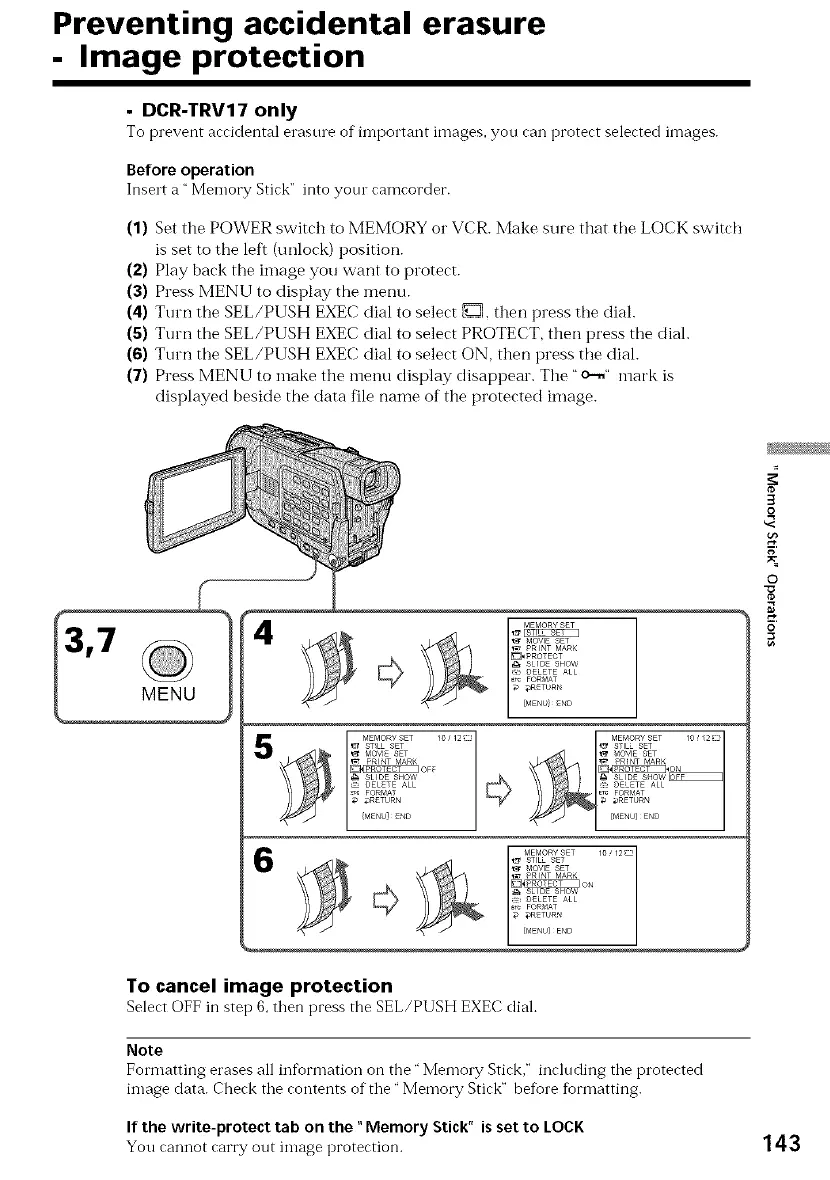
(1) Set the POWER switch to MEMORY or VCR. Make sure that tile LOCK switch
is set to the left (unlock) position.
(2) Play back the image you want to protect.
(3) Press MENU to display the menu.
(4) Turn the SEL/PUSH EXEC dial to select D, then press the dial.
(5) Turn the SEL/PUSH EXEC dial to select PROTECT, then press the diah
(6) Turn the SEL/PUSH EXEC dial to select ON, then press the dial.
(7) Press MENU to make the menu display disappear. The "o--." mark is
displayed beside the data file name of the protected image.
3
o
g
O
o
To cancel image protection
Select OFF in step 6, then press the SEL/PUSH EXEC diah
Note
Formatting erases all information on the" Memory Stick," including the protected
image data. Check the contents of the" Memory Stick" beIore tiormatting.
If the write-protect tab on the "Memory Stick" is set to LOCK
You cannot carry out image protection. 143










 To Next Page