Superimposing a title
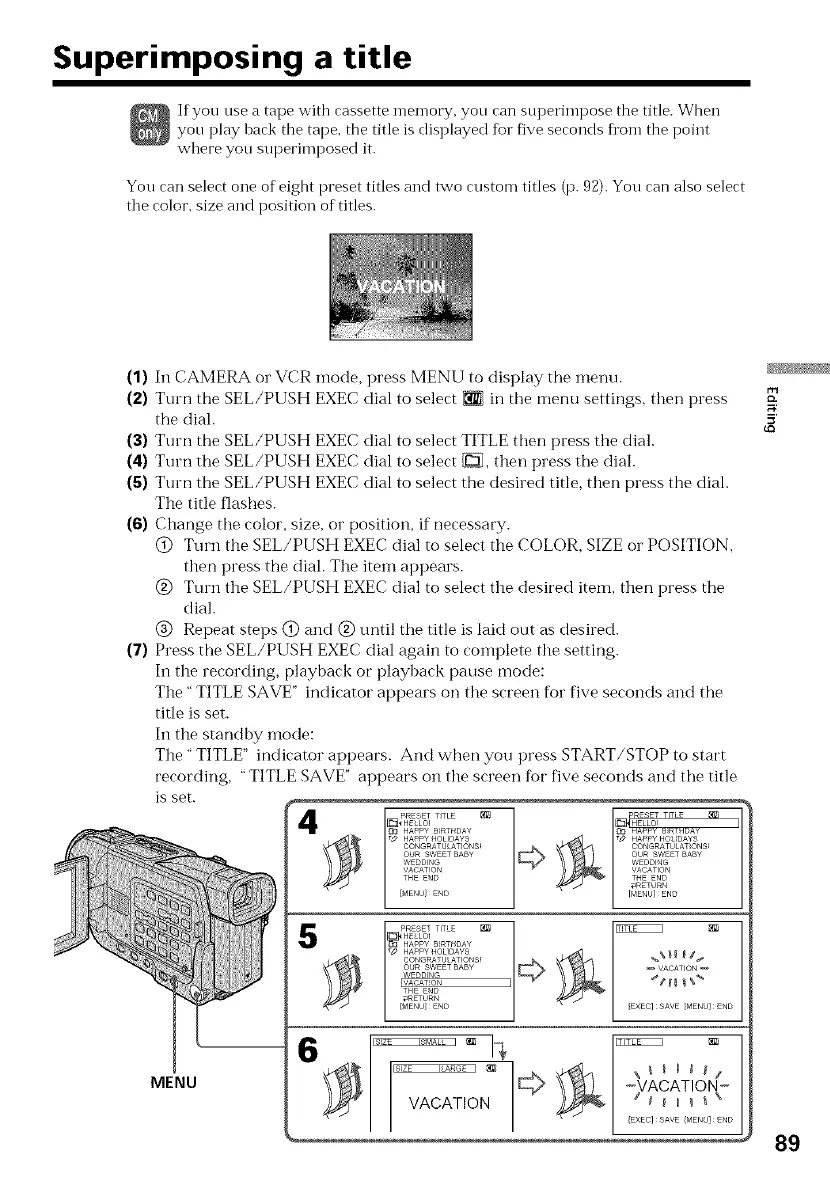
If you use a tape with cassette memory, you can superinlpose the title. When
you play hack the tape, the title is displayed f_r five seconds fl'om the point
where you superimposed it.
You can select one of eight preset titles and two custom titles (p. 92). You can also select
the color, size and position of titles.
(1)
(2)
(3)
(4)
(s)
(6)
(7)
In CAMERA or VCR mode, press MENU to display the menu.
Turn the SEL/PUSH EXEC dial to select _ in the menu settings, then press
the diah
Turn the SEL/PUSH EXEC dial to select TITLE then press tile dial.
Turn the SEL/PUSH EXEC dial to select [_, then press the dial.
Turn the SEL/PUSH EXEC dial to select the desired title, then press the dial.
The title flashes.
Change the color, size, or position, if necessary.
@ Turn tile SEL/PUSH EXEC dial to select the COLOR, SIZE or POSITION,
then press the dial. The item appears.
@ Turn the SEL/PUSH EXEC dial to select the desired item, then press the
dial.
@ Repeat steps @ and @ until the title is laid out as desired.
Press the SEL/PUSH EXEC dial again to complete tile setting.
In the recording, playback or playback pause mode:
The" TITLE SAVE" indicator appears on tile screen fbr five seconds and the
title is set.
In the standby mode:
The" TITLE" indicator appears. And when you press START/STOP to start
recording, "TITLE SAVE" appears on the screen for five seconds and the title
is set.
[]_ HELLO! _ HELLO!
133 HAPPY NRT DAY _ HAF_Y _NIHL)Ay
T_ HAPPYHOLIDAYS _d' HAPPYHOLIDAYS
CONGRATULATIONS_ CONGRATULAT ONS!
OR SWEETBABY OUR SWEET BABY
WEDD NG WEDDING
VACATION VACATION
THE ENOTHE END
_/ I _RET RN
[_ENU] END [V_ENU]ENO
HAPPY BIRT D_aY
[TD HAPPYHOUDAYS %%_ _ d_
CONGRATULATIONS!
OUR SWEET BABY _ VACATION
WDD_NG
IVAGATION I _dH g %_
THE END
,,'RETURN
p<_ENU/END {EXEC] SAVE {MENU] END
MENU \\ ,_ I I '-_VACATION-
VACATION :E: Lvl M_EN:]:ND
5'
89





 To Next Page