35
Advanced Recording Operations
You can record an still image like a photograph.
You can record about 510 images in the SP mode and about 765 images in the LP mode
on a 60-minute tape.
Besides the operation described here, your camcorder can record still images on
“Memory Stick”s (p. xx).
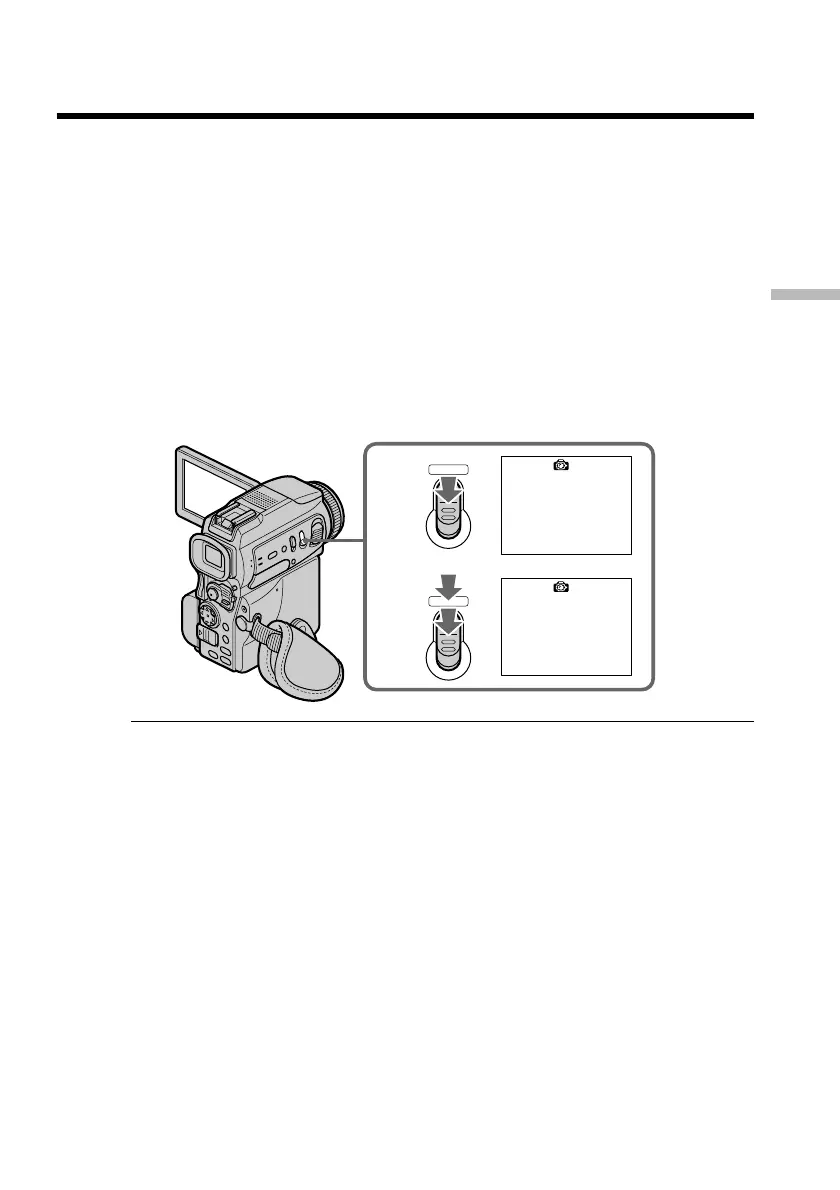
(1) In the standby mode, keep pressing PHOTO lightly until a still image appears.
The CAPTURE indicator appears. Recording does not start yet.
To change the still image, release PHOTO, select a still image again, and then
press and hold PHOTO lightly.
(2) Press PHOTO deeper.
The still image on the screen is recorded for about seven seconds. The sound
during those seven seconds is also recorded.
The still image is displayed on the screen until recording is completed.
Notes
•During tape photo recording, you cannot change the mode or setting.
•When recording a still image, do not shake your camcorder. The image may fluctuate.
•You cannot use PHOTO during the following operations:
– Fader
– Digital effect
If you record a moving subject with tape photo recording function
When you play back the still image on other equipment, the image may fluctuate.
This is not a malfunction.
To use the tape photo recording function using the Remote Commander
Press PHOTO on the Remote Commander. Your camcorder records an image on the
screen immediately.
To use the tape photo recording function during normal CAMERA recording
You cannot check an image on the screen by pressing PHOTO lightly. Press PHOTO
deeper. The still image is then recorded for about seven seconds, and your camcorder
returns to the standby mode.
To record clear and less fluctuated still images
We recommend that you record on “Memory Stick”s.
— Advanced Recording Operations —
Recording a still image on a tape
– Tape Photo recording
1
•••••••
2
CAPTURE
PHOTO
PHOTO


 To Next Page