52
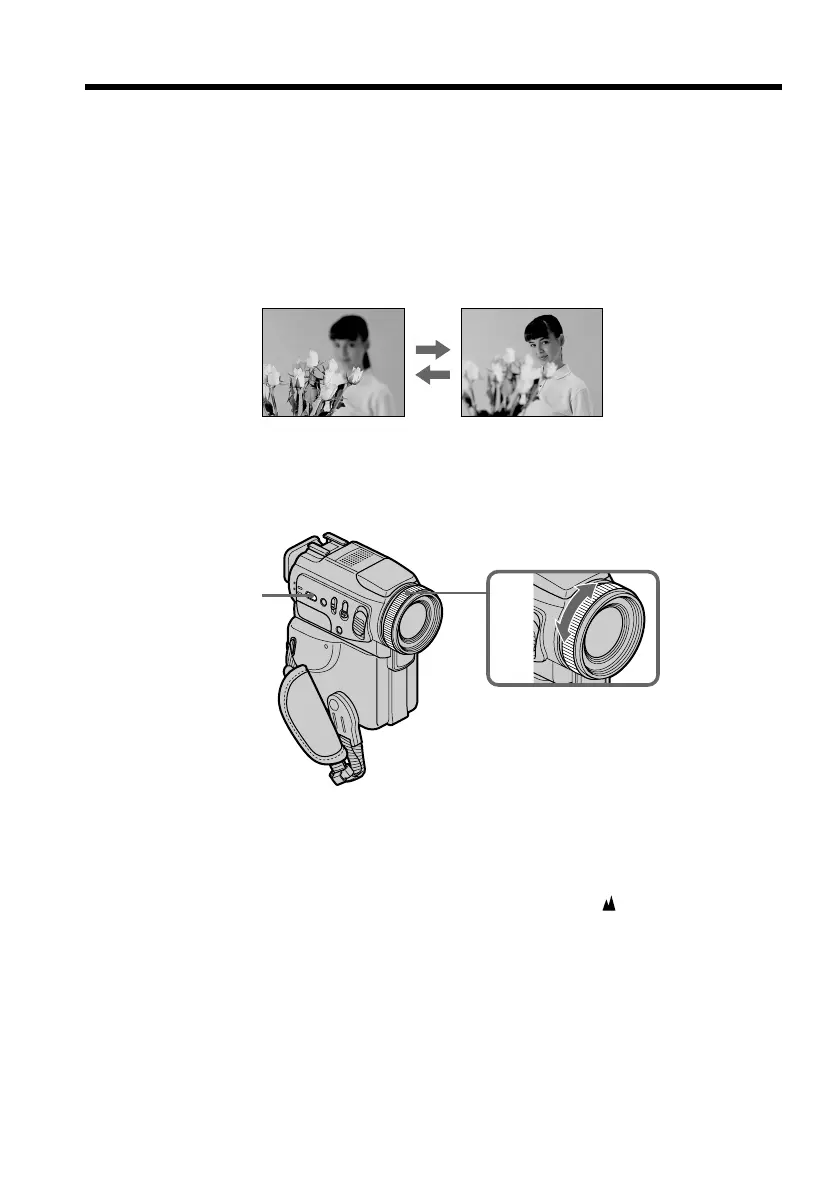
You can gain better results by manually adjusting the focus in the following cases.
Normally, focus is automatically adjusted:
•The autofocus mode is not effective when shooting:
– subjects through glass coated with water droplets
– horizontal stripes
– subjects with little contrast with backgrounds such as walls and sky
•When you want to change the focus from a subject in the foreground to a subject in
the background.
•Shooting a stationary subject when using a tripod.
(1) Set the POWER switch to CAMERA or MEMORY, press FOCUS lightly.
The 9 indicator appears.
(2) Turn the focus ring to sharpen focus.
To return to the autofocus mode
Press FOCUS lightly to turn off the indicator.
To record distant subjects
When you press FOCUS down firmly, the lens focuses on and indicator appears.
When you release FOCUS, your camcorder returns to the manual focus mode. Use this
mode when your camcorder focuses on near objects even though you are trying to
shoot a distant object.
Focusing manually
2
FOCUS


 To Next Page