44
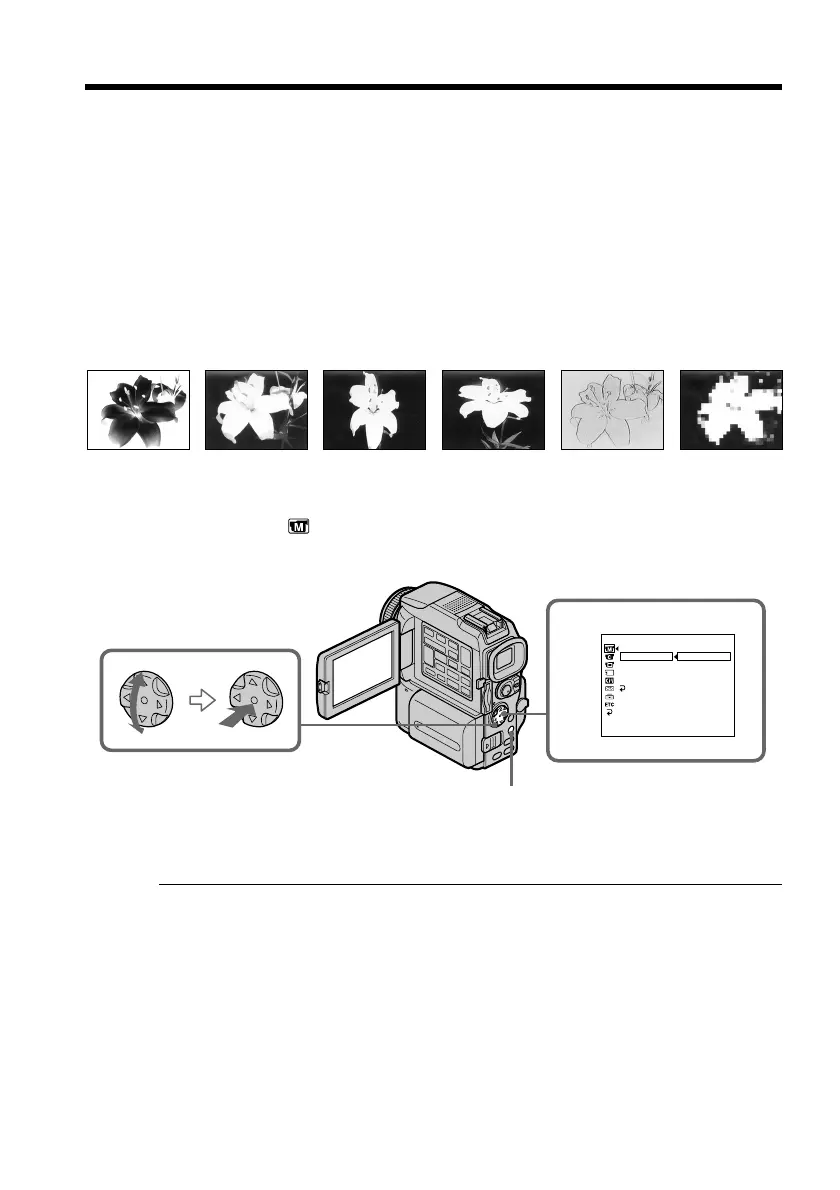
You can digitally process images to obtain special effects like those in films or on TV.
NEG. ART [a] : The color and brightness of the picture are reversed.
SEPIA : The picture gets sepia.
B&W : The picture appears in monochrome (black-and-white).
SOLARIZE [b] : The light intensity is clearer, and the picture looks like an illustration.
SLIM [c] : The picture expands vertically.
STRETCH [d] : The picture expands horizontally.
PASTEL [e] : The contrast of the picture is emphasized, and the picture looks like an
animated cartoon.
MOSAIC [f] : The picture gets mosaic-patterned.
(1) Set the POWER switch to CAMERA. Press MENU, then select and decide upon
P EFFECT in
with the control button (p. xx).
(2) Select and decide upon the desired picture effect mode with the control button.
To cancel the picture effect function
Set P EFFECT to OFF in the menu settings.
While using the picture effect function
You cannot select OLD MOVIE mode with DIGITAL EFFECT.
When you set the POWER switch to OFF (CHG)
The picture effect is automatically canceled.
Using special effects – Picture effect
[a] [b] [c] [d] [e] [f]
MANUAL SET
.
FFO
TRAGEN
AIPES
W
&B
EZIRALOS
MILS
HCTERTS
LETSAP
CIASOM
DEFFECT
PROGRAM AE
PEFFECT
LABTH
W
RTHSOTUA
NRUTER
[
MENU
]
:
END
1
MENU


 To Next Page