55
Advanced Recording Operations
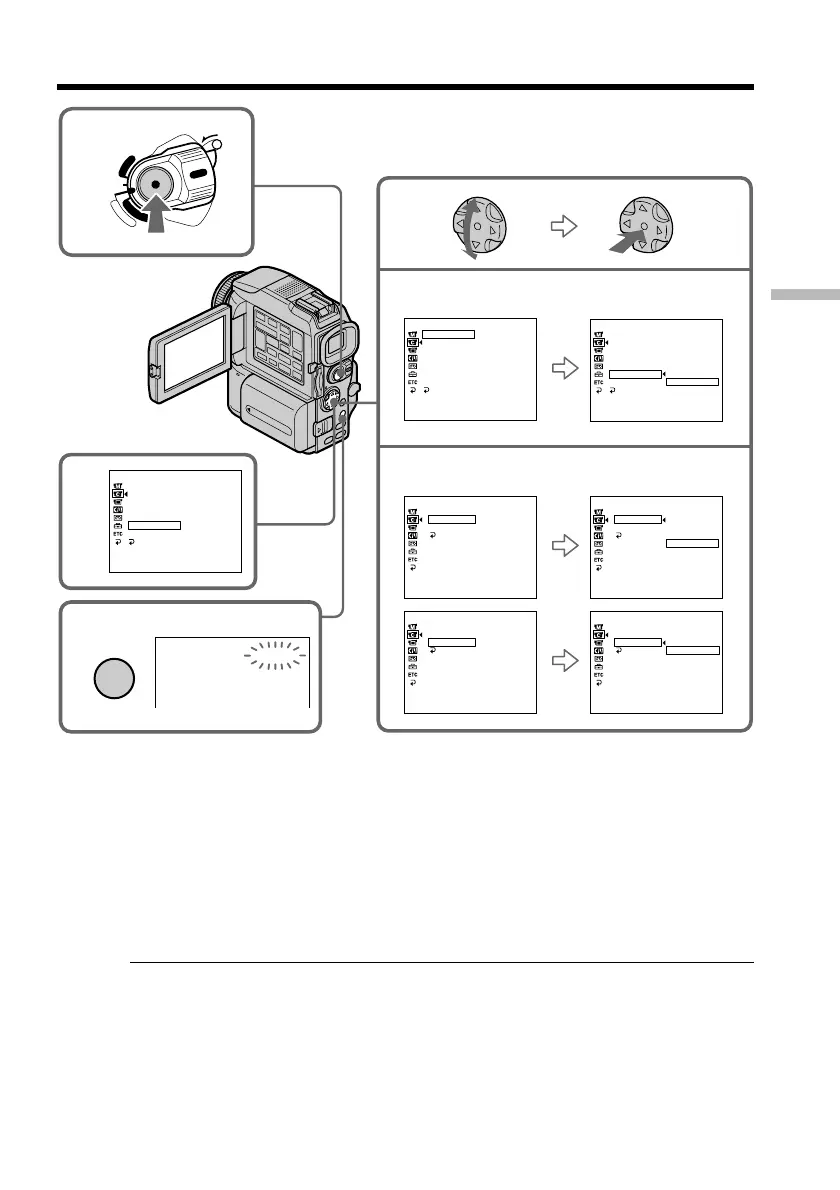
Interval recording
4
6
CAMERA SET
D ZOOM
16 : 9W
I
DE
STEADYSHOT
N.
S.
L
I
GHT
FRAME REC
I
NT. REC
FLASH
LVL
RETURN
ON
[
MENU
]
:
END
LOCK
POWER
V
C
R
M
E
M
O
R
Y
C
A
M
E
R
A
OFF
(CHG)
5
I
NTERVAL
STBY
MENU
CAMERA SET
D ZOOM OFF
16 : 9W
I
DE
STEADYSHOT
N.
S.
L
I
GHT
FRAME REC
I
NT. REC
FLASH
LVL
RETURN
[
MENU
]
:
END
CAMERA SET
D ZOOM
16 : 9W
I
DE
STEADYSHOT
N.
S.
L
I
GHT
FRAME REC
I
NT. REC
FLASH
LVL
RETURN
ON
OFF
SET
[
MENU
]
:
END
CAMERA SET
I
NT. REC
I
NTERVAL
REC T
I
ME
RETURN
30SEC
[
MENU
]
:
END
CAMERA SET
I
NT. REC
I
NTERVAL
REC T
I
ME
RETURN
30SEC
1M
I
N
5M
I
N
10M
I
N
[
MENU
]
:
END
CAMERA SET
I
NT. REC
I
NTERVAL
REC T
I
ME
RETURN
0
.
5SEC
[
MENU
]
:
END
CAMERA SET
I
NT. REC
I
NTERVAL
REC T
I
ME
RETURN
0
.
5SEC
1SEC
1
.
5SEC
2SEC
[
MENU
]
:
END
2
3
To cancel the interval recording
Perform either of the following:
– Set INT. REC to OFF in the menu settings.
– Set the POWER switch to other than CAMERA.
To perform normal recording during the interval recording
You can perform normal recording only once during INTERVAL.
Press START/STOP. The INTERVAL indicator flashes, and normal recording starts. To
stop normal recording, press START/STOP again.
On recording time
There may be a discrepancy in recording time of up to +/– six frames from the selected
time.


 To Next Page