30
A maximum of three tabs can be shown on the
touchscreen.
If you delete the document from your computer or
remove a memory card while viewing a document,
only tabs may remain. In that case, close some tabs
by the close the tab icon.
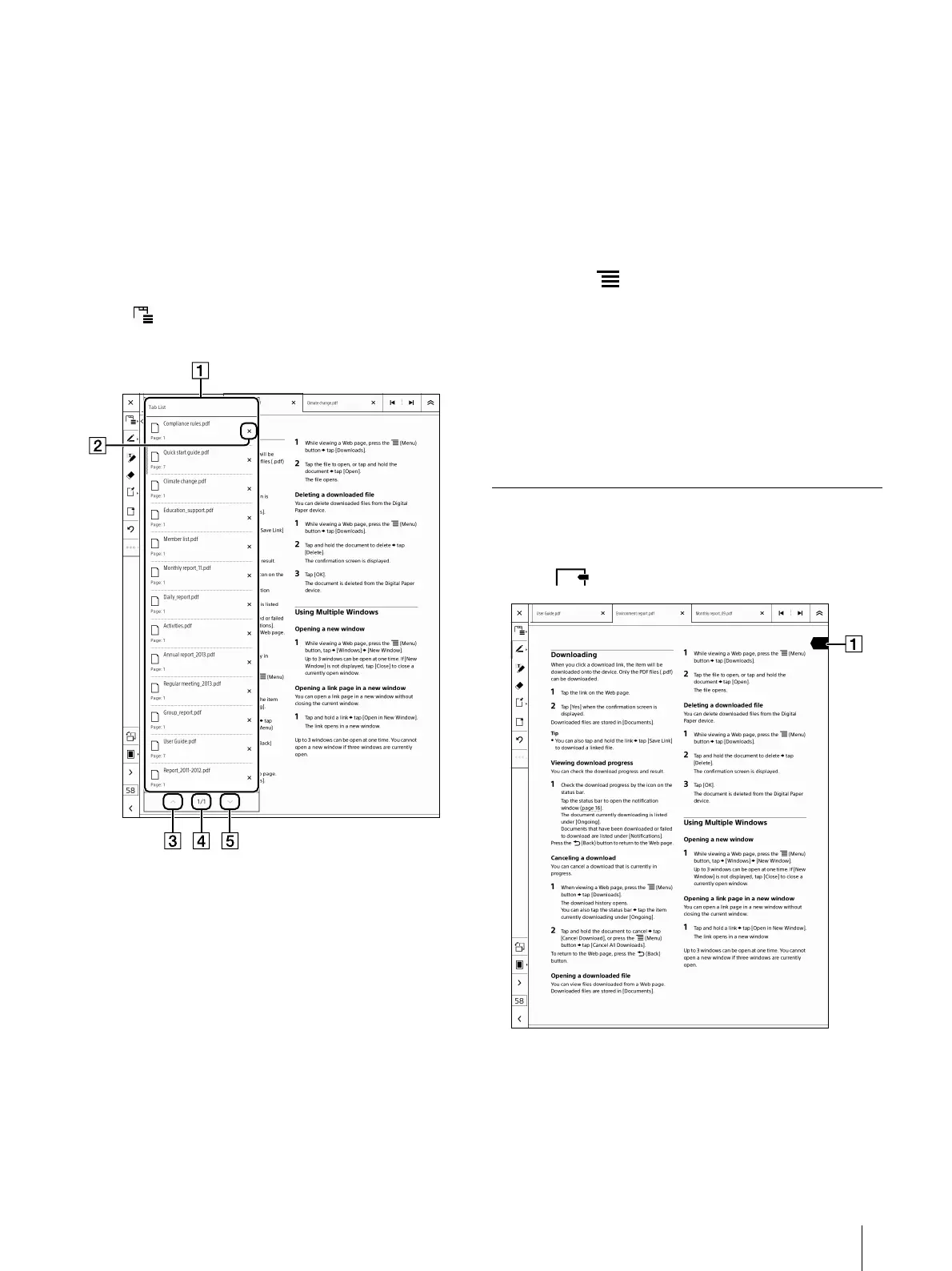
Displaying the tab list
You can select a document from the tab list.
1 Tap (tab list) on the toolbar.
The tab list appears.
Tab list
Close the tab icon
Closes the targeted tab.
Previous list view icon
Page indicator
Next list view icon
2 Tap the document you want to open in the tab
list.
The selected document is displayed.
Adding a duplicate tab
You can display a document as another tab. The
newly added tab will be placed next to the active tab.
1 Press the (Menu) button tap [Duplicate
Tab].
The newly added tab will be displayed for the
same document.
Tip
A document is displayed in two tabs. Both tabs
relate to the same document.
Adding a Bookmark
You can add a bookmark to a page.
1 Tap (Bookmark) on the toolbar.













 To Next Page