43
Setting up a Wi-Fi®
Network
To connect to the internet wirelessly, set up a
connection to a wireless (Wi-Fi) network.
Tip
Supported security methods are WEP, WPA/WPA2
PSK, and 802.1x EAP.
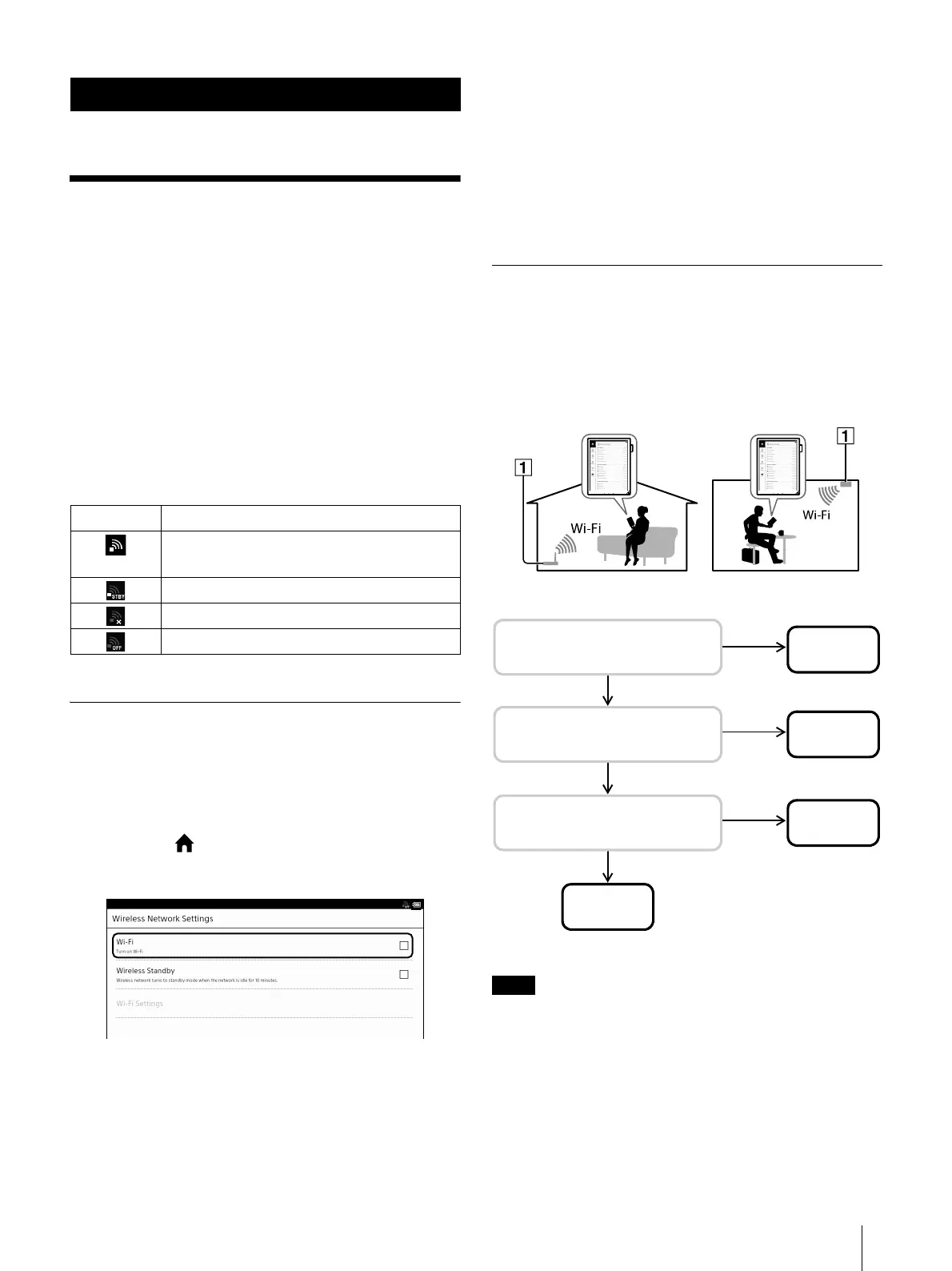
Wi-Fi status icons
The following icons in the status bar indicate the
status of the Wi-Fi connection.
Preparing to Set Up a Wi-Fi
Connection
Before connecting to a Wi-Fi access point, turn on
[Wi-Fi] on the Digital Paper device.
1 Press the (Home) button tap [Settings]
[Wireless Network Settings].
2 Tap [Wi-Fi] to check the check box.
A check indicates that [Wi-Fi] is turned on. Wi-Fi
is turned on by default.
Tip
Alternatively, you can tap the status bar tap [Wi-
Fi] to turn on the Wi-Fi (page 18).
Turn off [Wi-Fi] when it is not in use in order to
extend the battery life of the device.
Turn on [Wireless Standby] to extend the battery life
(page 9).
Selecting a Connection Type
Depending on your Wi-Fi environment, connect to an
access point via one of the following methods. The
following questions will determine the most suitable
case for setting the Wi-Fi network connection.
Internet
* WPS: Wi-Fi Protected Setup
Connection and communication fees apply when
using a Wi-Fi router.
Wireless communication exposes risks to
wiretapping, manipulation and illegal invasion into
the network.
Unless absolutely necessary, Sony recommends
that you use safe security methods (WPA/WPA2-
PSK, etc.) and avoid non secure or WEP access.
Network
Icon Status
Wi-Fi is activated. The number of bars
indicates the Wi-Fi signal strength.
Wi-Fi is in standby mode (page 57).
There is no Wi-Fi access point.
The [Wi-Fi] setting is turned off.
No
Case B
No
Case C
YES
YES
No
1. Are you using a home or
office Wi-Fi connection?
2. Is your Wi-Fi router WPS*
compatible?
3. Does your Wi-Fi router
have a WPS button?
Case D
YES
Case A



 To Next Page