GETTING
STARTED
Location and Function of Parts
----15
-----16
II]
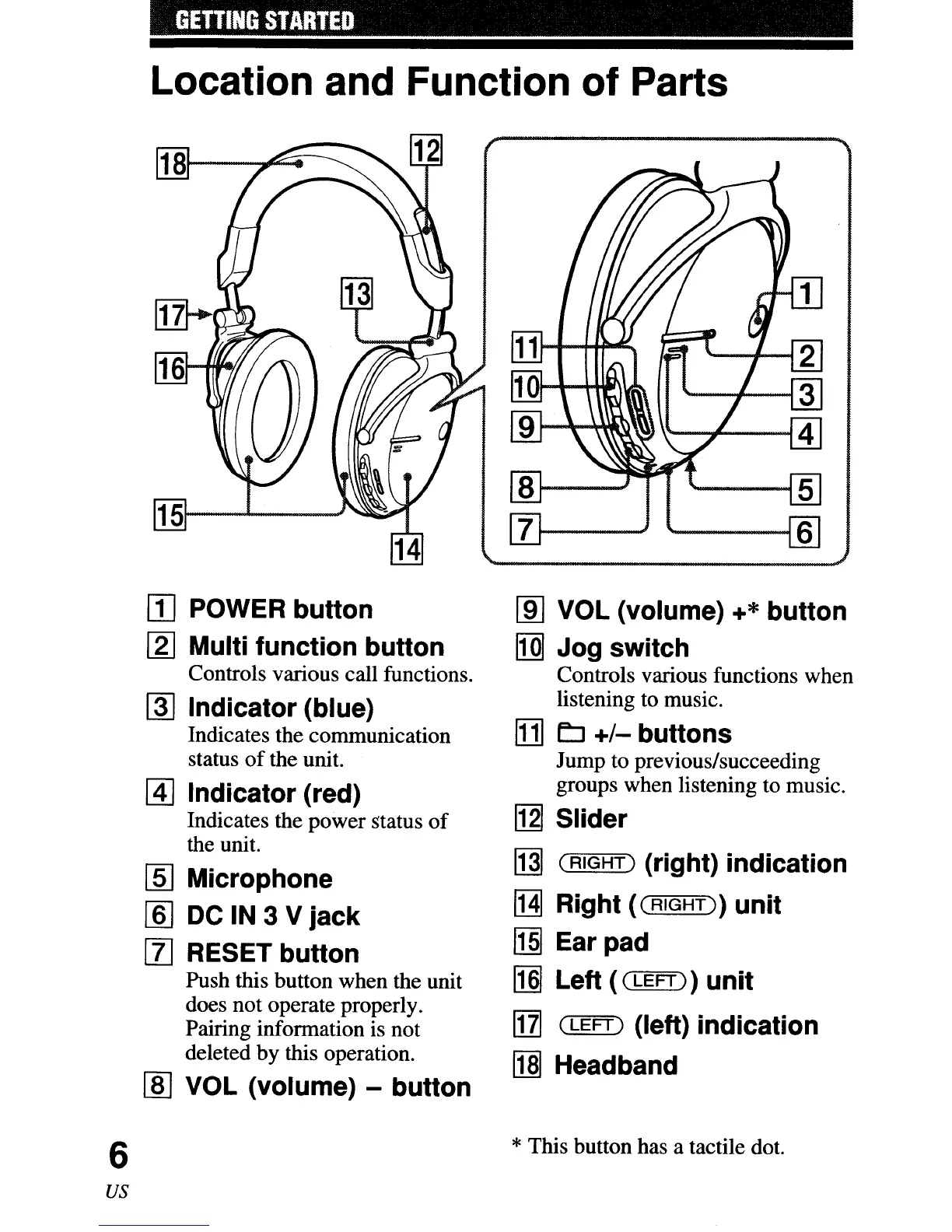
POWER button
[2J
Multi function button
Controls various call functions.
~
Indicator (blue)
Indicates the communication
status
of
the unit.
@]
Indicator (red)
Indicates the power status
of
the unit.
~
Microphone
[ID
DC IN 3 V jack
[I]
RESET button
Push this button when the unit
does not operate properly.
Pairing infonnation is not
deleted by this operation.
[ID
VOL (volume) - button
[ID
VOL (volume) +* button
rill
Jog switch
Controls various functions when
listening to music.
[1] LJ
+/-
buttons
Jump to previous/succeeding
groups when listening to music.
~
Slider
MI
(RIGHT)
(right) indication
!HI
Right
«(
RIGHT)
unit
1m
Ear pad
~
Left (
(LEFT)
unit
1111
(LEFT)
(left) indication
[]]J
Headband
6
*This button has a tactile dot.
us



 To Next Page