Before performing advanced operations
43
When the mode dial is set to
, you can easily view the next/previous image by
turning the jog dial.
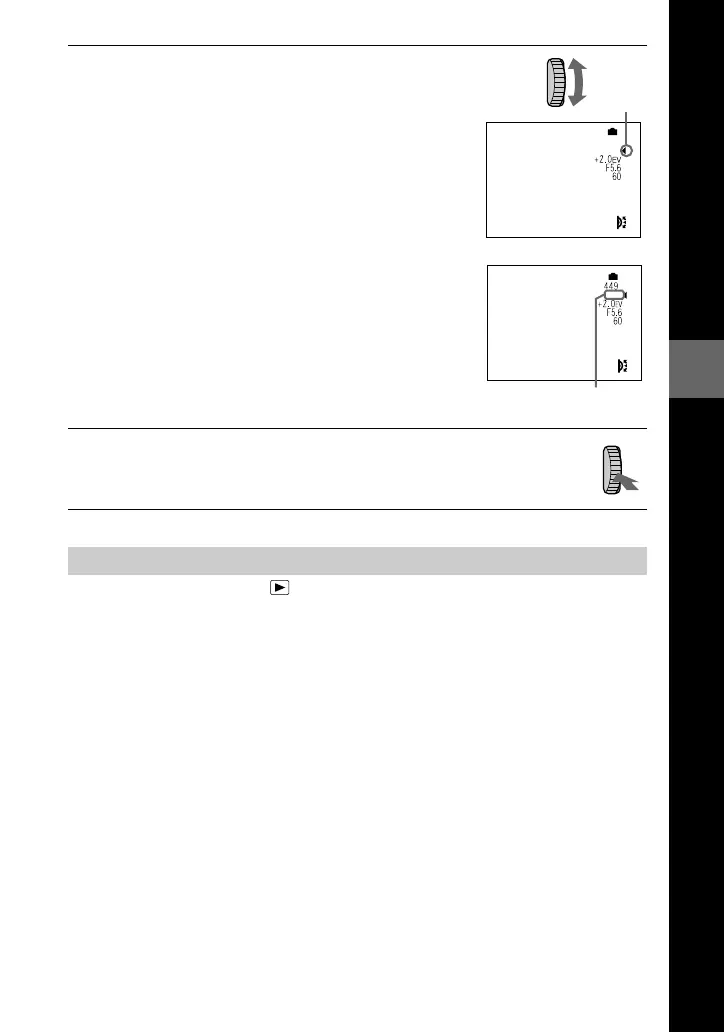
2
Turn the jog dial to select the item or value
number you want to adjust.
•
When the indication
b
at the right corner on the
LCD screen is in yellow, you can select the item.
In such cases, go to step
3
.
•
When the value number at the right corner on the
LCD screen is in yellow, you can adjust the value.
(When you press FOCUS, the 9 mark appears on
value number position.)
When you adjust only the value, the adjustment is
complete.
3
Press the jog dial.
The value number turns to yellow. To adjust the value, repeat step
2
.
Viewing the next/previous image using the jog dial during playback







 To Next Page