16-GB
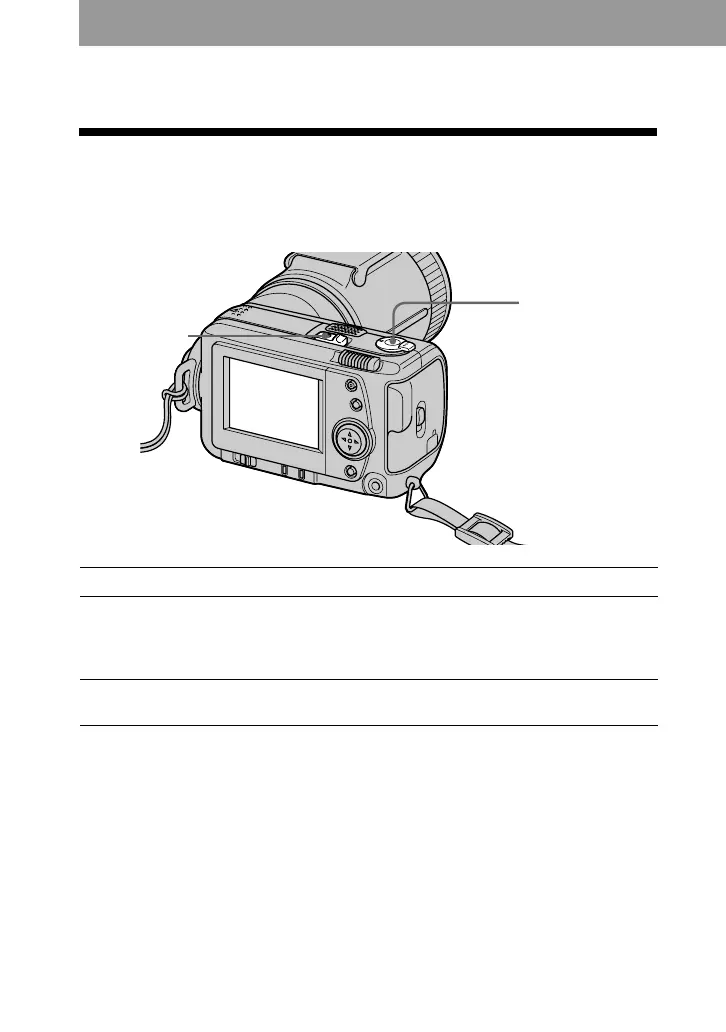
MODE selector
POWER switch
Recording still images
To record images, slide the POWER switch to the right to turn on the power (The
POWER lamp lights up) and insert the “Memory Stick”.
Recording
1 Set the MODE selector to STILL.
2 Press the shutter button halfway down.
The AE lock indicator z flashes.
When AE (auto exposure) and AF (auto focus) are frozen, the AE lock indicator z
lights up.
3 Press the shutter button fully down.
The image is recorded on the “Memory Stick”.
PNotes
•When the image is recorded on the
“Memory Stick”, “RECORDING”
appears on the LCD screen. When this
indication appears, never shake or strike
the unit. Also, do not turn the power
off, or remove the battery pack or
“Memory Stick”. Otherwise, an image
data breakdown may occur and the
“Memory Stick” may become unusable.
•When FOCUS AUTO/MANUAL is set
to MANUAL, AF (auto focus) is not
frozen. The AE lock indicator z lights
up as AE (auto exposure) is frozen.
•See page 52 for VOICE mode.



 To Next Page