57-GB
Using image data with other equipment
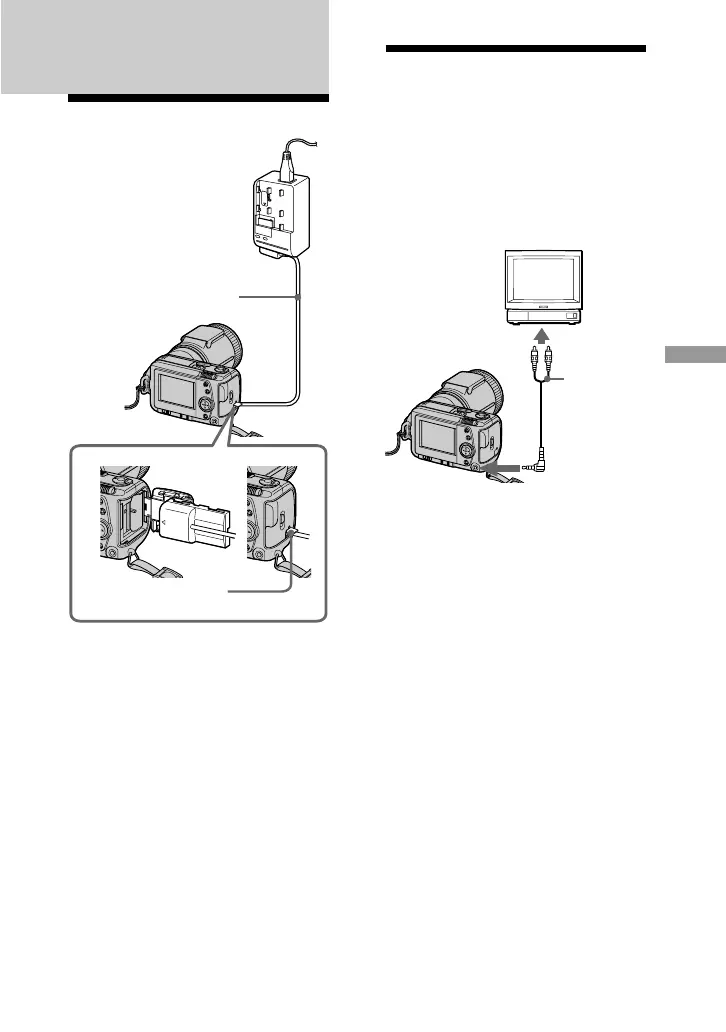
Using the house
current (mains)
1 Open the battery/“Memory Stick”
cover.
2 Insert the one end of the DK-115
DC connecting cable to the battery
terminal, and close the cover.
When inserting the cable, open the
slot cover for AC power adaptor/
charger and be careful not to pinch
the cable.
3 Connect the other end of the DC
connecting cable to the AC power
adaptor/charger.
4
Connect the power cord (mains
lead) to the AC power adaptor/
charger, and to a wall outlet (mains).
Power cord (mains
lead) (supplied)
AC power adaptor/
charger AC-VF10
(supplied)
DK-115 DC
connecting cable
(supplied)
Watching images on a
TV screen
Connect the camera to the TV that has
a video input jack. You can enjoy a
“SLIDE SHOW“ on the TV screen.
When shooting an image in macro, you
can adjust the focus more easily on the
TV screen.
1 Connect the A/V OUT jack of
your camera to the video input
jack of the TV.
2 Start playback on your camera.
Playback picture appears on the
TV screen.
PNotes
•Before making connections, turn off
each equipment. After connections are
completed, turn on each equipment.
• When you use your camera with
connecting other equipment for a long
time, connect the AC power adaptor/
charger to a wall outlet (mains).
• You cannot use a TV that has an
antenna (aerial) connector only.
• Beep does not sound and indicators are
not displayed on the LCD screen when
connecting with the A/V connecting
cable.
B
Using image data with
other equipment
to A/V OUT
Set the TV/
video input
selector to the
video position
Slot cover for AC
power adaptor/charger
A/V
connecting
cable
(supplied)



 To Next Page