89-GB
PictureGear 3.2 Lite
z Hint
If the “Loading images by background process” box is checked, images can be loaded
by background processing. Refer to the on-line help for details.
6 Click [Detail].
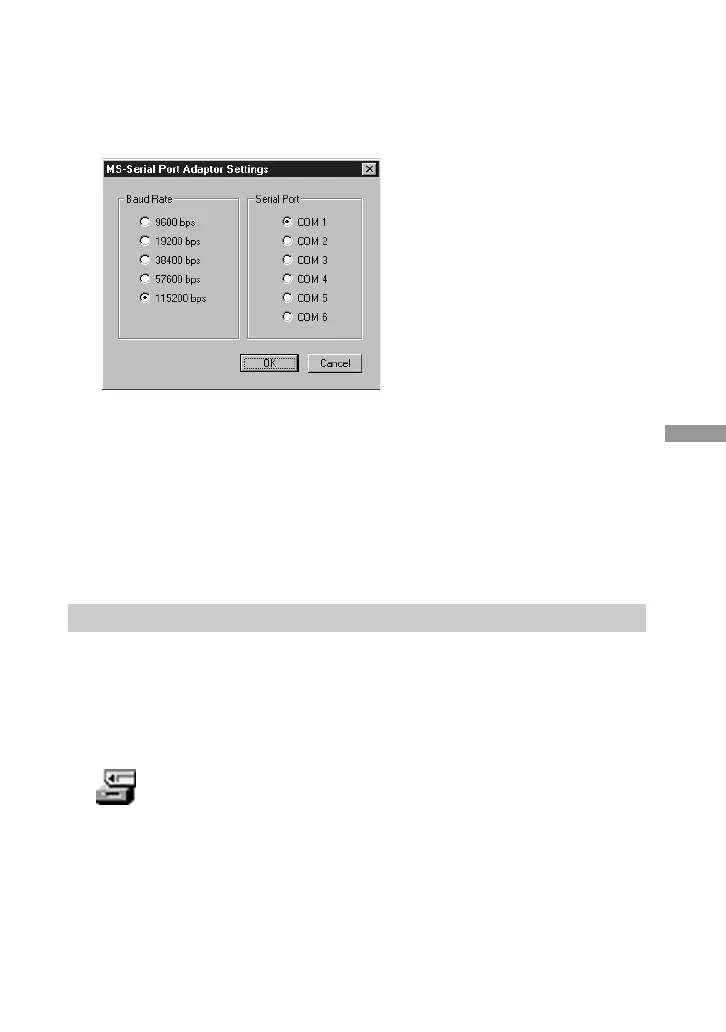
The MS-Serial Port Adaptor Settings dialog box appears.
7 Make the desired settings, and click [OK].
Baud Rate: Normally 115200 bps. A slower rate may be used if serial
communications problems occur.
Serial Port: Select the PC port that corresponds to the connection in step 2. See the
PC operating manual for the port number.
Close the MS Serial Port Adaptor Settings dialog box.
8 Click [OK].
The settings are refreshed and the dialog box closes.
Using the First Time
1 Check the connections and insert the “Memory Stick” containing the desired
image in the MS Serial Port Adaptor.
2 In the File menu, point to Connections, and click MS Serial Port Adaptor.
The MS Serial Port Adaptor folder icon appears in the folder list, and images in the
folder below it appear in the View Area.
MS Serial Port Adaptor folder icon
(Continued on the following page)



 To Next Page