83-GB
PictureGear 3.2 Lite
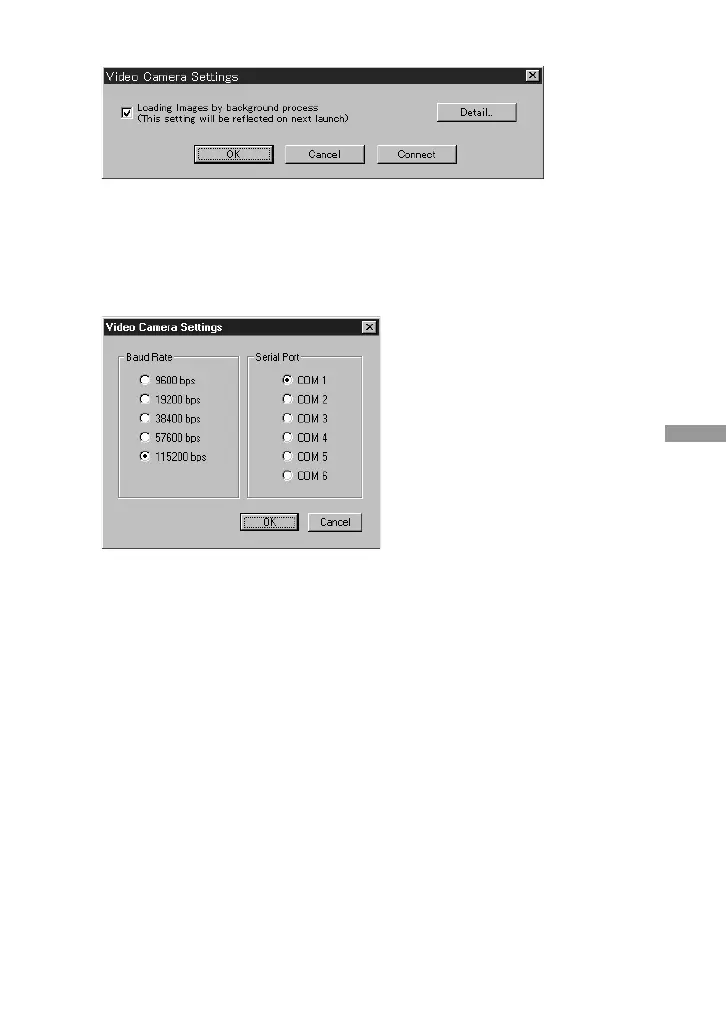
The Video Camera Settings dialog box appears.
z Hint
If the “Loading images by background process” box is checked, images can be loaded
by background processing. Refer to the on-line help for details.
6 Click [Detail].
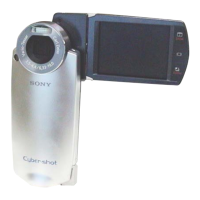
The Video Camera Settings dialog box appears.
7 Make the desired settings, and click [OK].
Baud Rate: Normally 115200 bps. A slower rate may be used if serial
communications problems occur.
Serial Port: Select the PC port that corresponds to the connection in step 2. See the
PC operating manual for the port number.
Close the Video Camera Settings dialog box.
8 Click [OK].
The settings are refreshed and the dialog box closes.
(Continued on the following page)



 To Next Page