24 (GB) Chapter 1 Overview
Location and Function of Parts
Chapter 1 Overview
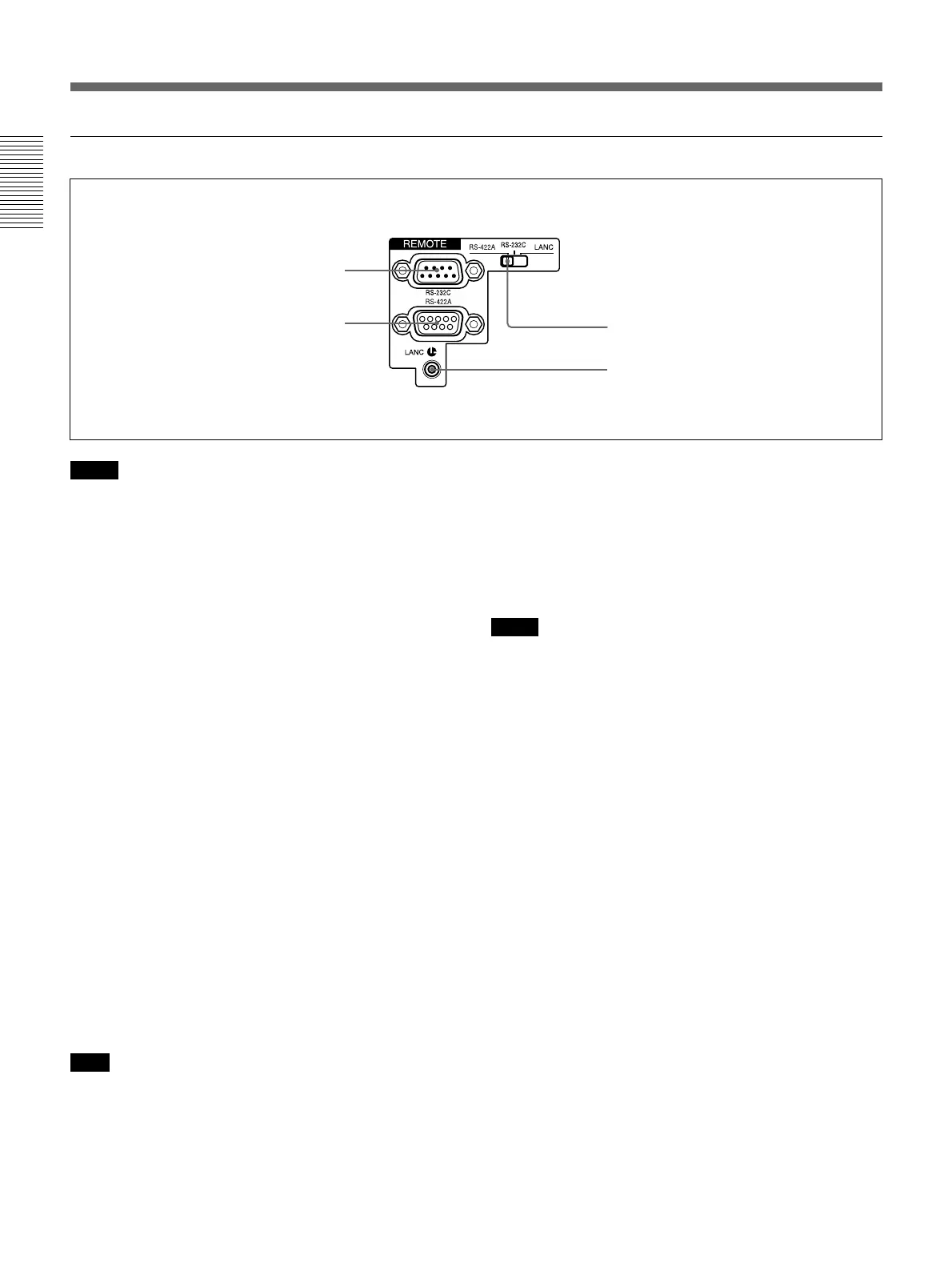
3 Remote control section
Notes
•When controlling the unit using a device connected to
the RS-232C connector 1 or the RS-422A connector
2, set the REMOTE/LOCAL switch on the front
panel to REMOTE. (Regardless of the setting of the
REMOTE/LOCAL switch, you can use a device
connected to the LANC jack 3 to control the unit.)
•If you use the unit in the editing system, some of its
features will be restricted.
For more details, see “Note on Usage in the Editing
System” on page 46 (GB).
•Even when the DSR-45A plays back a PAL
formatted tape (or the DSR-45AP plays back an
NTSC formatted tape), you can control the basic tape
transport functions using a device connected to the
RS-232C connector 1 or the RS-422A connector 2.
However, editing operations attempted in this case
are not guaranteed.
•For editing, if you intend to use this unit as a recorder
and to use the FXE-120/120P or the FXE-100/100P
upgraded by installing the FXE-KIT1 as an editing
controller, you also need to use the IF-FXE2 LANC
Interface Box.
1 RS-232C connector (9-pin)
Use when controlling the unit using an editing
controller or a computer that has an RS-232C
interface.
Note
For editing, if you intend to use this unit as a player
and the FXE-120/120P or FXE-100/100P as an editing
controller, set the baud rate of both devices to 19200
bps.
2 RS-422A connector (9-pin)
Use when controlling the unit using an editing
controller that has an RS-422A interface.
3 LANC jack
Use when controlling the tape transport operation of
the unit using a device that has a LANC
1)
jack.
Notes
•Regardless of the setting of the REMOTE/LOCAL
switch, you can use a device connected to the LANC
jack to control the unit.
• The LANC jack on the unit has only LANC-S
functions. The unit has no LANC-M functions. A
device that is set to LANC-S mode cannot be
connected to this unit. Either this, the unit or the other
device may not operate properly.
• If the device that you connect to this unit has a
SHUTTLE A/B switching function and a LANC-M
function, set the device to the SHUTTLE B mode.
• The LANC connection transmits signals such as
control signals, time code, time counter data, and
status data.
• Jacks labeled CONTROL L have the same function
as LANC jacks.
•When using this unit as a player, set the LANC mode
on the recorder to M. A device that does not have an
M / S switching function cannot be used to control
this unit.
4 Remote selector
Selects one from among RS-422A, RS-232C, or
LANC according to a device connected to the unit.
1 RS-232C connector
2 RS-422A connector
3 LANC jack
4 Remote selector
.........................................................................................................................................................................................................
1) LANC (Local Application Control bus system):
Bidirectional interface used to control a consumer VCR


 To Next Page