24
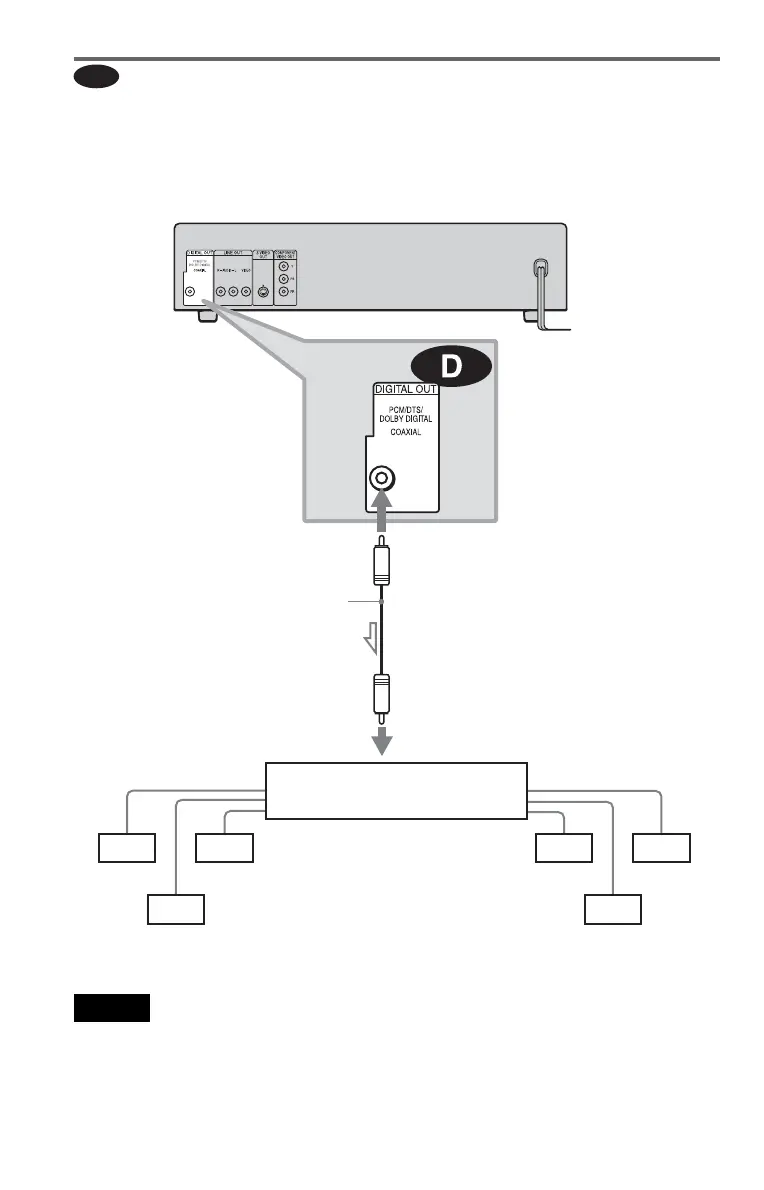
Connecting to an AV amplifier (receiver) with a digital input jack having
a Dolby Digital, MPEG audio or DTS decoder and 6 speakers
This connection will allow you to use the Dolby Digital, MPEG audio or DTS decoder function
of your AV amplifier (receiver). You are not able to enjoy the surround sound effects of this
player.
Notes
• After you have completed the connection, be sure
to set “DOLBY DIGITAL” to “DOLBY
DIGITAL” and “DTS” to “ON” in Quick Setup
(page 25). Otherwise, no sound or a loud noise
will come from the speakers.
• For Asian/Oceanian models only
If your AV amplifier (receiver) has an MPEG
audio decoder function, set “MPEG” to “MPEG”
(page 67). Otherwise, no sound or a loud noise
will come from the speakers.
D
Front (R)
Front (L)
Rear (R)
AV amplifier (receiver) having
a decoder
Subwoofer
Center
Coaxial digital cord
(not supplied)
[Speakers]
CD/DVD player
l: Signal flow
[Speakers]
Rear (L)
to coaxial digital
input
to DIGITAL OUT
(COAXIAL)





 To Next Page