EasyManua.ls Logo

Sony EV-C500E - Recording TV Programmes

Sony EV-C500E
38 pages
Print Icon
To Next Page IconTo Next Page
To Previous Page IconTo Previous Page
Loading...
AUDIO
LINE
IN
(ST/BIL)
@
REC
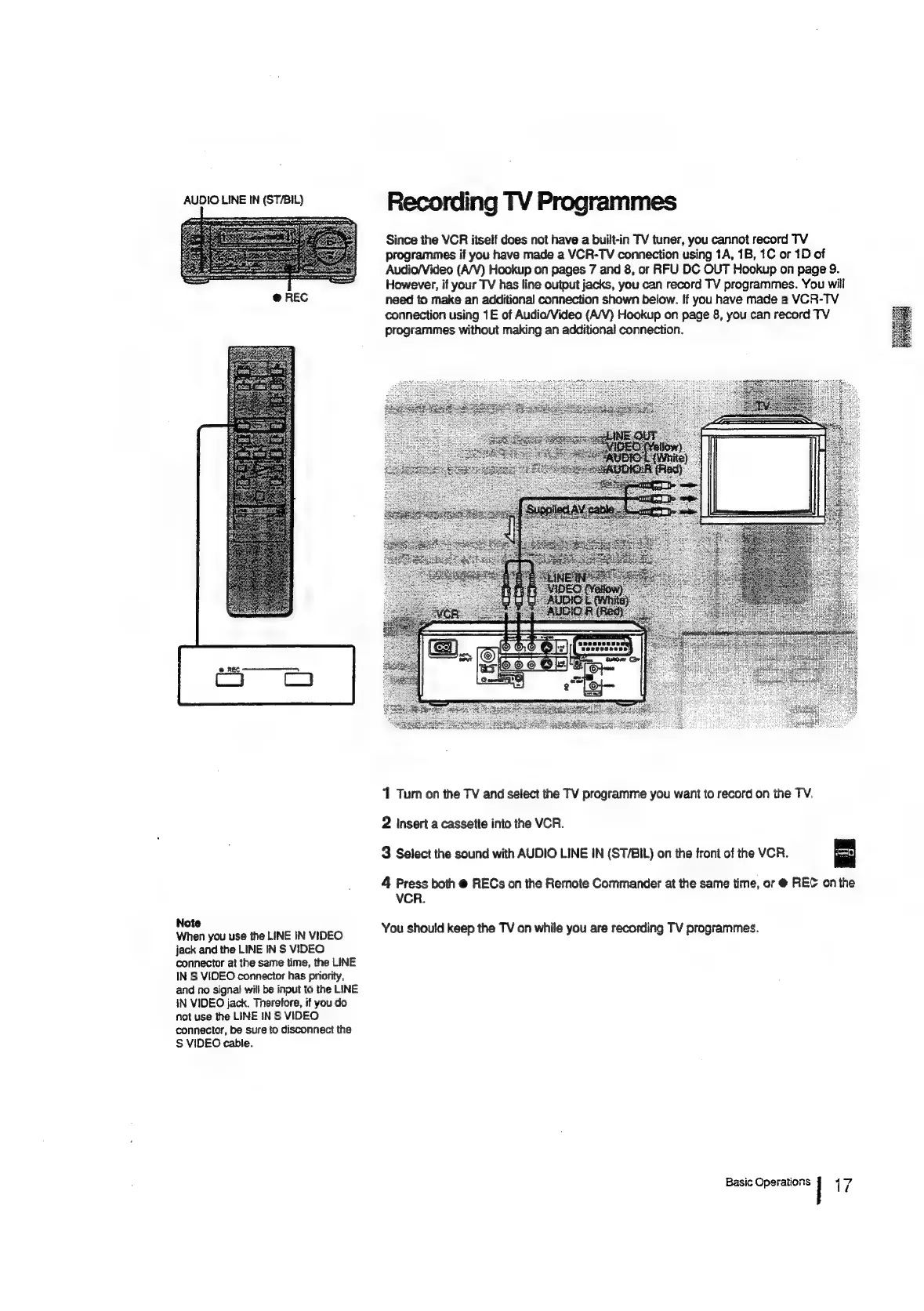
Recording
TV
Programmes
Since
the
VCR
itself
does
not
have
a
built-in
TV
tuner,
you
cannot
record
TV
programmes
if
you
have
made
a
VCR-TV
connection
using
1A,
1B,
1C
or
1D
of
Audio/Video
(A/V)
Hookup
on
pages
7
and
8,
or
RFU
DC
OUT
Hookup
on
page
9.
However,
if
your
TV
has
line
output
jacks,
you
can
record
TV
programmes.
You
will
need
to
make
an
additional
connection
shown
below.
If
you
have
made
a
VCR-TV
connection
using
1E
of
Audio/Video
(A/V)
Hookup
on
page
8,
you
can
record
TV
programmes
without
making
an
additional
connection.
Note
When
you
use
the
LINE
IN
VIDEO
jack
and
the
LINE
IN
S
VIDEO
connector
at
the
same
time,
the
LINE
IN
S
VIDEO
connector
has
priority,
and
no
signal
will
be
input
to
the
LINE
IN
VIDEO
jack.
Therefore,
if
you
do
not
use
the
LINE
IN
S
VIDEO
connector,
be
sure
to
disconnect
the
S
VIDEO
cable.
1
Turn
on
the
TV
and
select
the
TV
programme
you
want
to
record
on
the
TV,
2
Insert
a
cassette
into
the
VCR.
3
Select
the
sound
with
AUDIO
LINE
IN
(ST/BIL)
on
the
front
of
the
VCR.
4
Press
both
@
RECs
on
the
Remote
Commander
at
the
same
time,
or
@
REC
on
the
VCR.
You
should
keep
the
TV
on
while
you
are
recording
TV
programmes.
Basic
Operations
|
17

Related product manuals