Basic Operations 45
Basic Operations
Focusing on a subject
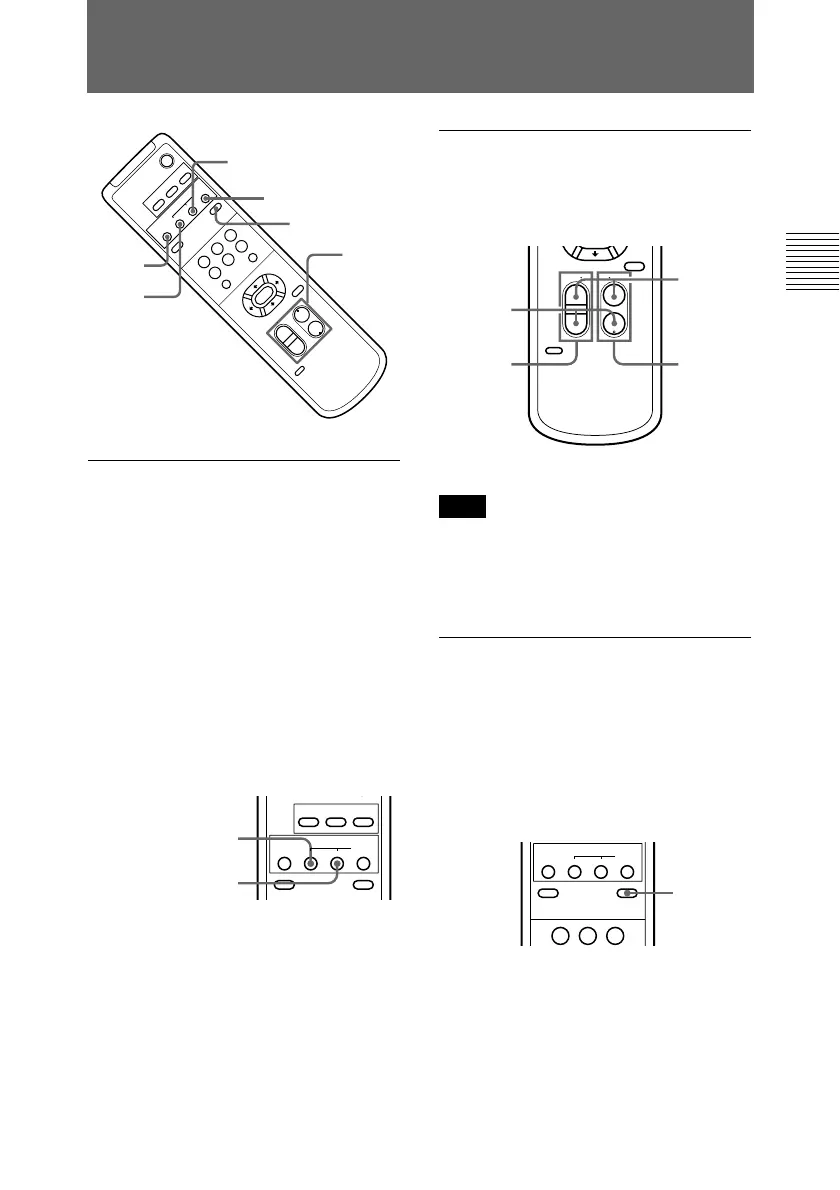
To focus the camera on a
subject automatically
Press the AUTO button.
The camera focuses on the subject at
the center of the screen automatically.
To focus the camera on a
subject manually
After pressing the MANUAL button,
press either the FAR or the NEAR
button to have the camera focus on the
subject.
CAMERA SELECT
123
AUTO
DATA SCREEN BACK LIGHT
MANUAL
NEARFAR
FOCUS
Adjusting the Camera
POWER
CAMERA SELECT
12
3
AUTO
POSITION
HOME
RM-EV100
RESETPRESET
STD REV
FAR
FOCUS
W
T
W
T
123
456
PAN-TILT
SLOW
FAST
ZOOM
L/R
DIRECTION SET
PAN-TILT
RESET
DATA SCREEN
AUTO
FAR
NEAR
ZOOM
BACK LIGHT
MANUAL
NEAR
MANUAL
BACK LIGHT
Zooming
Press either of the four ZOOM
buttons.
PAN-TILT
RESET
RM-EV100
SLOW FAST
ZOOM
L/R
DIRECTION SET
TT
WW
Note
When you perform a pan/tilt operation
while the camera is in the telephoto
mode, the moving speed of the image
on the screen may be a little jerky.
Shooting with back lighting
When you shoot a subject with a light
source behind it, the subject becomes
dark. In such a case, press the BACK
LIGHT button.
To cancel the function, press the
BACK LIGHT button again.
AUTO
DATA SCREEN
STD REV
BACK LIGHT
123
MANUAL
NEARFAR
FOCUS
Focusing on a
far subject
Focusing on a
near subject
Subject
appears
farther
away.
(Wide
angle)
Subject
appears
closer.
(Telephoto)
Zooms in
or out from
the subject
slowly.
(SLOW
side)
Zooms in
or out
from the
subject
fast.
(FAST
side)
Subject
appears
brighter.


 To Next Page