EasyManua.ls Logo

Sony FH-C33X - Page 10

Sony FH-C33X
26 pages
Print Icon
To Next Page IconTo Next Page
To Previous Page IconTo Previous Page
Loading...
=>
continued
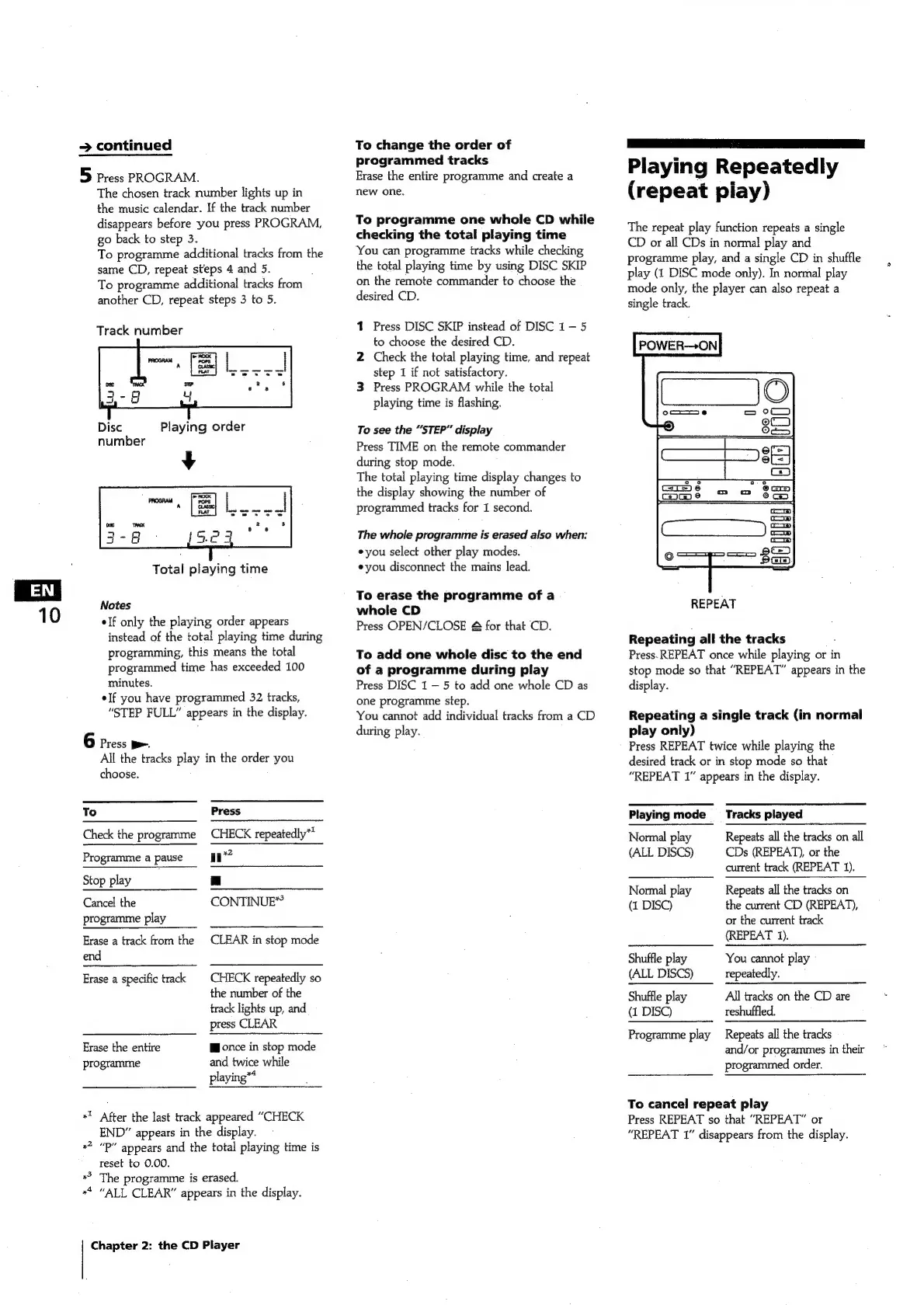
5
Press
PROGRAM.
The
chosen
track
number
lights
up
in
the
music
calendar.
If
the
track
number
disappears
before
you
press
PROGRAM,
go
back
to
step
3.
To
programme
additional
tracks
from
the
same
CD,
repeat
steps
4
and
5.
To
programme
additional
tracks
from
another
CD,
repeat
steps
3
to
5.
Track
number
Disc
Playing
order
number
Notes
Total
playing
time
elf
only
the
playing
order
appears
instead
of
the
total
playing
time
during
programming,
this
means
the
total
programmed
time
has
exceeded
100
minutes.
elf
you
have
programmed
32
tracks,
“STEP
FULL”
appears
in
the
display.
6
Press
>.
All
the
tracks
play
in
the
order
you
choose.
To
Press
Check
the
programme
CHECK
repeatedly**
Programme
a
pause
mn?
Stop
play
a
Cancel
the
CONTINUE”
programme
play
Erase
a
track
from
the
CLEAR
in
stop
mode
end
Erase
a
specific
track
CHECK
repeatedly
so
the
number
of
the
track
lights
up,
and
press
CLEAR
Erase
the
entire
Wonce
in
stop
mode
programme
and
twice
while
playing“*
+!
After
the
last
track
appeared
“CHECK
END”
appears
in
the
display.
reset
to
0.00.
“P”
appears
and
the
total
playing
time
is
The
programme
is
erased.
«4
“ALL
CLEAR”
appears
in
the
display.
Chapter
2:
the
CD
Player
To
change
the
order
of
programmed
tracks
Erase
the
entire
programme
and
create
a
new
one.
To
programme
one
whole
CD
whiie
checking
the
total
playing
time
You
can
programme
tracks
while
checking
the
total
playing
time
by
using
DISC
SKIP
on
the
remote
commander
to
choose
the
desired
CD.
1
Press
DISC
SKIP
instead
of
DISC
1-5
to
choose
the
desired
CD.
2
Check
the
total
playing
time,
and
repeat
step
1
if
not
satisfactory.
3
Press
PROGRAM
while
the
total
playing
time
is
flashing.
To
see
the
“STEP”
display
Press
TIME
on
the
remote
commander
during
stop
mode.
The
total
playing
time
display
changes
to
the
display
showing
the
number
of
programmed
tracks
for
I
second.
The
whole
programme
is
erased
also
when:
you
select
other
play
modes.
eyou
disconnect
the
mains
lead.
To
erase
the
programme
of
a
whole
CD
Press
OPEN/CLOSE
&
for
that
CD.
To
add
one
whole
disc
to
the
end
of
a
programme
during
play
Press
DISC
1
5
to
add
one
whole
CD
as
one
programme
step.
You
cannot
add
individual
tracks
from
a
CD
during
play.
ee
ee
Playing
Repeatedly
(repeat
piay)
The
repeat
play
function
repeats
a
single
CD
or
all
CDs
in
normal
play
and
programme
play,
and
a
single
CD
in
shuffle
play
(1
DISC
mode
only).
In
normal
play
mode
only,
the
player
can
also
repeat
a
single
track.
POWER—ON
REPEAT
Repeating
all
the
tracks
Press.
REPEAT
once
while
playing
or
in
stop
mode
so
that
“REPEAT”
appears
in
the
display.
Repeating
a
single
track
(in
normal
play
only)
Press
REPEAT
twice
while
playing
the
desired
track
or
in
stop
mode
so
that
“REPEAT
1”
appears
in
the
display.
Playing
mode
__
Tracks
played
Normal
play
Repeats
all
the
tracks
on
all
(ALL
DISCS)
CDs
(REPEAT),
or
the
current
track
(REPEAT
1).
Normal
play
Repeats
all
the
tracks
on
(1
DISC)
the
current
CD
(REPEAT),
or
the
current
track
(REPEAT
1).
Shuffle
play
You
cannot
play
(ALL
DISCS)
repeatedly.
Shuffle
play
All
tracks
on
the
CD
are
(1
DISC)
reshuffled.
Programme
play
Repeats
all
the
tracks
and/or
programmes
in
their
programmed
order.
To
cancel
repeat
play
Press
REPEAT
so
that
“REPEAT”
or
“REPEAT
1”
disappears
from
the
display.

Related product manuals